原文
GPT Image 2 · en
{
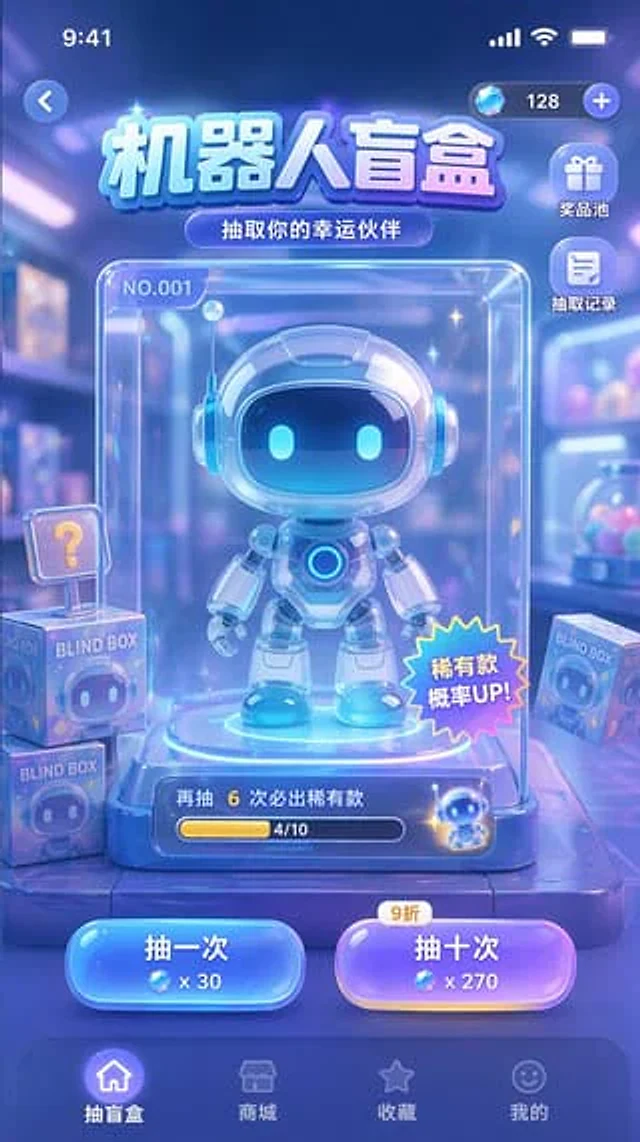
  "type": "Mobile game UI prototype",
  "theme": "Sci-fi, cute, glass-like, neon blue and purple color scheme",
  "header": {
    "status_bar": "Top standard iOS status bar",
    "top_controls": "The left side has a back button, and the right side displays a currency bar with a diamond icon and \"128\".",
    "title": "{argument name=\"main title\" default=\"Robot blind boxes\"}",
    "subtitle": "{argument name=\"subtitle\" default=\"Draw your lucky partner\"}"
  },
  "layout": {
    "side_menu": {
      "position": "The currency column is located to the right below.",
      "count": 2,
      "items": [
        {
          "icon": "gift",
          "label": "Prize pool"
        },
        {
          "icon": "document",
          "label": "Extract records"
        }
      ]
    },
    "centerpiece": {
      "description": "A transparent glass display case containing the grand prize.",
      "subject": "{argument name=\"robot character description\" default=\"A cute chibi-style robot with glowing blue eyes and glossy white armor.\"}",
      "case_details": [
        "The top left corner is marked \"NO.001\".",
        "The bottom right corner has a star-shaped sticker that says \"Rare Item Probability UP!\"",
        "The progress bar at the bottom displays the text \"Guaranteed rare item after 6 more draws\" and \"4/10\"."
      ]
    },
    "background_elements": {
      "description": "Blurry toy store background",
      "floating_items": {
        "count": 3,
        "description": "A square box with a robot face design and labeled \"BLIND BOX\", one of which has a \"?\" mark."
      }
    },
    "action_buttons": {
      "position": "Centered above the bottom navigation bar",
      "count": 2,
      "buttons": [
        {
          "color": "blue",
          "text": "{argument name=\"left button text\" default=\"One draw\"}",
          "cost": "x 30"
        },
        {
          "color": "purple",
          "text": "{argument name=\"right button text\" default=\"ten times\"}",
          "cost": "x 270",
          "tag": "10% off"
        }
      ]
    },
    "bottom_navigation": {
      "count": 4,
      "items": [
        {
          "icon": "home",
          "label": "Blind box",
          "state": "active"
        },
        {
          "icon": "store",
          "label": "Mall"
        },
        {
          "icon": "star",
          "label": "collect"
        },
        {
          "icon": "smiley",
          "label": "mine"
        }
      ]
    }
  }
}
使い方
- パラメータを含む元のプロンプト全体をコピーします。
- 被写体、文字、構図を自分の要件に置き換えます。
- 対応する外部ツールで使用し、利用条件と結果を確認します。
開始前の確認
- 参考画像の要否を確認してください。互換モデルの表示は、そのモデルでの生成実績を意味しません。
- 名前、数値、画像内の文字を確認します。モデルの版で結果は変わります。