원본 문서
GPT Image 2 · en
{
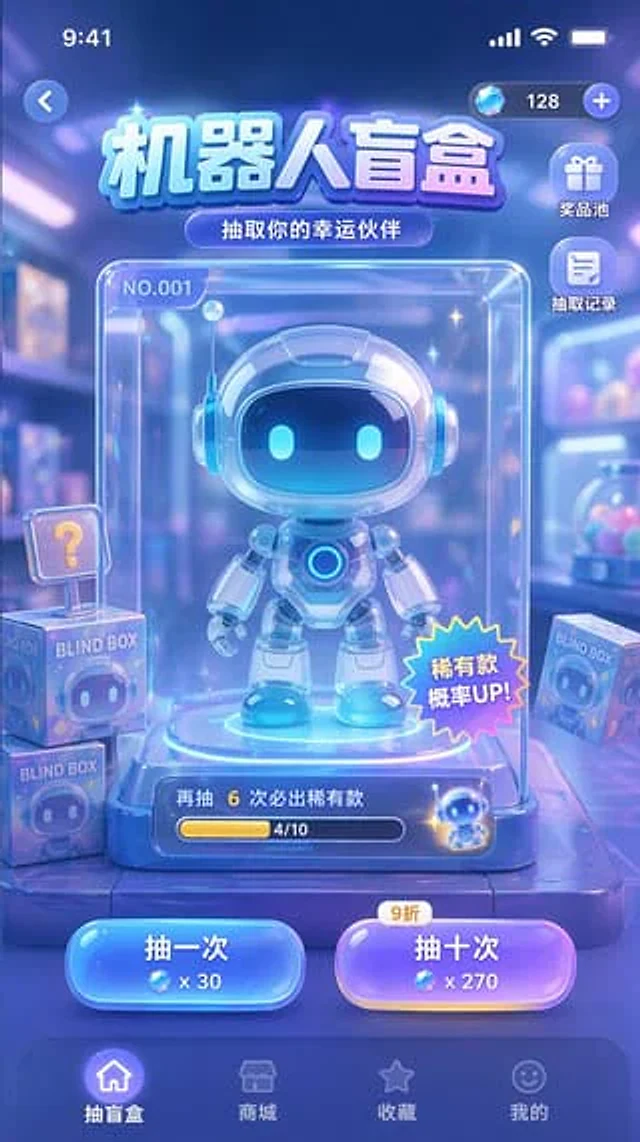
  "type": "Mobile game UI prototype",
  "theme": "Sci-fi, cute, glass-like, neon blue and purple color scheme",
  "header": {
    "status_bar": "Top standard iOS status bar",
    "top_controls": "The left side has a back button, and the right side displays a currency bar with a diamond icon and \"128\".",
    "title": "{argument name=\"main title\" default=\"Robot blind boxes\"}",
    "subtitle": "{argument name=\"subtitle\" default=\"Draw your lucky partner\"}"
  },
  "layout": {
    "side_menu": {
      "position": "The currency column is located to the right below.",
      "count": 2,
      "items": [
        {
          "icon": "gift",
          "label": "Prize pool"
        },
        {
          "icon": "document",
          "label": "Extract records"
        }
      ]
    },
    "centerpiece": {
      "description": "A transparent glass display case containing the grand prize.",
      "subject": "{argument name=\"robot character description\" default=\"A cute chibi-style robot with glowing blue eyes and glossy white armor.\"}",
      "case_details": [
        "The top left corner is marked \"NO.001\".",
        "The bottom right corner has a star-shaped sticker that says \"Rare Item Probability UP!\"",
        "The progress bar at the bottom displays the text \"Guaranteed rare item after 6 more draws\" and \"4/10\"."
      ]
    },
    "background_elements": {
      "description": "Blurry toy store background",
      "floating_items": {
        "count": 3,
        "description": "A square box with a robot face design and labeled \"BLIND BOX\", one of which has a \"?\" mark."
      }
    },
    "action_buttons": {
      "position": "Centered above the bottom navigation bar",
      "count": 2,
      "buttons": [
        {
          "color": "blue",
          "text": "{argument name=\"left button text\" default=\"One draw\"}",
          "cost": "x 30"
        },
        {
          "color": "purple",
          "text": "{argument name=\"right button text\" default=\"ten times\"}",
          "cost": "x 270",
          "tag": "10% off"
        }
      ]
    },
    "bottom_navigation": {
      "count": 4,
      "items": [
        {
          "icon": "home",
          "label": "Blind box",
          "state": "active"
        },
        {
          "icon": "store",
          "label": "Mall"
        },
        {
          "icon": "star",
          "label": "collect"
        },
        {
          "icon": "smiley",
          "label": "mine"
        }
      ]
    }
  }
}
사용 방법
- 매개변수를 포함한 전체 원본 프롬프트를 복사하세요.
- 주제, 문구, 구도를 자신의 요구에 맞게 바꾸세요.
- 호환되는 외부 도구에서 사용하고 이용 조건과 결과를 확인하세요.
시작 전 확인
- 참조 이미지가 필요한지 확인하세요. 호환 표시는 해당 모델로 이 예시를 생성했다는 뜻이 아닙니다.
- 이름, 수치, 이미지 속 문구를 확인하세요. 모델 버전에 따라 결과가 다를 수 있습니다.