
原文
GPT Image 2.5 · en
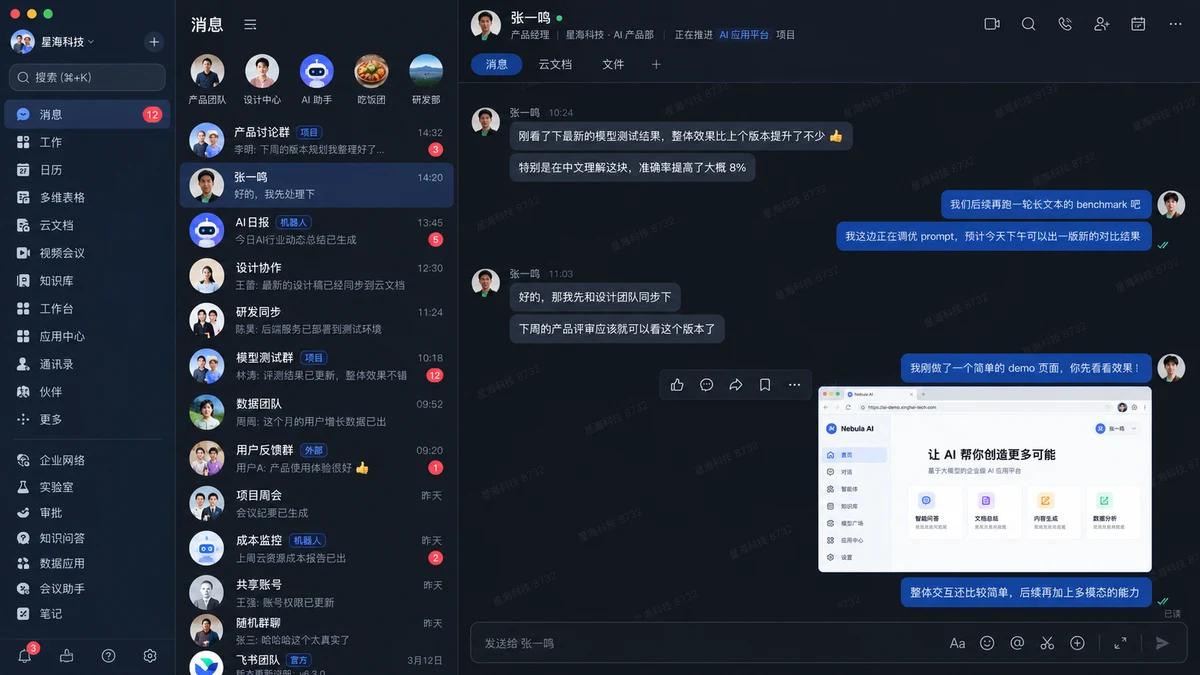
@创建图片 Create a highly realistic desktop screenshot of a Chinese enterprise collaboration and messaging app in dark mode, strongly inspired by the modern Feishu / Lark desktop interface.

Treat this as a UI reconstruction task, not an illustration or concept design. Prioritize component fidelity, information density, spacing, alignment, typography hierarchy, and authentic desktop-app composition.

Use a 16:9 landscape desktop screenshot with the full application window visible, macOS traffic-light controls, a narrow global navigation sidebar, a conversation list column, and a large active chat workspace. Use a dark navy and charcoal palette with muted blue selected states, deep-blue outgoing bubbles, gray incoming bubbles, red unread badges, and cyan or green status indicators.

Include Chinese navigation labels, realistic workplace conversations, a selected message thread, compact action icons, a tab bar for 消息 / 云文档 / 文件, a bottom message composer, and one large browser or internal-product screenshot attachment. Keep the hierarchy, three-column layout, spacing rhythm, message alignment, and information density stable. Render Chinese UI text cleanly and legibly.

No browser chrome, device mockup, perspective, glassmorphism, 3D, decorative illustration, oversized marketing typography, random logos, gibberish, or clutter. The final result must feel like a genuine production enterprise messaging application screenshot.
使い方
- パラメータを含む元のプロンプト全体をコピーします。
- 被写体、文字、構図を自分の要件に置き換えます。
- 対応する外部ツールで使用し、利用条件と結果を確認します。
開始前の確認
- 参考画像の要否を確認してください。互換モデルの表示は、そのモデルでの生成実績を意味しません。
- 名前、数値、画像内の文字を確認します。モデルの版で結果は変わります。