原文
GPT Image 2 · en
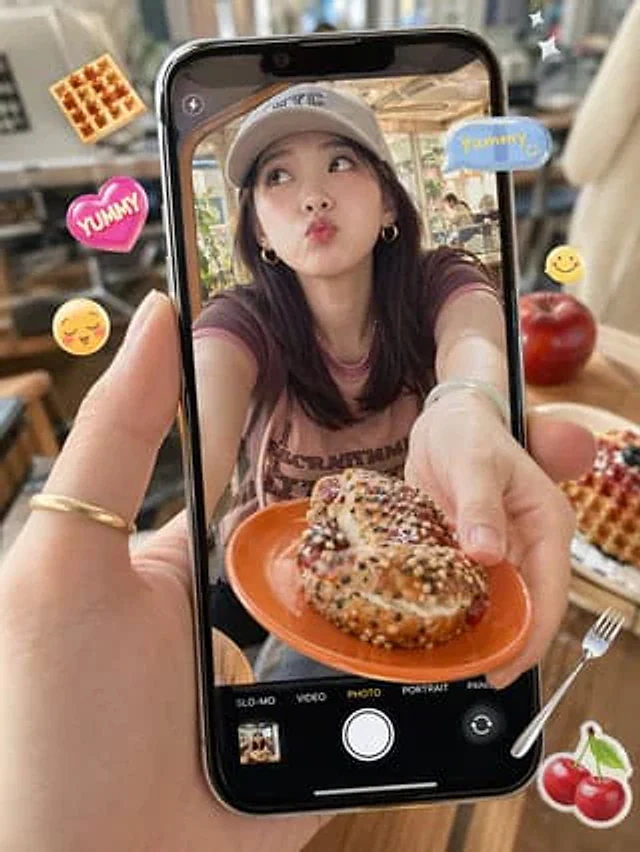
A photorealistic close-up shows a hand holding a modern black smartphone vertically in a sun-drenched, cozy café. The screen displays live view in camera mode, showing a young woman leaning forward at a table, offering an orange plate to the camera. On the plate is a cream-filled pastry or bagel sandwich sprinkled with a mixture of sesame seeds, poppy seeds, and powdered sugar. The woman has shoulder-length dark brown hair, small gold hoop earrings, a light-colored baseball cap with "NYC" printed on it, and a faded pale purple-pink trim crewneck T-shirt with faintly visible vintage lettering. Her face is deliberately obscured by a centrally positioned rectangular blur. The smartphone camera interface is clearly visible: a flash icon in the upper left corner, a target or focus icon in the upper right corner, and five mode labels at the bottom: SLO-MO, VIDEO, PHOTO, PORTRAIT, and PANO, with PHOTO highlighted in yellow; a large white shutter button, a small album thumbnail in the lower left corner, and a camera switching icon in the lower right corner. Outside the phone screen, playful floating food-themed stickers are added: a waffle in the upper left corner, a pink heart sticker with "YUMMY" on the left, a yellow smiley face emoji on the left, and a sticker with "YUMMY" on the upper right.{argument name="sticker text" default="Yummy!"} The camera features a blue speech bubble, a small yellow smiley face on the right, two white twinkling stars in the upper right corner, a silver fork in the lower right corner, and a cherry sticker in the lower right corner. The real-life café background outside the phone's view is soft-focused, showcasing warm wood tones, chairs, tables, and large windows. A red apple and a plate of waffles with berries sit on the right side of the table. The camera emphasizes shallow depth of field, natural sunlight, the glossy reflections of the phone's surface, realistic skin textures, and a trendy social media food-capture aesthetic.使い方
- パラメータを含む元のプロンプト全体をコピーします。
- 被写体、文字、構図を自分の要件に置き換えます。
- 対応する外部ツールで使用し、利用条件と結果を確認します。
開始前の確認
- 参考画像の要否を確認してください。互換モデルの表示は、そのモデルでの生成実績を意味しません。
- 名前、数値、画像内の文字を確認します。モデルの版で結果は変わります。