원본 문서
GPT Image 2 · en
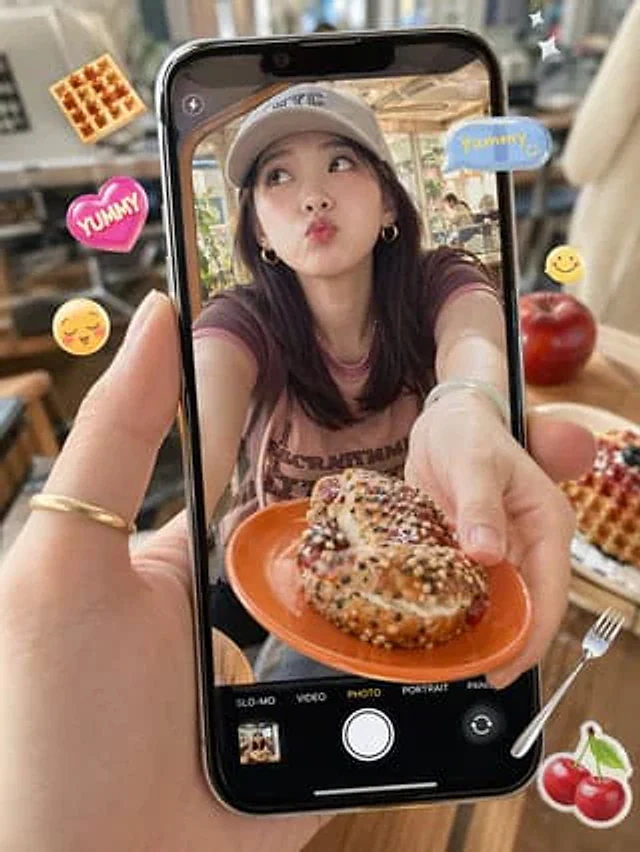
A photorealistic close-up shows a hand holding a modern black smartphone vertically in a sun-drenched, cozy café. The screen displays live view in camera mode, showing a young woman leaning forward at a table, offering an orange plate to the camera. On the plate is a cream-filled pastry or bagel sandwich sprinkled with a mixture of sesame seeds, poppy seeds, and powdered sugar. The woman has shoulder-length dark brown hair, small gold hoop earrings, a light-colored baseball cap with "NYC" printed on it, and a faded pale purple-pink trim crewneck T-shirt with faintly visible vintage lettering. Her face is deliberately obscured by a centrally positioned rectangular blur. The smartphone camera interface is clearly visible: a flash icon in the upper left corner, a target or focus icon in the upper right corner, and five mode labels at the bottom: SLO-MO, VIDEO, PHOTO, PORTRAIT, and PANO, with PHOTO highlighted in yellow; a large white shutter button, a small album thumbnail in the lower left corner, and a camera switching icon in the lower right corner. Outside the phone screen, playful floating food-themed stickers are added: a waffle in the upper left corner, a pink heart sticker with "YUMMY" on the left, a yellow smiley face emoji on the left, and a sticker with "YUMMY" on the upper right.{argument name="sticker text" default="Yummy!"} The camera features a blue speech bubble, a small yellow smiley face on the right, two white twinkling stars in the upper right corner, a silver fork in the lower right corner, and a cherry sticker in the lower right corner. The real-life café background outside the phone's view is soft-focused, showcasing warm wood tones, chairs, tables, and large windows. A red apple and a plate of waffles with berries sit on the right side of the table. The camera emphasizes shallow depth of field, natural sunlight, the glossy reflections of the phone's surface, realistic skin textures, and a trendy social media food-capture aesthetic.사용 방법
- 매개변수를 포함한 전체 원본 프롬프트를 복사하세요.
- 주제, 문구, 구도를 자신의 요구에 맞게 바꾸세요.
- 호환되는 외부 도구에서 사용하고 이용 조건과 결과를 확인하세요.
시작 전 확인
- 참조 이미지가 필요한지 확인하세요. 호환 표시는 해당 모델로 이 예시를 생성했다는 뜻이 아닙니다.
- 이름, 수치, 이미지 속 문구를 확인하세요. 모델 버전에 따라 결과가 다를 수 있습니다.