原文
GPT Image 2 · en
{
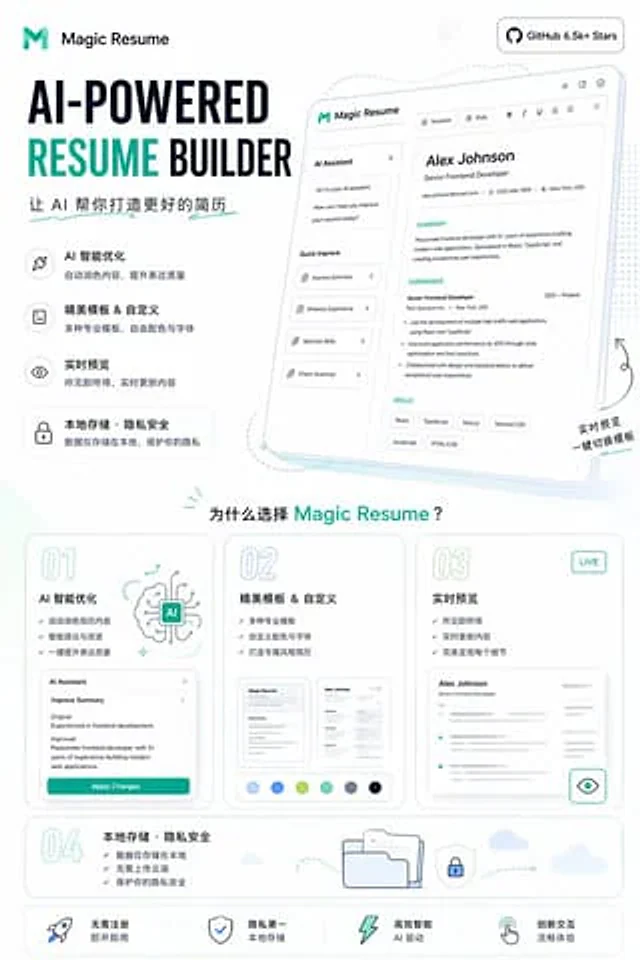
  "type": "Landing page product promotional poster",
  "product": {
    "name": "{argument name=\"product name\" default=\"Magic Resume\"}",
    "category": "AI resume generator website",
    "brand_style": "A clean and modern SaaS style, minimalist, with a white background accented with cyan and dark blue, rounded cards, thin gray outlines, and soft, light-colored shadows."
  },
  "canvas": {
    "orientation": "Vertical screen",
    "aspect_ratio": "9:16"
  },
  "headline_block": {
    "position": "Top left corner",
    "logo": "Abstract cyan M logo and text label",
    "headline": "AI-driven resume generator",
    "subheadline": "Let AI help you create a better resume",
    "style": "Extra-large bold sans-serif heading; RESUME text in bright cyan; other text in dark blue."
  },
  "top_right_badge": {
    "text": "GitHub 6.5k+ Stars",
    "style": "Rounded white capsule badge with dark text and GitHub icon."
  },
  "hero_section": {
    "position": "Top right corner",
    "main_visual": "A large, tilted web application model card showcases the resume editor UI.",
    "screen_contents": {
      "left_panel": {
        "title": "AI Assistant",
        "chat_lines_count": 3,
        "quick_actions_count": 4,
        "quick_actions": [
          "Optimization Summary",
          "Enhance work experience",
          "Optimize skills",
          "Grammar check"
        ]
      },
      "top_toolbar_count": 7,
      "top_toolbar_items": [
        "template",
        "style",
        "Bold",
        "italics",
        "underline",
        "Align/Set Icons",
        "Share/Export Icon"
      ],
      "resume_preview": {
        "name": "{argument name=\"sample candidate name\" default=\"Alex Johnson\"}",
        "role": "Senior Front-End Developer",
        "contact_count": 3,
        "contact_items": [
          "Mail",
          "Telephone",
          "address"
        ],
        "sections_count": 3,
        "sections": [
          "Personal Summary",
          "Work experience",
          "Skill"
        ],
        "skill_tags_count": 6,
        "skill_tags": [
          "React",
          "TypeScript",
          "Next.js",
          "Tailwind CSS",
          "JavaScript",
          "HTML/CSS"
        ]
      }
    },
    "decorations": "Soft blue projection, dashed curved guide lines, tiny glitter dots, handwritten-style annotations in the lower right corner: real-time preview and one-click template switching."
  },
  "feature_list": {
    "position": "Left and Middle",
    "count": 4,
    "items": [
      {
        "title": "AI Intelligent Optimization",
        "description": "Automatically polish content to improve expression quality.",
        "icon": "Magic wand or glitter icon inside a rounded square"
      },
      {
        "title": "Beautiful templates & customization",
        "description": "Multiple professional templates, customizable color schemes and fonts",
        "icon": "Document icon inside a rounded square"
      },
      {
        "title": "Live Preview",
        "description": "What you see is what you get, content updated in real time.",
        "icon": "Eye icon inside a rounded square"
      },
      {
        "title": "Local storage · Privacy and security",
        "description": "Data is stored locally only, protecting your privacy.",
        "icon": "The lock icon inside the rounded capsule card"
      }
    ]
  },
  "why_section": {
    "position": "Middle to lower",
    "title": "Why choose{argument name=\"product name\" default=\"Magic Resume\"} ?",
    "cards_count": 4,
    "cards": [
      {
        "number": "01",
        "title": "AI Intelligent Optimization",
        "bullet_count": 3,
        "bullets": [
          "Automatically polish your resume content",
          "Intelligent suggestions and improvements",
          "Improve expression quality with one click"
        ],
        "visual": "Illustration of an AI brain and a mini Agent panel with an \"App Change\" button."
      },
      {
        "number": "02",
        "title": "Beautiful templates & customization",
        "bullet_count": 3,
        "bullets": [
          "Multiple professional templates",
          "Custom color schemes and fonts",
          "Create a resume with your own style"
        ],
        "visual": "2 resume thumbnails and 6 color charts"
      },
      {
        "number": "03",
        "title": "Live Preview",
        "badge": "LIVE",
        "bullet_count": 3,
        "bullets": [
          "What you see is what you get",
          "Real-time updated content",
          "Perfectly presenting every detail"
        ],
        "visual": "Blurry resume preview card with eye icon button"
      },
      {
        "number": "04",
        "title": "Local storage · Privacy and security",
        "bullet_count": 3,
        "bullets": [
          "Data is stored only locally",
          "No need to upload to the cloud",
          "Protect your privacy and security"
        ],
        "visual": "Folder, shield lock, dotted arrow path, little cloud"
      }
    ]
  },
  "bottom_bar": {
    "position": "bottom",
    "count": 4,
    "items": [
      "No registration required, use immediately",
      "Privacy First Local Storage",
      "Highly efficient and intelligent AI-driven",
      "Innovative and smooth interactive experience"
    ],
    "icons_count": 4,
    "icons": [
      "Rocket",
      "Shield",
      "lightning",
      "Gesture pointer"
    ]
  },
  "style": {
    "typography": "A mix of bold geometric sans-serif fonts and simple Chinese sans-serif fonts",
    "rendering": "High-fidelity marketing graphics, crisp vector-level UI, subtle gradients, soft cyan highlights, and a spacious layout.",
    "palette": {
      "background": "White",
      "primary": "blue",
      "secondary": "Dark blue",
      "accent": "Light green and pale blue"
    }
  }
}
使い方
- パラメータを含む元のプロンプト全体をコピーします。
- 被写体、文字、構図を自分の要件に置き換えます。
- 対応する外部ツールで使用し、利用条件と結果を確認します。
開始前の確認
- 参考画像の要否を確認してください。互換モデルの表示は、そのモデルでの生成実績を意味しません。
- 名前、数値、画像内の文字を確認します。モデルの版で結果は変わります。