原文
GPT Image 2 · zh
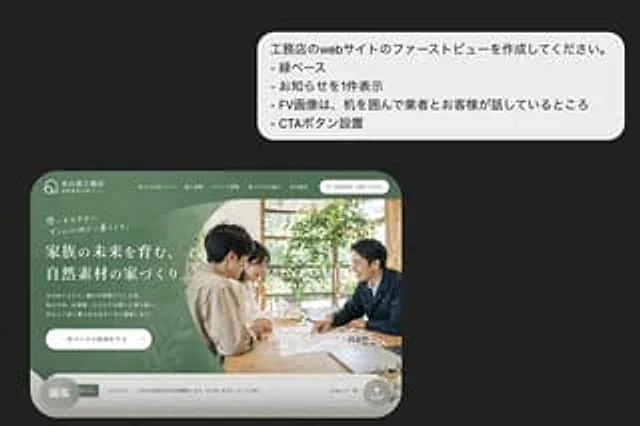
Presenting a beautiful presentation style mockup of a Japanese residential construction company website above the fold design concept on a dark charcoal gray background. In the upper right corner, place a large white rounded bubble box with 4 lines of concise sans-serif Japanese bullet points: , おknowledgeらせを1 piece display", "-FV image は, machine を囲んで商とお客様が语しているところ", "-CTA ボタン setting". In the lower left corner, a realistic desktop website homepage is displayed, set within a large, rounded browser frame. It features a soft forest green theme, reflecting the elegant lifestyle brand image of the Japanese architecture company. The top navigation bar includes a small house logo on the far left, the company name in Japanese in the center, five horizontal navigation links at the top, and a rounded white contact button on the right. The homepage is visually divided into two main sections: the left side features a green textured panel with a layered organic leaf pattern, accompanied by brief introductory text, a multi-line large white Japanese title, a short Japanese body text, and a white rounded CTA button; the right side features a photograph in warm natural light showing two people sitting around a wooden table discussing documents and a small architectural model, with indoor plants and light from a window visible in the background. The entire website card features soft shadows, sophisticated typographic spacing, and rounded bottoms. At the bottom of the website model is a narrow, light gray bulletin board displaying an announcement with a small green icon, date, Japanese announcement text, and a subtle link on the right. A semi-transparent gray circular badge containing the Japanese text "Edit" is overlaid in the lower left corner of the website card. A small circular share/upload icon is added to the lower right corner of the website card. Overall style: High-end Japanese web design concept, realistic UI mockups, exquisite typography, green natural materials for a brand feel, and simple yet elegant composition.使い方
- パラメータを含む元のプロンプト全体をコピーします。
- 被写体、文字、構図を自分の要件に置き換えます。
- 対応する外部ツールで使用し、利用条件と結果を確認します。
開始前の確認
- 参考画像の要否を確認してください。互換モデルの表示は、そのモデルでの生成実績を意味しません。
- 名前、数値、画像内の文字を確認します。モデルの版で結果は変わります。