원본 문서
GPT Image 2 · zh
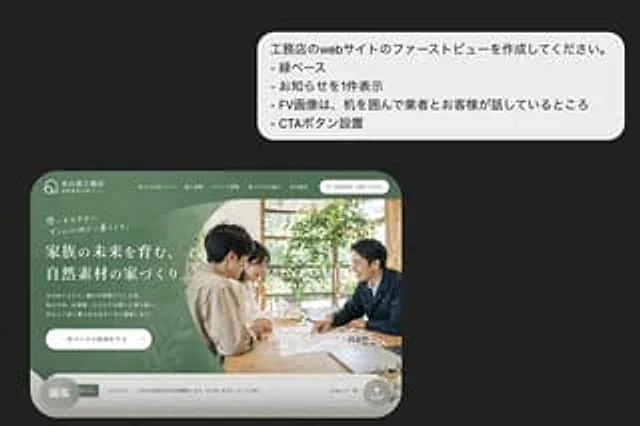
Presenting a beautiful presentation style mockup of a Japanese residential construction company website above the fold design concept on a dark charcoal gray background. In the upper right corner, place a large white rounded bubble box with 4 lines of concise sans-serif Japanese bullet points: , おknowledgeらせを1 piece display", "-FV image は, machine を囲んで商とお客様が语しているところ", "-CTA ボタン setting". In the lower left corner, a realistic desktop website homepage is displayed, set within a large, rounded browser frame. It features a soft forest green theme, reflecting the elegant lifestyle brand image of the Japanese architecture company. The top navigation bar includes a small house logo on the far left, the company name in Japanese in the center, five horizontal navigation links at the top, and a rounded white contact button on the right. The homepage is visually divided into two main sections: the left side features a green textured panel with a layered organic leaf pattern, accompanied by brief introductory text, a multi-line large white Japanese title, a short Japanese body text, and a white rounded CTA button; the right side features a photograph in warm natural light showing two people sitting around a wooden table discussing documents and a small architectural model, with indoor plants and light from a window visible in the background. The entire website card features soft shadows, sophisticated typographic spacing, and rounded bottoms. At the bottom of the website model is a narrow, light gray bulletin board displaying an announcement with a small green icon, date, Japanese announcement text, and a subtle link on the right. A semi-transparent gray circular badge containing the Japanese text "Edit" is overlaid in the lower left corner of the website card. A small circular share/upload icon is added to the lower right corner of the website card. Overall style: High-end Japanese web design concept, realistic UI mockups, exquisite typography, green natural materials for a brand feel, and simple yet elegant composition.사용 방법
- 매개변수를 포함한 전체 원본 프롬프트를 복사하세요.
- 주제, 문구, 구도를 자신의 요구에 맞게 바꾸세요.
- 호환되는 외부 도구에서 사용하고 이용 조건과 결과를 확인하세요.
시작 전 확인
- 참조 이미지가 필요한지 확인하세요. 호환 표시는 해당 모델로 이 예시를 생성했다는 뜻이 아닙니다.
- 이름, 수치, 이미지 속 문구를 확인하세요. 모델 버전에 따라 결과가 다를 수 있습니다.