원본 문서
GPT Image 2 · en
{
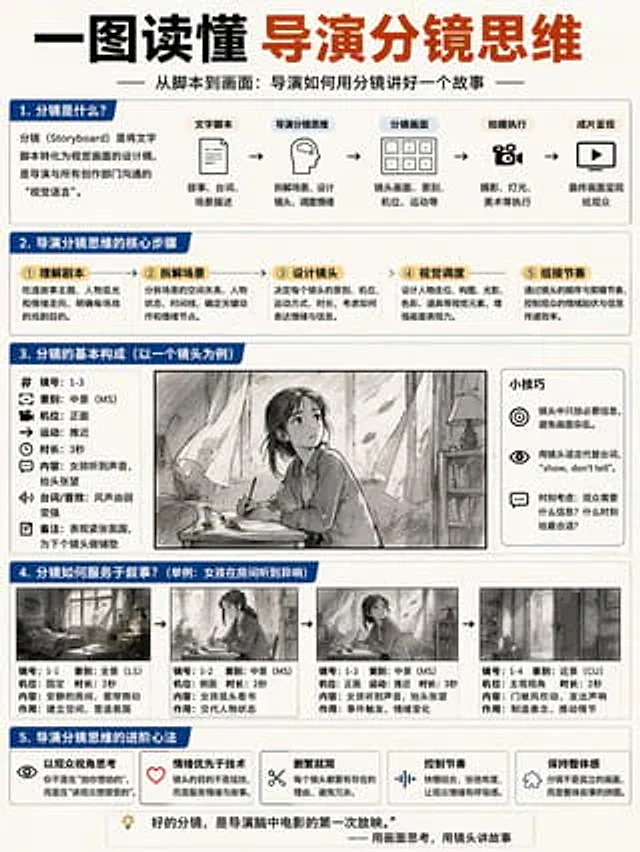
  "type": "Educational infographic poster",
  "header": {
    "title": "{argument name=\"main title\" default=\"Understanding the Director's Storyboard Mindset in One Picture\"}",
    "subtitle": "{argument name=\"subtitle\" default=\"From Script to Visuals: How a Director Tells a Story Through Storyboarding\"}"
  },
  "layout": {
    "sections": [
      {
        "title": "1. What is a storyboard?",
        "components": [
          "Define text box",
          {
            "type": "flowchart",
            "count": 5,
            "labels": [
              "Script",
              "Director's Storyboard Thinking",
              "Storyboard",
              "Filming execution",
              "Final presentation"
            ]
          }
        ]
      },
      {
        "title": "2. The core steps of a director's storyboard thinking",
        "count": 5,
        "labels": [
          "① Understanding the script",
          "② Disassembly of the scenario",
          "③ Design lens",
          "④ Visual scheduling",
          "⑤ Grouping rhythm"
        ]
      },
      {
        "title": "3. The basic structure of a storyboard (taking a single shot as an example)",
        "columns": [
          {
            "position": "left",
            "count": 8,
            "labels": [
              "Mirror number",
              "Shot type",
              "camera position",
              "sports",
              "Duration",
              "content",
              "Dialogue/Sound Effects",
              "Remark"
            ]
          },
          {
            "position": "center",
            "image": "{argument name=\"character subject\" default=\"anime girl reading in a room\"}"
          },
          {
            "position": "right",
            "title": "Tips",
            "count": 3,
            "description": "Icon Highlights"
          }
        ]
      },
      {
        "title": "4. How do storyboards serve the narrative?",
        "subtitle": "{argument name=\"example scenario\" default=\"Example: The girl heard strange noises in the room.\"}",
        "count": 4,
        "panels": [
          "Panoramic view of the room",
          "Girl reading (middle scene)",
          "Girl looking up (medium shot)",
          "Close-up of the door opening"
        ],
        "caption_labels": [
          "Mirror number",
          "Shot type",
          "camera position",
          "Duration",
          "content",
          "effect"
        ]
      },
      {
        "title": "5. Advanced Techniques for Directors' Storyboard Thinking",
        "count": 5,
        "labels": [
          "Thinking from the audience's perspective",
          "Emotion over technology",
          "Simplify",
          "Control the rhythm",
          "Maintain a sense of unity"
        ]
      }
    ],
    "footer": "{argument name=\"footer quote\" default=\"A good storyboard is the first screening of the film in the director's mind.\"}"
  },
  "style": "Simple business-style infographics, blue and white color scheme, structured grid."
}
사용 방법
- 매개변수를 포함한 전체 원본 프롬프트를 복사하세요.
- 주제, 문구, 구도를 자신의 요구에 맞게 바꾸세요.
- 호환되는 외부 도구에서 사용하고 이용 조건과 결과를 확인하세요.
시작 전 확인
- 참조 이미지가 필요한지 확인하세요. 호환 표시는 해당 모델로 이 예시를 생성했다는 뜻이 아닙니다.
- 이름, 수치, 이미지 속 문구를 확인하세요. 모델 버전에 따라 결과가 다를 수 있습니다.