원본 문서
GPT Image 2 · en
{
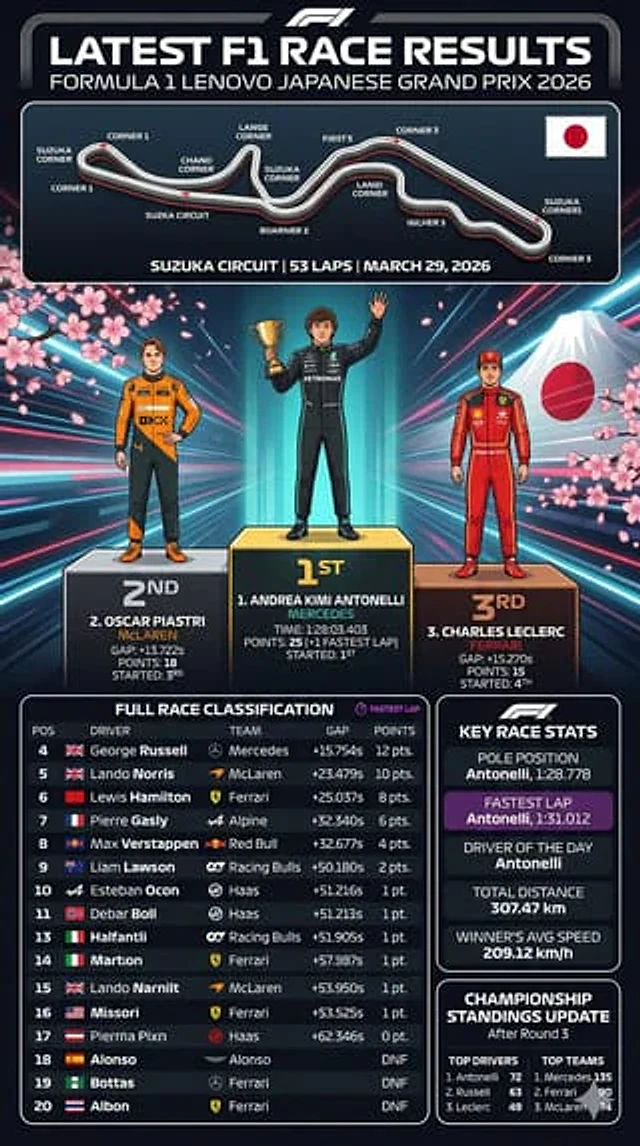
  "type": "Sports Infographic",
  "theme": "F1 race results",
  "header": {
    "title": "Latest F1 race results",
    "subtitle": "{argument name=\"grand prix name\" default=\"2026 F1 Lenovo Japanese Grand Prix\"}"
  },
  "layout": {
    "sections": [
      {
        "title": "Track Map",
        "position": "top",
        "elements": [
          "Track layout with 11 marked corners",
          "Japanese flag",
          "Track details text:{argument name=\"track name\" default=\"Suzuka Circuit\"} | 53 laps | March 29, 2026"
        ]
      },
      {
        "title": "podium",
        "position": "Central",
        "background": "Mount Fuji, cherry blossoms, neon lights radiating outwards",
        "count": 3,
        "drivers": [
          {
            "position": "First place",
            "name": "{argument name=\"first place driver\" default=\"ANDREA KIMI ANTONELLI\"}",
            "team": "MERCEDES",
            "pose": "Holding a golden cup, waving in greeting",
            "suit": "black"
          },
          {
            "position": "Second place",
            "name": "{argument name=\"second place driver\" default=\"OSCAR PIASTRI\"}",
            "team": "McLAREN",
            "pose": "Hands on hips",
            "suit": "Orange and black"
          },
          {
            "position": "Third place",
            "name": "{argument name=\"third place driver\" default=\"CHARLES LECLERC\"}",
            "team": "FERRARI",
            "pose": "Stand upright",
            "suit": "red"
          }
        ]
      },
      {
        "title": "Full match rankings",
        "position": "Bottom left",
        "count": 17,
        "description": "The table contains 17 rows, showing the 4th to 20th places, with columns including position (POS), driver (DRIVER), team (TEAM), gap (GAP), and points (POINTS)."
      },
      {
        "title": "Key match data",
        "position": "upper right",
        "count": 5,
        "stats": [
          "pole position",
          "Fastest lap time (purple background)",
          "Driver of the Day",
          "Total Mileage",
          "average speed of the winner"
        ]
      },
      {
        "title": "Standings updated",
        "position": "bottom right",
        "columns": 2,
        "lists": [
          "Top three in the drivers' standings",
          "Top three in the team standings"
        ]
      }
    ]
  }
}
사용 방법
- 매개변수를 포함한 전체 원본 프롬프트를 복사하세요.
- 주제, 문구, 구도를 자신의 요구에 맞게 바꾸세요.
- 호환되는 외부 도구에서 사용하고 이용 조건과 결과를 확인하세요.
시작 전 확인
- 참조 이미지가 필요한지 확인하세요. 호환 표시는 해당 모델로 이 예시를 생성했다는 뜻이 아닙니다.
- 이름, 수치, 이미지 속 문구를 확인하세요. 모델 버전에 따라 결과가 다를 수 있습니다.