원본 문서
GPT Image 2 · en
{
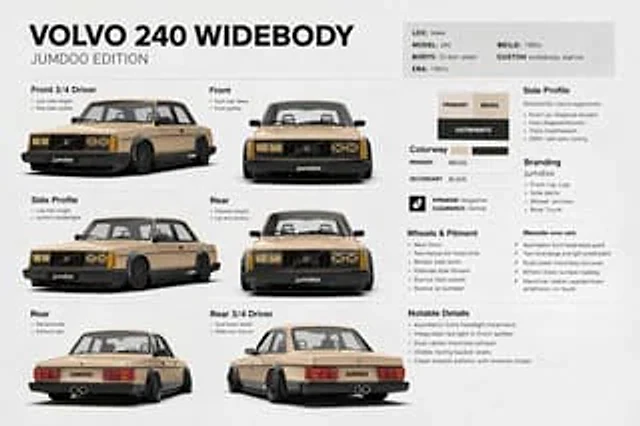
  "type": "Automotive design specifications project",
  "subject": {
    "vehicle": "{argument name=\"car model\" default=\"Volvo 240\"}",
    "edition": "{argument name=\"edition name\" default=\"JUMDOO EDITION\"}",
    "body_style": "Rendering of a 2-door sedan wide-body display vehicle",
    "era": "1980s",
    "location": "Make",
    "stance": "Extremely low air suspension posture, aggressive wheelbase",
    "paint": {
      "primary": "{argument name=\"primary color\" default=\"warm beige\"}",
      "secondary": "{argument name=\"secondary color\" default=\"Satin Black\"}",
      "finish": "Satin/Matte Texture"
    },
    "design_features": [
      "The square silhouette of the 1980s Volvo 240",
      "Wide-body riveted wheel arches",
      "Black front lip with extremely low ground clearance",
      "black side skirt",
      "Black lower body cladding",
      "Black multi-spoke deep concave wheel hub",
      "Low aspect ratio stretch tires",
      "Asymmetrical headlight design, with X-shaped inserts on one side of the grille light strip.",
      "Black grille with Volvo diagonal logo",
      "A clean, smooth body with minimalist trim.",
      "Center-mounted dual exhaust pipe",
      "Visible racing bucket seats",
      "Small JUMDOO brand logos are located on the front license plate area, side skirts, and rear panel."
    ]
  },
  "layout": {
    "background": "Simple light gray photography studio poster background",
    "overall_style": "Minimalist Swiss-style car specification sheet, clear 3D product rendering, black sans-serif font, and thin gray dividing lines.",
    "title_block": {
      "headline": "{argument name=\"headline text\" default=\"VOLVO 240 WIDEBODY\"}",
      "subheadline": "JUMDOO EDITION",
      "position": "Top left corner"
    },
    "info_panel": {
      "position": "Top right corner",
      "items": [
        {
          "label": "LOC:",
          "value": "Make"
        },
        {
          "label": "MODEL:",
          "value": "240"
        },
        {
          "label": "BODYS:",
          "value": "2-door sedan"
        },
        {
          "label": "ERA:",
          "value": "1980s"
        },
        {
          "label": "BEILD:",
          "value": "1980s"
        },
        {
          "label": "CUSTOM",
          "value": "Wide-body stance"
        }
      ]
    },
    "sections": [
      {
        "title": "Vehicle view",
        "position": "Left side and center",
        "count": 6,
        "labels": [
          "Left front 3/4 perspective",
          "front",
          "side",
          "back",
          "back",
          "Left rear 3/4 perspective"
        ],
        "content": "Six individual studio renders of the same vehicle, arranged in a 3x2 grid, each with a bold title and two brief captions below or to the side."
      },
      {
        "title": "Material color swatch",
        "position": "upper right middle",
        "count": 3,
        "labels": [
          "main color",
          "secondary color",
          "Satin Matte"
        ],
        "content": "Three rectangular color/material blocks, beige, beige, and black respectively."
      },
      {
        "title": "Color scheme",
        "position": "Right sidebar",
        "count": 2,
        "labels": [
          "main color",
          "secondary color"
        ],
        "content": "The primary color scheme is beige, and the secondary color scheme is black."
      },
      {
        "title": "Side profile",
        "position": "Top right corner",
        "count": 4,
        "labels": [
          "front lip",
          "Volvo diagonal processing",
          "Track style",
          "OEM + Retro Style"
        ],
        "content": "A brief list of key points describing the side and front styling features."
      },
      {
        "title": "Brand logo",
        "position": "Right middle",
        "count": 4,
        "labels": [
          "front lip",
          "Side skirt",
          "wheel arch",
          "trunk"
        ],
        "content": "List of key points for marking the placement area"
      },
      {
        "title": "Wheels and Fit",
        "position": "lower right side",
        "count": 5,
        "labels": [
          "Aerodynamic hubcap",
          "Elegant headlights",
          "Wheel side skirts",
          "Adaptability",
          "attitude"
        ],
        "content": "List of key points describing wheel style, fit, and stance"
      },
      {
        "title": "significant details",
        "position": "bottom right corner",
        "count": 4,
        "labels": [
          "Asymmetrical headlight treatment",
          "Front lip integrated red light",
          "Center-mounted dual exhaust",
          "Visible racing bucket seats"
        ],
        "content": "Key Modification Points List"
      }
    ]
  },
  "rendering": {
    "camera": "Studio product photography, similar to orthographic projection, with slight perspective, consistent and soft lighting.",
    "quality": "High-end industrial design projects, ultra-clear realistic 3D rendering",
    "aspect_ratio": "16:9 Landscape"
  }
}
사용 방법
- 매개변수를 포함한 전체 원본 프롬프트를 복사하세요.
- 주제, 문구, 구도를 자신의 요구에 맞게 바꾸세요.
- 호환되는 외부 도구에서 사용하고 이용 조건과 결과를 확인하세요.
시작 전 확인
- 참조 이미지가 필요한지 확인하세요. 호환 표시는 해당 모델로 이 예시를 생성했다는 뜻이 아닙니다.
- 이름, 수치, 이미지 속 문구를 확인하세요. 모델 버전에 따라 결과가 다를 수 있습니다.