원본 문서
GPT Image 2 · en
{
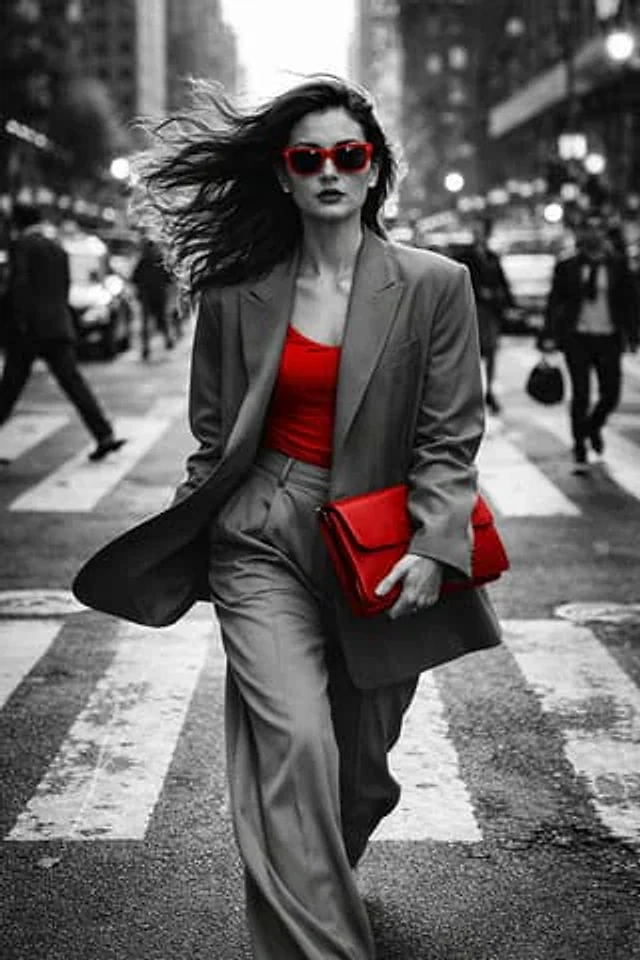
  "objective": "Generate a hyper-realistic black and white street fashion photograph with selective color accents.",
  "image_type": "photography",
  "prompt": {
    "subject": "A stylish, confident woman crossing a busy city intersection",
    "wardrobe": {
      "outerwear": "Oversized blazer in neutral tone",
      "innerwear": "Bright red fitted top (selective color)",
      "bottoms": "Loose tailored trousers in neutral tone",
      "accessories": [
        "Bright red leather clutch in hand",
        "Bright red sunglasses"
      ]
    },
    "action_motion": "Walking briskly toward the camera, hair flowing backward due to motion, blazer and trousers moving naturally",
    "scene": "Busy urban crosswalk with pedestrians and cars motion-blurred in the background",
    "perspective": "Frontal tracking shot at waist level",
    "style": [
      "High-end street fashion",
      "Paparazzi aesthetic",
      "Editorial candid",
      "Dynamic movement photography"
    ],
    "visual_details": [
      "Realistic fabric physics",
      "Detailed hair movement",
      "Sharp facial features",
      "Asphalt road texture",
      "Motion blur on background crowd",
      "Bokeh city lights"
    ],
    "mood": [
      "Confident",
      "Cosmopolitan",
      "Urgent",
      "Powerful"
    ]
  },
  "camera_and_composition": {
    "angle": "Waist-level",
    "framing": "Subject centered, background expanding outward with motion blur",
    "depth_of_field": "Shallow depth of field isolating the subject"
  },
  "lighting": {
    "type": "Natural backlight with rim lighting",
    "contrast": "High contrast emphasizing silhouette and edges"
  },
  "post_processing": {
    "color_mode": "Black and white with selective red color accents only on innerwear, sunglasses, and clutch bag",
    "effects": [
      "Subtle lens flare",
      "Vintage film stock emulation",
      "High micro-contrast",
      "Film grain texture"
    ]
  },
  "negative_prompt": [
    "Posed studio look",
    "Empty street",
    "Static posture",
    "Low realism",
    "Full color image",
    "Overexposed highlights",
    "Flat lighting"
  ],
  "output_quality": {
    "resolution": "Ultra high resolution",
    "detail_level": "Maximum photorealism",
    "sharpness": "Crisp subject, soft background"
  }
}
사용 방법
- 매개변수를 포함한 전체 원본 프롬프트를 복사하세요.
- 주제, 문구, 구도를 자신의 요구에 맞게 바꾸세요.
- 호환되는 외부 도구에서 사용하고 이용 조건과 결과를 확인하세요.
시작 전 확인
- 참조 이미지가 필요한지 확인하세요. 호환 표시는 해당 모델로 이 예시를 생성했다는 뜻이 아닙니다.
- 이름, 수치, 이미지 속 문구를 확인하세요. 모델 버전에 따라 결과가 다를 수 있습니다.