원본 문서
GPT Image 2 · en
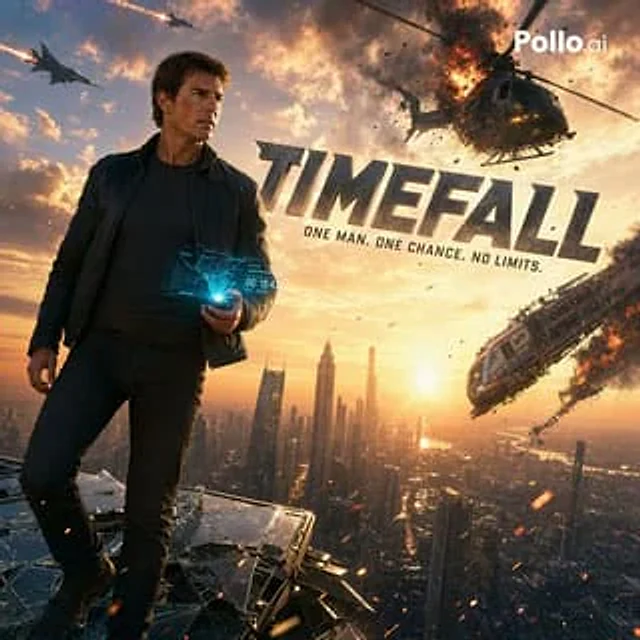
Create a hyper-realistic, cinematic action poster against a golden sunset backdrop, depicting a rugged, adult male action hero standing on the edge of shattered glass in a futuristic megacity. Positioned on the left, he strikes a powerful full-body pose, wearing a dark fitted T-shirt, black jeans, and a dark cardigan jacket, with short, wind-blown brown hair. His face is deliberately obscured by a smooth, rectangular blur, as if censored. One hand holds a glowing blue holographic device projecting a transparent sci-fi interface displaying a map, target graphics, and a countdown timer showing 00:18:43. The background is a spectacular skyline of modern towers stretching to the horizon, with the sun low in the right-center sky, bathing the city in warm orange light. The sky is filled with explosive action movie elements: a large helicopter explodes mid-air in the upper right corner, accompanied by flames, smoke, debris, and spinning rotor wreckage; a damaged passenger plane tilts downwards in the lower right corner, trailing flames and black smoke; two fast-flying military jets streak across the sky in the upper left corner, leaving bright missile trails. The addition of flying embers, sparks, floating debris, and intense, voluminous smoke clouds creates a high-risk, disaster-themed atmosphere. A large, metallic 3D movie title is placed in the upper right center, with the content {argument name="title text" default="TIMEFALL"} With a slight tilt, it presents a rugged steel texture and cinematic shadow effects. Below the title, add a simple, eye-catching capitalized slogan:{argument name="tagline" default="ONE MAN. ONE CHANCE. NO LIMITS."} Add a small white brand logo in the upper right corner with the following text:{argument name="logo text" default="Pollo.ai"} It employs an ultra-realistic style, strong contrast, blockbuster poster composition, anamorphic lens flare, clear character details, epic scale, and exquisite Hollywood key visual art style.사용 방법
- 매개변수를 포함한 전체 원본 프롬프트를 복사하세요.
- 주제, 문구, 구도를 자신의 요구에 맞게 바꾸세요.
- 호환되는 외부 도구에서 사용하고 이용 조건과 결과를 확인하세요.
시작 전 확인
- 참조 이미지가 필요한지 확인하세요. 호환 표시는 해당 모델로 이 예시를 생성했다는 뜻이 아닙니다.
- 이름, 수치, 이미지 속 문구를 확인하세요. 모델 버전에 따라 결과가 다를 수 있습니다.