원본 문서
GPT Image 2 · en
{
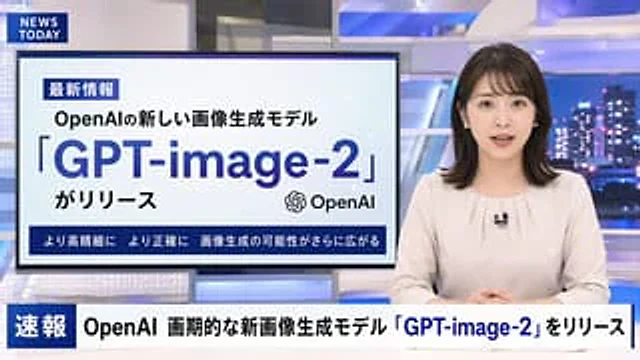
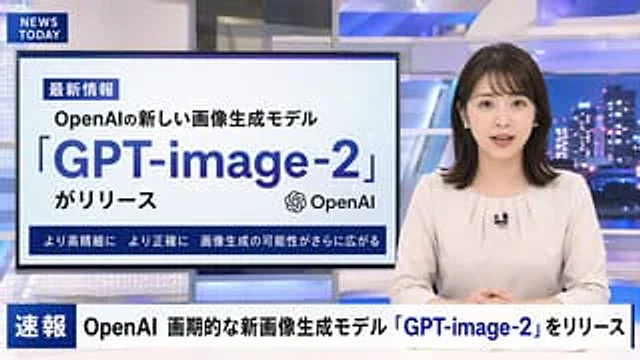
  "type": "Television news broadcasting layout",
  "anchor": {
    "appearance": "{argument name=\"anchor appearance\" default=\"A young Japanese female news anchor with shoulder-length dark hair.\"}",
    "attire": "Light beige shirt, wearing a small lapel microphone",
    "pose": "Sit at the table, hands clasped together, facing forward."
  },
  "studio_environment": "A modern news studio with blue illuminated panels and a nighttime city skyline as a backdrop.",
  "graphics": {
    "top_left_bug": {
      "style": "Dark blue rectangle",
      "text": "{argument name=\"channel logo\" default=\"NEWS TODAY\"}"
    },
    "presentation_monitor": {
      "location": "The left side behind the anchor",
      "badge": "Latest Information",
      "subtitle": "{argument name=\"subheadline\" default=\"OpenAI's new image generation model\"}",
      "title": "{argument name=\"main headline\" default=\"「GPT-image-2」\"}",
      "suffix": "がリリース",
      "icon": "OpenAI logo",
      "bottom_bar": "Higher resolution, greater accuracy – the possibilities for image generation are expanding even further."
    },
    "lower_thirds_ticker": {
      "badge": "breaking news",
      "headline": "{argument name=\"ticker text\" default=\"OpenAI releases groundbreaking new image generation model "GPT-image-2"\"}"
    }
  }
}
사용 방법
- 매개변수를 포함한 전체 원본 프롬프트를 복사하세요.
- 주제, 문구, 구도를 자신의 요구에 맞게 바꾸세요.
- 호환되는 외부 도구에서 사용하고 이용 조건과 결과를 확인하세요.
시작 전 확인
- 참조 이미지가 필요한지 확인하세요. 호환 표시는 해당 모델로 이 예시를 생성했다는 뜻이 아닙니다.
- 이름, 수치, 이미지 속 문구를 확인하세요. 모델 버전에 따라 결과가 다를 수 있습니다.