원본 문서
GPT Image 2 · en
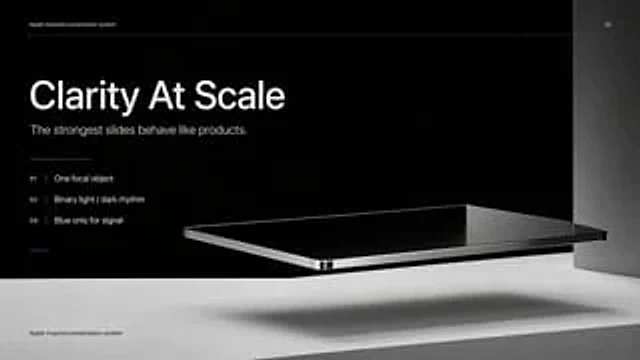
Create a high-end, minimalist Keynote-style presentation cover slide with Apple industrial design aesthetics. Use a 16:9 widescreen layout with a deep matte black upper half of the background and a light concrete gray platform occupying the bottom quarter of the image. Place a large, realistic floating rectangular panel in the center foreground on the right, resembling a thin black glass device or a polished obsidian platform with mirrored reflections, beveled chrome edges, and a precision industrial finish. This panel should float above the light-colored surface, casting a soft, elongated shadow directly below it. Add a tall, vertical gray metal wall or column along the far right edge for composition. Employ extremely minimalist, high-end art direction, leaving ample negative space, utilizing cinematic studio lighting, subtle gradients, and a clear contrast between black and silver materials. On the left, set up a clean white sans-serif font and maintain a clear hierarchy: a small heading at the top.{argument name="system label" default="Apple-inspired presentation system"} The title in the middle is a very large, bold heading.{argument name="headline text" default="Clarity At Scale"} Below this is a subtitle in medium font size.{argument name="subtitle text" default="The strongest slides behave like products."} Below it, in a vertical list format, are three numbering principles with thin separators and delicate spacing: "01 |{argument name="principle 1" default="One focal object"} “02 | Binary light / dark rhythm” and “03 | Blue only for signal”. Add a short, thin horizontal line above the list and a tiny blue accent line below the list. Draw an extremely thin horizontal guide line near the top that runs through most of the slides and label the page number “01” in the upper right corner. Repeat the tiny title “Apple-inspired presentation system” again on a light-colored surface at the bottom left. Overall look: luxurious tech presentation, editorial product launch slides, ultra-clean Swiss grid layout, restrained monochromatic color scheme (with only one subtle blue accent), and realistic rendering effects that blend with the presentation design.사용 방법
- 매개변수를 포함한 전체 원본 프롬프트를 복사하세요.
- 주제, 문구, 구도를 자신의 요구에 맞게 바꾸세요.
- 호환되는 외부 도구에서 사용하고 이용 조건과 결과를 확인하세요.
시작 전 확인
- 참조 이미지가 필요한지 확인하세요. 호환 표시는 해당 모델로 이 예시를 생성했다는 뜻이 아닙니다.
- 이름, 수치, 이미지 속 문구를 확인하세요. 모델 버전에 따라 결과가 다를 수 있습니다.