原始文档
GPT Image 2 · en
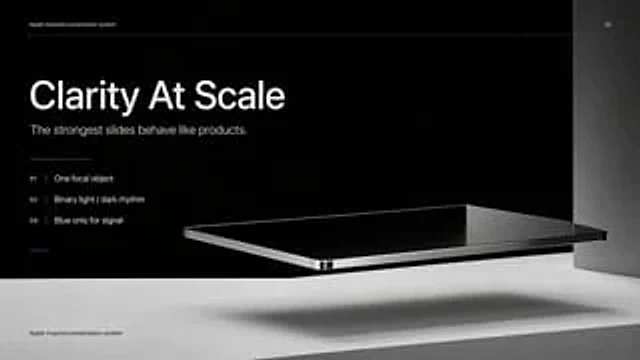
Create a high-end, minimalist Keynote-style presentation cover slide with Apple industrial design aesthetics. Use a 16:9 widescreen layout with a deep matte black upper half of the background and a light concrete gray platform occupying the bottom quarter of the image. Place a large, realistic floating rectangular panel in the center foreground on the right, resembling a thin black glass device or a polished obsidian platform with mirrored reflections, beveled chrome edges, and a precision industrial finish. This panel should float above the light-colored surface, casting a soft, elongated shadow directly below it. Add a tall, vertical gray metal wall or column along the far right edge for composition. Employ extremely minimalist, high-end art direction, leaving ample negative space, utilizing cinematic studio lighting, subtle gradients, and a clear contrast between black and silver materials. On the left, set up a clean white sans-serif font and maintain a clear hierarchy: a small heading at the top.{argument name="system label" default="Apple-inspired presentation system"} The title in the middle is a very large, bold heading.{argument name="headline text" default="Clarity At Scale"} Below this is a subtitle in medium font size.{argument name="subtitle text" default="The strongest slides behave like products."} Below it, in a vertical list format, are three numbering principles with thin separators and delicate spacing: "01 |{argument name="principle 1" default="One focal object"} “02 | Binary light / dark rhythm” and “03 | Blue only for signal”. Add a short, thin horizontal line above the list and a tiny blue accent line below the list. Draw an extremely thin horizontal guide line near the top that runs through most of the slides and label the page number “01” in the upper right corner. Repeat the tiny title “Apple-inspired presentation system” again on a light-colored surface at the bottom left. Overall look: luxurious tech presentation, editorial product launch slides, ultra-clean Swiss grid layout, restrained monochromatic color scheme (with only one subtle blue accent), and realistic rendering effects that blend with the presentation design.使用方法
- 复制完整原始提示词,并保留其中的参数。
- 按需求替换主体、文字和构图要求。
- 在兼容的外部工具中使用,核对当前使用条件并检查结果。
开始前需了解
- 先确认是否需要参考图。标注兼容模型,不代表该示例由这个模型生成。
- 核对名称、数字与画面文字;不同模型版本的结果可能不同。