Oryginalny dokument
GPT Image 2 · en
{
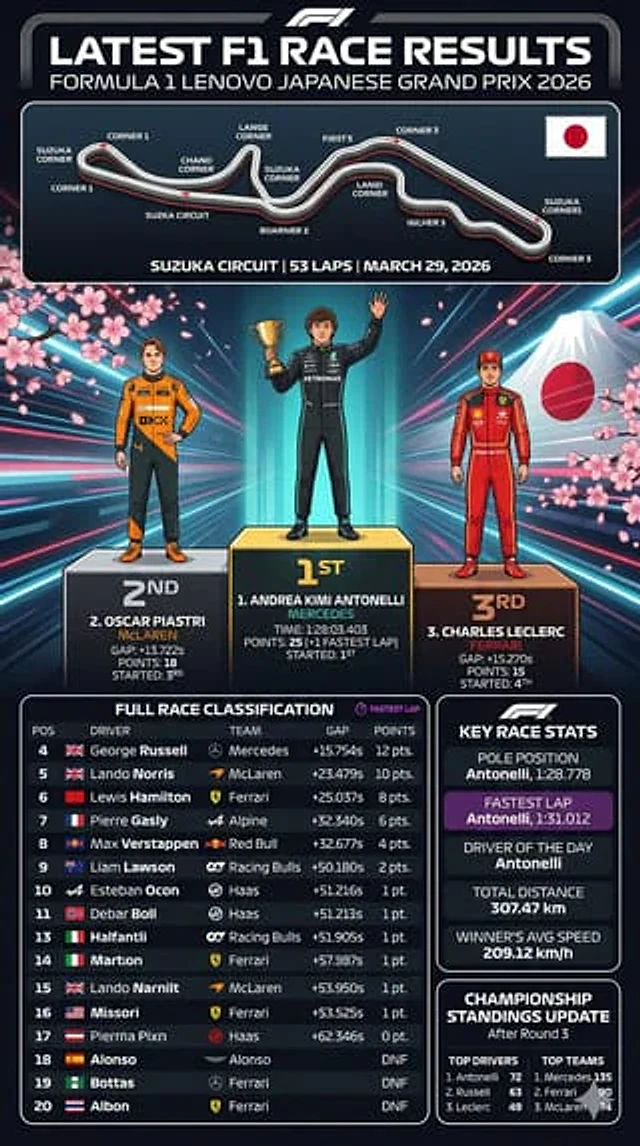
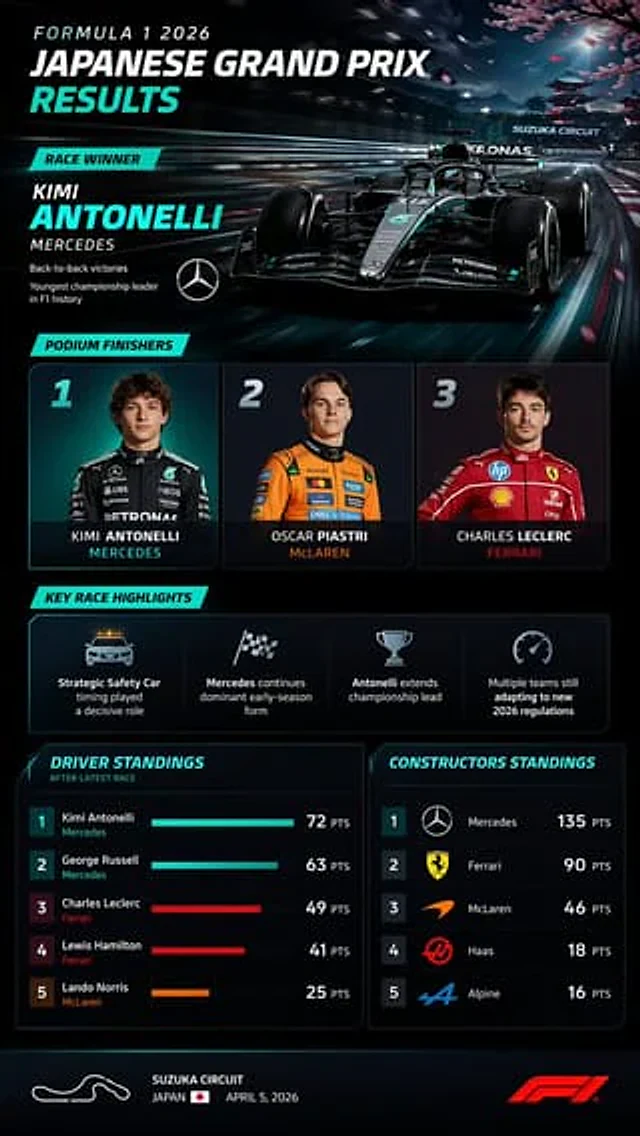
  "type": "Sports broadcast infographic dashboard",
  "theme": "Dark mode, stylish, modern, with neon cyan accents, high-tech F1 graphics.",
  "header": {
    "title": "Formula One{argument name=\"year\" default=\"2026\"} Year{argument name=\"race name\" default=\"Japan Grand Prix\"} Match Results",
    "winner_callout": {
      "label": "winner of the competition",
      "driver": "{argument name=\"winner name\" default=\"KIMI ANTONELLI\"}",
      "team": "{argument name=\"winning team\" default=\"Mercedes\"}",
      "stats": [
        "Retained the championship",
        "The youngest points leader in F1 history"
      ],
      "logo": "Mercedes Star"
    },
    "background_image": "A stylish black and blue F1 race car speeds along the track, its motion blurred, against a backdrop of cherry blossoms and a Japanese pagoda, with the words 'SUZUKA CIRCUIT' written on the race track overhead."
  },
  "layout": {
    "sections": [
      {
        "title": "Podium athletes",
        "position": "Upper-middle",
        "count": 3,
        "labels": [
          "1 - Photo of a young male driver wearing a black Mercedes racing suit, Kimi Antonelli, Mercedes",
          "2 - Photo of a young male driver in an orange McLaren racing suit, OSCAR PIASTRI, McLaren",
          "3 - Photo of a young male driver in a red Ferrari racing suit, CHARLES LECLERC, Ferrari"
        ]
      },
      {
        "title": "Key Match Highlights",
        "position": "middle",
        "count": 4,
        "labels": [
          "Safety car icon: The strategic timing of the safety car played a decisive role.",
          "Checkered flag icon: Mercedes continues their dominance from the start of the season.",
          "Trophy icon: Antonelli extends his lead in the standings.",
          "Speedometer icon: Many teams are still adapting to the new regulations in 2026."
        ]
      },
      {
        "title": "Drivers' standings",
        "position": "Bottom left",
        "count": 5,
        "labels": [
          "1. Kimi Antonelli, Mercedes, 72 points",
          "2. George Russell, Mercedes, 63 points",
          "3 Charles Leclerc, Ferrari, 49 points",
          "4. Lewis Hamilton, Ferrari, 41 points",
          "5. Lando Norris, McLaren, 25 points"
        ],
        "visuals": "Horizontal bar chart showing each driver's team color"
      },
      {
        "title": "Team standings",
        "position": "Bottom right",
        "count": 5,
        "labels": [
          "1. Mercedes 135 points",
          "2 Ferrari 90 points",
          "3. McLaren 46 points",
          "4. Haas scored 18 points.",
          "5. Alpine 16 points"
        ],
        "visuals": "The team logo is displayed next to each ranking."
      }
    ]
  },
  "footer": {
    "content": "The white outline of the track layout{argument name=\"circuit name\" default=\"Suzuka Circuit\"} Japan and its flag, April 5, 2026, red F1 logo."
  }
}
Jak używać
- Skopiuj cały oryginalny prompt wraz z parametrami.
- Dostosuj temat, tekst i kompozycję do swoich potrzeb.
- Użyj zgodnego narzędzia zewnętrznego; sprawdź warunki dostępu i wynik.
Przed rozpoczęciem
- Sprawdź, czy potrzebny jest obraz referencyjny. Zgodność nie potwierdza modelu użytego do przykładu.
- Sprawdź nazwy, liczby i napisy; wyniki zależą od wersji modelu.