Oryginalny dokument
GPT Image 2 · en
{
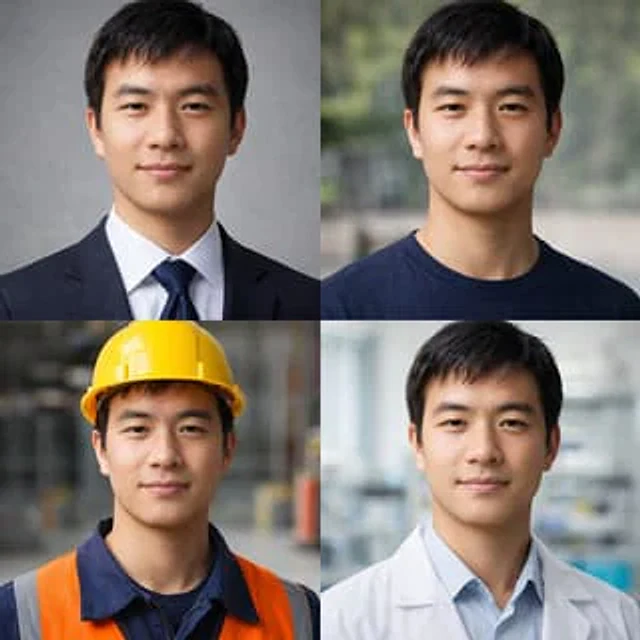
  "type": "2x2 portrait grid",
  "subject": "{argument name=\"subject description\" default=\"A young East Asian man with short black hair and a smile.\"}",
  "style": "Photorealistic rendering, high resolution, professional lighting, and consistent facial features across all panels.",
  "layout": {
    "format": "2x2 grid",
    "panel_count": 4,
    "panels": [
      {
        "position": "Top left",
        "description": "{argument name=\"profession 1\" default=\"A business professional, dressed in a dark navy blue suit, white shirt, and blue tie, against a gray textured background.\"}"
      },
      {
        "position": "Top right",
        "description": "{argument name=\"profession 2\" default=\"Dressed casually, wearing a dark blue crew neck T-shirt, with a blurred outdoor park in the background.\"}"
      },
      {
        "position": "Bottom left",
        "description": "{argument name=\"profession 3\" default=\"Construction workers, wearing yellow hard hats, navy blue work shirts, and bright orange high-visibility vests, in a blurred warehouse background.\"}"
      },
      {
        "position": "Bottom right",
        "description": "{argument name=\"profession 4\" default=\"A medical professional, wearing a light blue shirt under a white lab coat, in a blurred laboratory background.\"}"
      }
    ]
  }
}
Jak używać
- Skopiuj cały oryginalny prompt wraz z parametrami.
- Dostosuj temat, tekst i kompozycję do swoich potrzeb.
- Użyj zgodnego narzędzia zewnętrznego; sprawdź warunki dostępu i wynik.
Przed rozpoczęciem
- Sprawdź, czy potrzebny jest obraz referencyjny. Zgodność nie potwierdza modelu użytego do przykładu.
- Sprawdź nazwy, liczby i napisy; wyniki zależą od wersji modelu.