Oryginalny dokument
GPT Image 2 · en
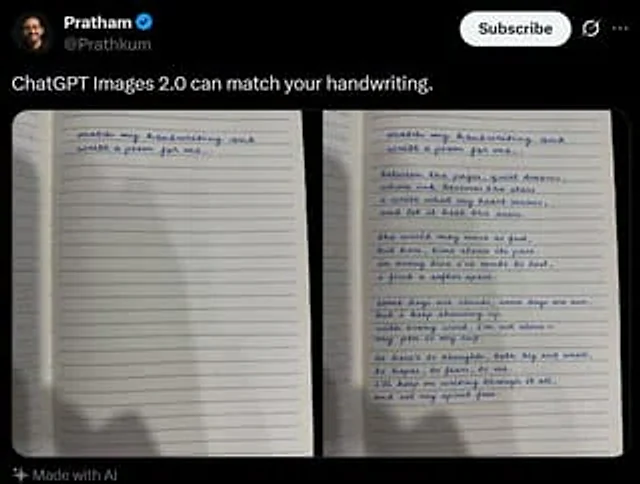
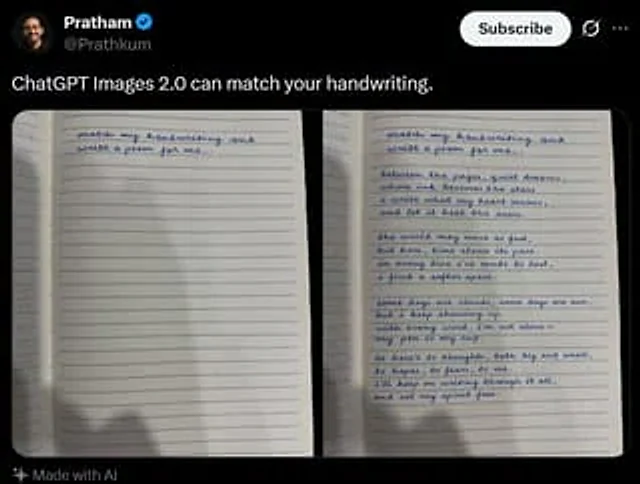
A realistic dark-mode social media post screenshot styled like X/Twitter on a black interface. At the top left is a small blurred circular profile photo beside the display name {argument name="profile name" default="Pratham"} with a blue verification badge, and the handle {argument name="handle" default="@Prathkum"} underneath. At the top right is a rounded white Subscribe button plus two small interface icons. The tweet text in large white sans-serif type reads: {argument name="tweet text" default="ChatGPT Images 2.0 can match your handwriting."} Below it is a side-by-side comparison image made of 2 notebook photos separated by a narrow black vertical gap. Both photos show an open lined notebook page shot from above under dim indoor lighting with soft shadows near the bottom edge. The left notebook page is mostly blank except for 2 handwritten lines in neat blue cursive at the top that say: {argument name="handwriting prompt text" default="match my hanawriting ana write a poem for me.."} Keep the misspellings and punctuation exactly as written. The right notebook page shows the same first 2 handwritten lines at the top, followed by a handwritten poem in matching blue cursive handwriting filling the page in 4 stanzas. The poem text reads exactly: {argument name="poem text" default="between the pages, quiet dreams, where ink becomes the stars, i write what my heart means, and let it heal the scars.

the world may move so fast, but here, time slows its pace. in every line i’ve made to last, i find a softer space.

some days are clouds, some days are sun, but i keep showing up. with every word, i’m not alone— my pen is my cup.

so here’s to thoughts, both big and small, to hopes, to fears, to me. i’ll keep on writing through it all, and set my spirit free."} The handwriting should look natural, slightly uneven, and convincingly human, with blue ballpoint pen texture. At the bottom left of the post, include a small sparkle icon and the words “Made with AI”. Preserve the look of a genuine mobile app screenshot with realistic spacing, rounded image corners, crisp UI typography, and subtle screen-capture softness.
Jak używać
- Skopiuj cały oryginalny prompt wraz z parametrami.
- Dostosuj temat, tekst i kompozycję do swoich potrzeb.
- Użyj zgodnego narzędzia zewnętrznego; sprawdź warunki dostępu i wynik.
Przed rozpoczęciem
- Sprawdź, czy potrzebny jest obraz referencyjny. Zgodność nie potwierdza modelu użytego do przykładu.
- Sprawdź nazwy, liczby i napisy; wyniki zależą od wersji modelu.