Documento original
GPT Image 2 · en
{
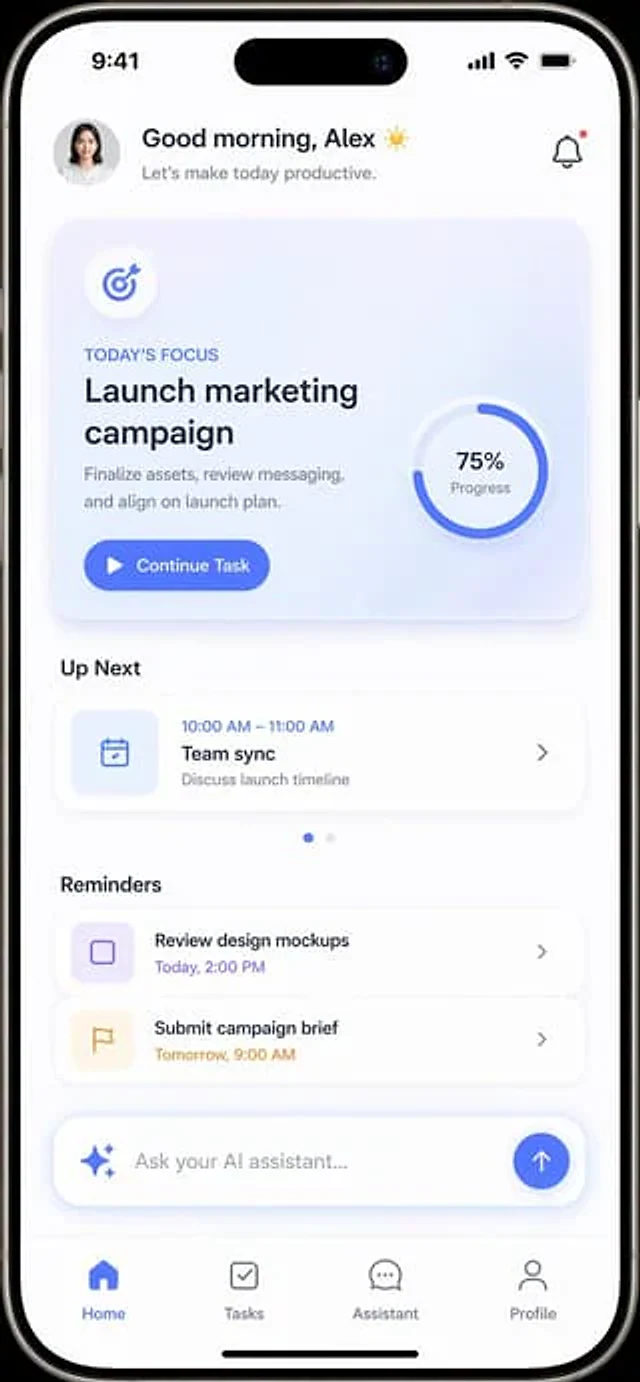
  "type": "Mobile application UI prototype",
  "device": "Modern smartphones with Lingdong Island",
  "theme": "Light mode, minimalism.{argument name=\"primary color\" default=\"Soft Blue\"} Embellishment, soft projection",
  "layout": {
    "header": {
      "profile": "Small round female head",
      "greeting": "Good morning,{argument name=\"user name\" default=\"Alex\"} ☀️",
      "subtitle": "Let's start a productive day.",
      "icon": "Notification bell with red dot"
    },
    "hero_card": {
      "title": "Today's Focus",
      "headline": "{argument name=\"focus task\" default=\"Launch marketing campaign\"}",
      "description": "Finalize the materials, review the copy, and align with the release plan.",
      "button": "Continue the mission",
      "graphic": "A circular progress ring indicating 75% progress."
    },
    "sections": [
      {
        "title": "Next",
        "count": 1,
        "items": [
          "Team Synchronous Meeting (10:00 AM - 11:00 AM)"
        ]
      },
      {
        "title": "Reminders",
        "count": 2,
        "items": [
          "Review the design prototype",
          "Submit an event briefing"
        ]
      }
    ],
    "bottom_elements": {
      "ai_input": "Capsule-shaped text box with flashing icon and placeholder{argument name=\"ai placeholder\" default=\"Ask your AI assistant...\"} '",
      "navigation_bar": {
        "count": 4,
        "tabs": [
          "front page",
          "Task",
          "assistant",
          "Personal information"
        ]
      }
    }
  }
}
Como usar
- Copie o prompt original completo, incluindo os parâmetros.
- Adapte o tema, o texto e a composição aos seus requisitos.
- Use uma ferramenta externa compatível; confira o acesso e o resultado.
Antes de começar
- Verifique se é necessária uma imagem de referência. Compatibilidade não comprova qual modelo gerou o exemplo.
- Confira nomes, números e textos; os resultados variam entre versões do modelo.