原始文档
GPT Image 2 · en
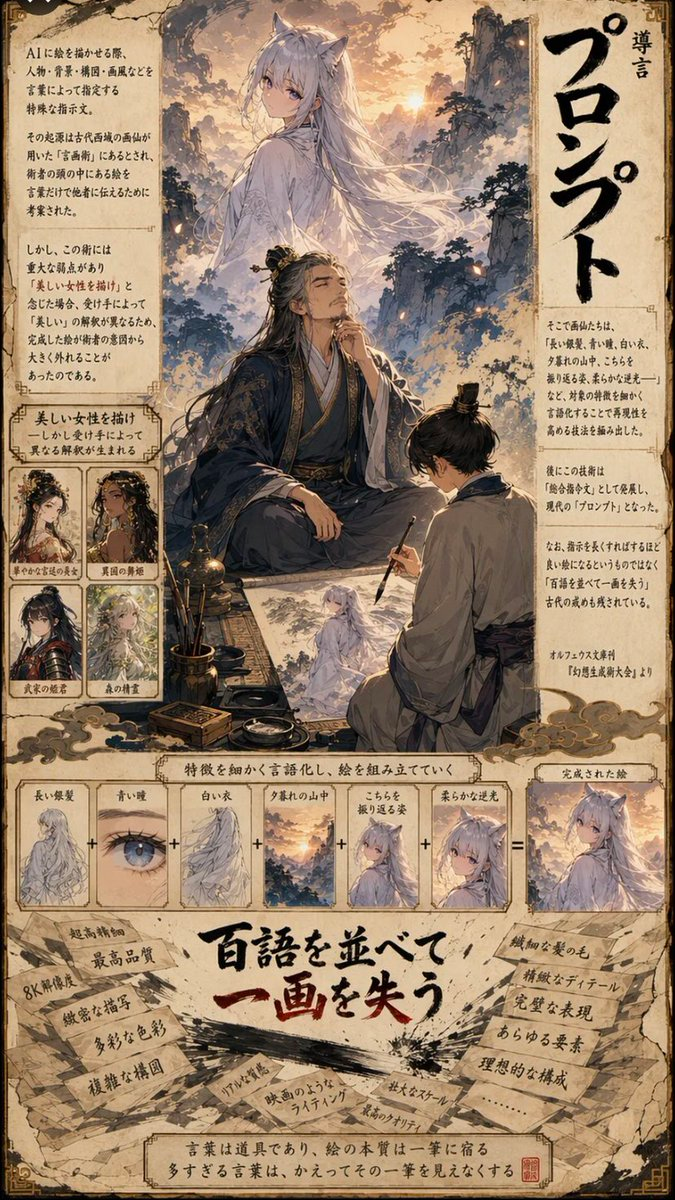
A vertical, highly detailed manga-style infographic page with a parchment-like background. The layout is divided into three main sections: a top illustration area, a middle diagrammatic breakdown, and a bottom text-heavy conclusion.

Top Section:
- A large, ethereal illustration of a woman with long white hair and fox ears (a kitsune) standing on a mountain peak at sunset. She wears flowing white robes.
- Below her, an elderly man with long black hair tied back, wearing dark blue traditional Chinese robes, sits cross-legged holding a calligraphy brush, looking up thoughtfully.
- To his right, a younger man in grey robes kneels, sketching the kitsune onto paper.
- Surrounding this scene are blocks of Japanese text explaining the concept of 'Prompt' (プロンプト).
- On the left side, there are four small square character portraits labeled with descriptions like 'Beautiful Woman', 'Dancer', etc., showing variations of female characters.
- Large vertical Japanese text on the right reads 'Introduction to Prompts'.

Middle Section:
- A horizontal flow diagram titled 'Verbalizing features to compose a picture'.
- It shows a sequence of six small square images connected by plus signs (+), leading to an equals sign (=) and a final result image.
- The sequence includes: 1. Long silver hair, 2. Blue eyes, 3. White clothes, 4. Mountain sunset, 5. Looking back pose, 6. Soft backlighting.
- The final result is the complete image of the kitsune from the top section.

Bottom Section:
- A large, bold Japanese headline in red and black ink style: "Listing hundreds of words loses one stroke" (百語を並べて一画を失う).
- Surrounding the headline are torn pieces of paper with handwritten notes listing negative effects of over-prompting, such as '8K resolution', 'ultra-high quality', 'complex composition', 'unnatural lighting', 'film-like lighting', 'large scale', 'highest quality'.
- At the very bottom, a concluding sentence in a box states that words are tools, but too many obscure the essence of the single stroke.
使用方法
- 复制完整原始提示词,并保留其中的参数。
- 按需求替换主体、文字和构图要求。
- 在兼容的外部工具中使用,核对当前使用条件并检查结果。
开始前需了解
- 先确认是否需要参考图。标注兼容模型,不代表该示例由这个模型生成。
- 核对名称、数字与画面文字;不同模型版本的结果可能不同。