原始文档
GPT Image 2 · en
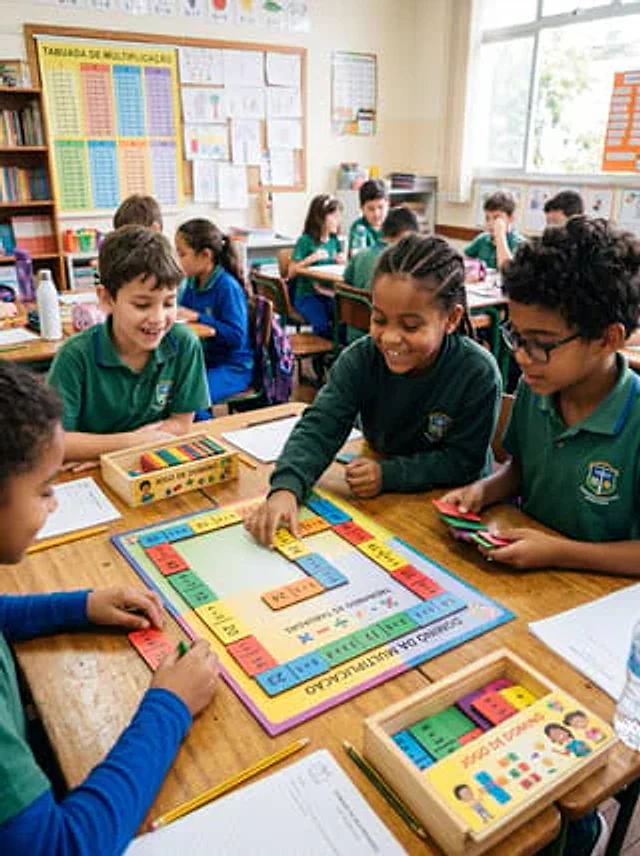
A realistic, documentary-style photograph captures a scene of a math activity in an elementary school classroom. About ten children in blue-green school uniforms sit around a makeshift wooden table, actively playing a brightly colored multiplication domino game. The camera is positioned at the children's eye level, tilted slightly downwards, pointing at the main table in the foreground. At the center of the scene is a square educational project labeled in Portuguese, with the title "DOMINÓ DA MULTIPLICAÇÃO" printed on the bottom edge and "TREINANDO AS TABUADAS" in the center, surrounded by brightly colored domino-shaped multiplication blocks. Four children are intently focused on this main project: one is placing a yellow domino into the project, another holds a stack of colored dominoes, one watches from the left, and another, wearing blue sleeves, organizes the dominoes at the bottom edge. Two light-colored wooden boxes labeled "JOGO DE DOMINÓ" are also present, one in the center left and the other in the lower right corner, containing colorful rectangular dominoes. School supplies are casually scattered on the desks: three pencils, two sheets of worksheets, a water bottle, a pencil case, a notebook, and extra play cards. In the background, the rest of the classroom is softly out of focus, showing other students sitting at desks, bookshelves, a corkboard covered with children's drawings, and a large multiplication table poster on the left wall that reads "TABUADA DE MULTIPLICAÇÃO". Bright natural light streams in from the high window on the right, creating a warm, lively, and authentic school atmosphere. Educational items and cards should use vibrant classroom colors such as yellow, blue, pink, green, and orange. Faces should be blurred or softened, emphasizing hands-on learning, collaboration, and the multiplication domino activity. A vertical composition, a highly realistic photograph, capturing a genuine classroom moment with clear foreground details and a soft depth of field in the background.使用方法
- 复制完整原始提示词,并保留其中的参数。
- 按需求替换主体、文字和构图要求。
- 在兼容的外部工具中使用,核对当前使用条件并检查结果。
开始前需了解
- 先确认是否需要参考图。标注兼容模型,不代表该示例由这个模型生成。
- 核对名称、数字与画面文字;不同模型版本的结果可能不同。