Original document
GPT Image 2 · en
{
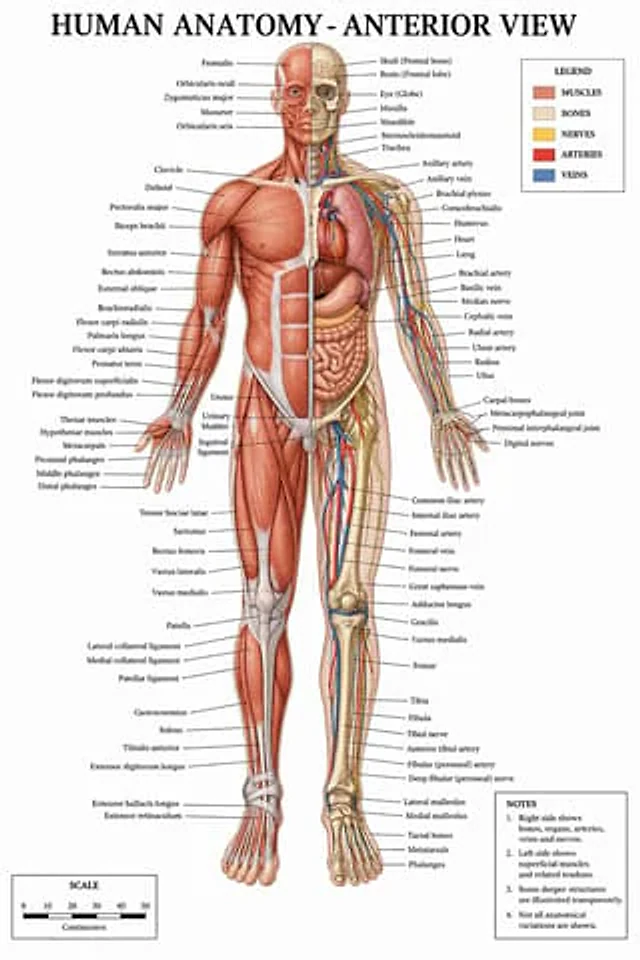
  "type": "Medical Infographic Poster",
  "title": "{argument name=\"main title\" default=\"Human Anatomy - Front View\"}",
  "subject": {
    "description": "whole body{argument name=\"subject type\" default=\"Male human body model\"} Front view, vertically divided along the center line.",
    "viewer_left_side": "{argument name=\"left side focus\" default=\"Superficial muscles\"}",
    "viewer_right_side": "{argument name=\"right side focus\" default=\"Bones, internal organs, arteries, veins, and nerves\"}",
    "style": "{argument name=\"color palette\" default=\"Clinical Medicine Textbook Color Scheme\"}"
  },
  "layout": {
    "centerpiece": "The anatomical model stands in the center with its arms slightly outstretched and palms facing forward.",
    "labeling_system": "Thin black guide lines connect the anatomical structures to neatly arranged text labels on both sides.",
    "label_counts": {
      "head_and_neck": 12,
      "torso_and_arms": 29,
      "hands": 10,
      "pelvis_and_legs": 34,
      "feet": 5
    },
    "panels": [
      {
        "title": "legend",
        "position": "Top right corner",
        "count": 5,
        "items": [
          {
            "color": "Red/Brown",
            "label": "muscle"
          },
          {
            "color": "Beige",
            "label": "skeleton"
          },
          {
            "color": "yellow",
            "label": "nerve"
          },
          {
            "color": "red",
            "label": "artery"
          },
          {
            "color": "blue",
            "label": "vein"
          }
        ]
      },
      {
        "title": "Remark",
        "position": "bottom right corner",
        "count": 4,
        "items": [
          "1. The right side shows bones, internal organs, arteries, veins, and nerves.",
          "2. The left side shows superficial muscles and related tendons.",
          "3. Some deep structures are presented in a transparent manner.",
          "4. Not all anatomical variations are shown."
        ]
      },
      {
        "title": "scale",
        "position": "bottom left corner",
        "count": 6,
        "description": "A horizontal bar scale with six numerical markings (0, 10, 20, 30, 40, 50) labeled \"centimeter\"."
      }
    ]
  }
}
How to use
- Copy the complete original prompt, including any parameters.
- Replace the subject, text and composition with your own requirements.
- Use a compatible external tool; check its current access conditions and review the result.
Before you start
- Check whether a reference image is required. A compatible model label does not mean this example was generated with that model.
- Keep names, figures and visible text accurate; results can vary between model versions.