
Original document
GPT Image 2 · en
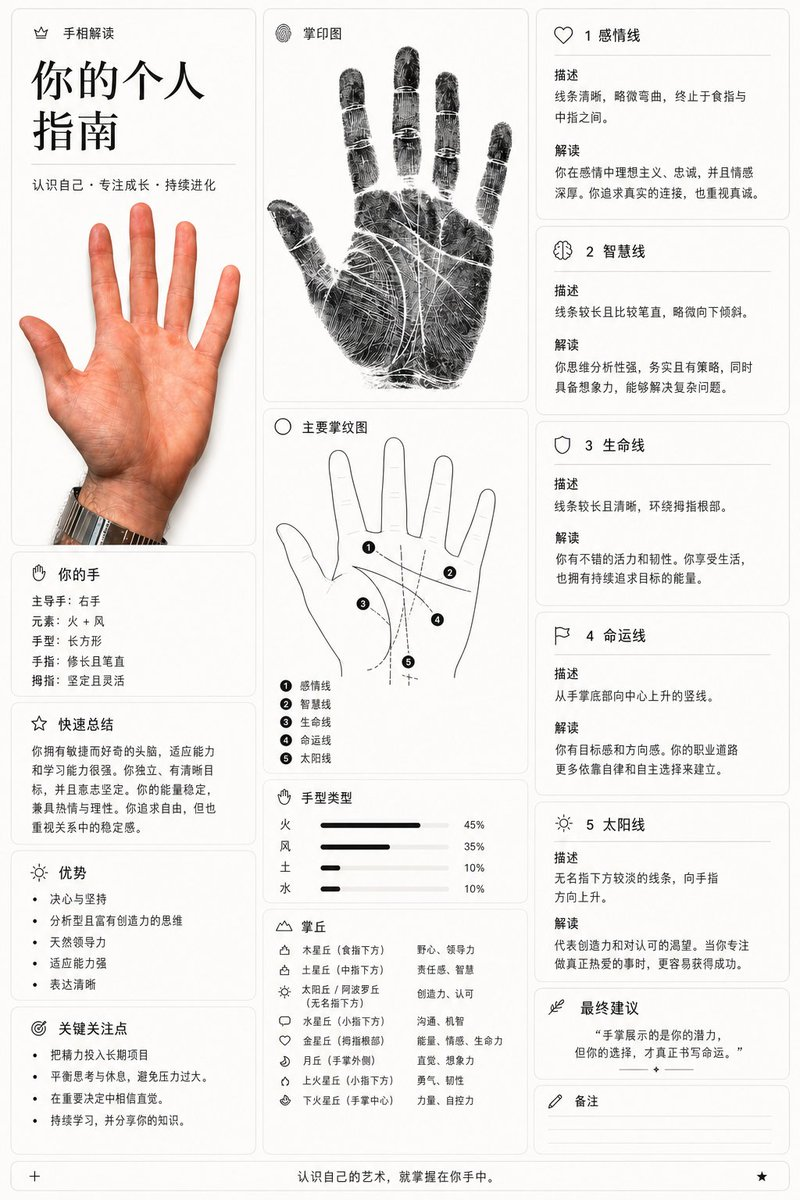
Goal: Create a vertical infographic-style palmistry guide titled {argument name="title text" default="你的个人指南"}.
Canvas: A clean, modern layout with a white background and black text, divided into three main columns. The style is minimalist and educational, resembling a high-end wellness or self-improvement app interface.
Layout:
- Left Column: Top section has the title "你的个人指南" in large bold characters, followed by the subtitle "认识自己 · 专注成长 · 持续进化". Below this is a realistic photo of an open right hand (palm facing forward). Further down are sections for "你的手" (Your Hand) listing details like dominant hand, element, shape, and finger traits; "快速总结" (Quick Summary); "优势" (Strengths) as a bulleted list; and "关键关注点" (Key Focus Points) as another bulleted list.
- Center Column: Top section shows a detailed black-and-white fingerprint scan image labeled "掌印图" (Palm Print Image). Below that is a line-drawing diagram of a hand labeled "主要掌纹图" (Main Palm Lines Diagram), with numbered lines (1-5) corresponding to specific palm lines. Underneath is a bar chart section "手型类型" (Hand Type) showing percentages for Fire, Wind, Earth, and Water elements. At the bottom is a legend for "掌丘" (Mounts) explaining their meanings.
- Right Column: Contains five distinct cards detailing specific palm lines: 1. 感情线 (Heart Line), 2. 智慧线 (Head Line), 3. 生命线 (Life Line), 4. 命运线 (Fate Line), and 5. 太阳线 (Sun Line). Each card includes a description and interpretation. Below these is a final advice box "最终建议" and a notes section "备注".
Visual Style: Use thin black borders for cards. Icons should be simple line art (e.g., heart, brain, shield). Text should be crisp sans-serif Chinese characters. The fingerprint image should have high contrast with visible ridges.
Text Content: Ensure all Chinese labels match the provided image exactly, including headings like "手相解读", "掌印图", and the specific interpretations for each line.
How to use
- Copy the complete original prompt, including any parameters.
- Replace the subject, text and composition with your own requirements.
- Use a compatible external tool; check its current access conditions and review the result.
Before you start
- Check whether a reference image is required. A compatible model label does not mean this example was generated with that model.
- Keep names, figures and visible text accurate; results can vary between model versions.