Original document
GPT Image 2 · en
{
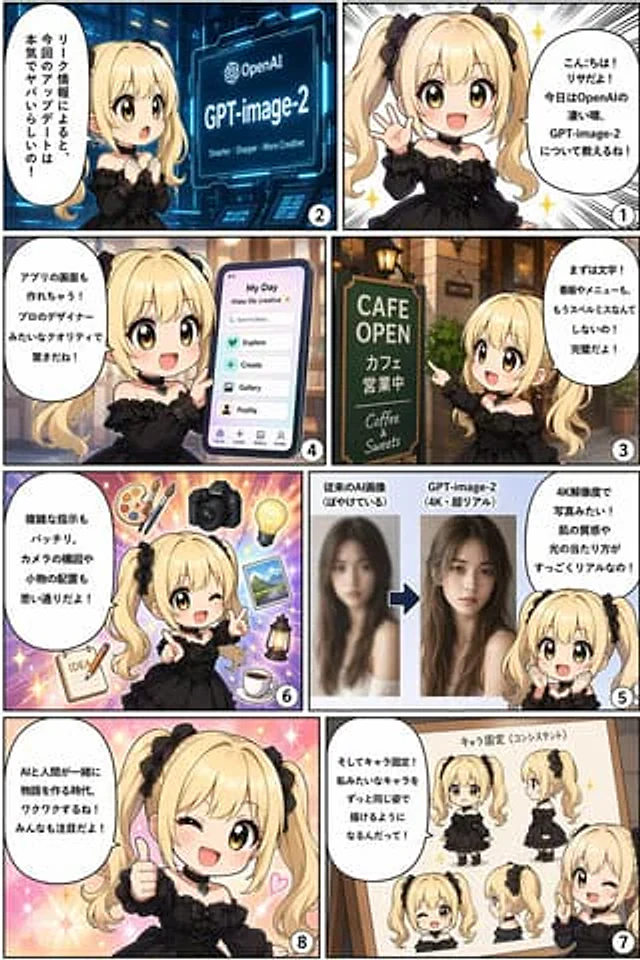
  "type": "8-panel comic infographic",
  "reading_order": "From right to left",
  "character": {
    "name": "{argument name=\"character name\" default=\"Lisa\"}",
    "appearance": "{argument name=\"character appearance\" default=\"Golden twin ponytails, black gothic dress, black heart-shaped choker\"}"
  },
  "panels": [
    {
      "number": 1,
      "action": "Waving happily",
      "speech_bubble": "{argument name=\"greeting text\" default=\"Hello! I'm Lisa! Today I'm going to talk to you about some major rumors surrounding OpenAI, specifically about GPT-image-2!\"}"
    },
    {
      "number": 2,
      "action": "Staring in surprise at the glowing screen",
      "screen_text": "OpenAI{argument name=\"product name\" default=\"GPT-image-2\"} Smarter - Clearer - More Creative",
      "speech_bubble": "According to leaked information, this update is ridiculously powerful!"
    },
    {
      "number": 3,
      "action": "Pointing to the coffee shop sign",
      "sign_text": "Cafe Open (Coffee & Sweets)",
      "speech_bubble": "First, the text processing! No more spelling errors on signs or menus! It's absolutely perfect!"
    },
    {
      "number": 4,
      "action": "Holding a smartphone displaying the application interface",
      "ui_elements_count": 6,
      "ui_elements": [
        "My daily life",
        "Searching for inspiration...",
        "explore",
        "creation",
        "Image Gallery",
        "Personal information"
      ],
      "speech_bubble": "It can even generate application interfaces directly! The professional-level quality is truly amazing!"
    },
    {
      "number": 5,
      "action": "Show comparison chart",
      "comparison": "Blurry portraits vs. sharp 4K realistic female portraits",
      "speech_bubble": "4K resolution, photorealistic picture quality! Skin texture and lighting effects are extremely detailed!"
    },
    {
      "number": 6,
      "action": "blink and point forward",
      "floating_objects_count": 7,
      "floating_objects": [
        "Palette",
        "camera",
        "Light bulb",
        "Landscape photos",
        "lantern",
        "coffee cup",
        "A notebook with IDEA written on it"
      ],
      "speech_bubble": "Complex commands can be executed perfectly. Camera composition and prop placement can be done at will!"
    },
    {
      "number": 7,
      "action": "Pointing to the project",
      "whiteboard_poses_count": 5,
      "whiteboard_poses": [
        "Front view, full body",
        "Side view of the whole body",
        "Front view of the face",
        "Side profile",
        "Half-body blink"
      ],
      "speech_bubble": "There's also a character-fixing feature! Characters like mine will be able to maintain a consistent appearance from now on!"
    },
    {
      "number": 8,
      "action": "Give a thumbs up, wink, and the background sparkles.",
      "speech_bubble": "{argument name=\"conclusion text\" default=\"The era of AI and humans co-creating stories is truly exciting! Be sure to stay tuned!\"}"
    }
  ]
}
How to use
- Copy the complete original prompt, including any parameters.
- Replace the subject, text and composition with your own requirements.
- Use a compatible external tool; check its current access conditions and review the result.
Before you start
- Check whether a reference image is required. A compatible model label does not mean this example was generated with that model.
- Keep names, figures and visible text accurate; results can vary between model versions.