综合应用场景图

综合应用场景图

Original document

GPT Image 2 · en

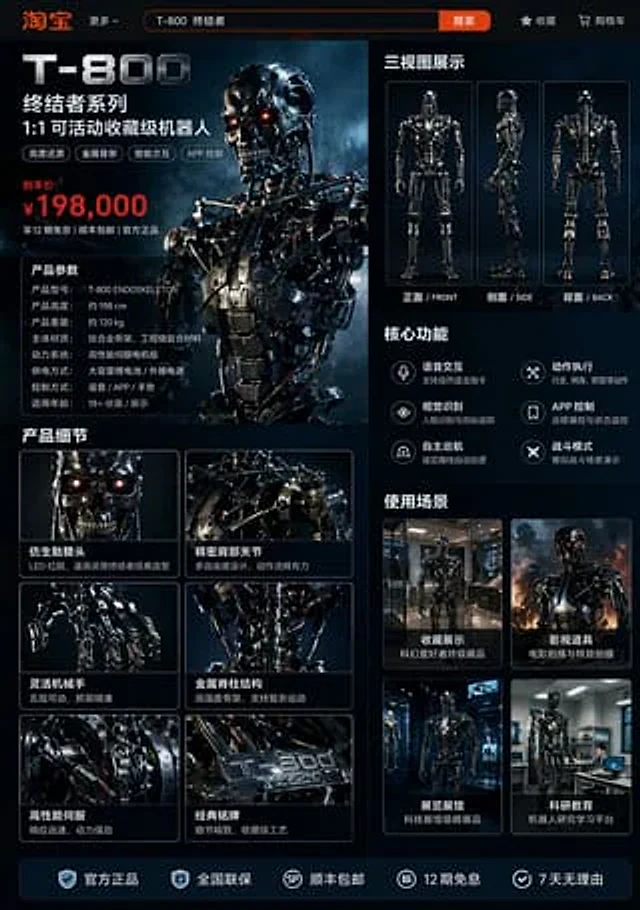
A {argument name="platform" default="Taobao"} product detail page for {argument name="robot model" default="T-800 robot"}, displaying: front, side, and back three-view drawings of the robot, product price, product details, functions, and usage scenarios, etc.

How to use

  1. Copy the complete original prompt, including any parameters.
  2. Replace the subject, text and composition with your own requirements.
  3. Use a compatible external tool; check its current access conditions and review the result.

Before you start

  • Check whether a reference image is required. A compatible model label does not mean this example was generated with that model.
  • Keep names, figures and visible text accurate; results can vary between model versions.
More like this

综合应用场景图
GPT Image 2en

A {argument name="platform" default="Taobao"} product detail page for {argument name="robot model" default="T-800 robot"}, displaying: front, side, and back three-view drawings of the robot, product price, product details, functions, and usage scenarios, etc.

综合应用场景图
GPT Image 2en

A {argument name="platform" default="Taobao"} product detail page for {argument name="robot model" default="T-800 robot"}, displaying: front, side, and back three-view drawings of the robot, product price, product details, functions, and usage scenarios, etc.

综合应用场景图
GPT Image 2en

A {argument name="platform" default="Taobao"} product detail page for {argument name="robot model" default="T-800 robot"}, displaying: front, side, and back three-view drawings of the robot, product price, product details, functions, and usage scenarios, etc.