
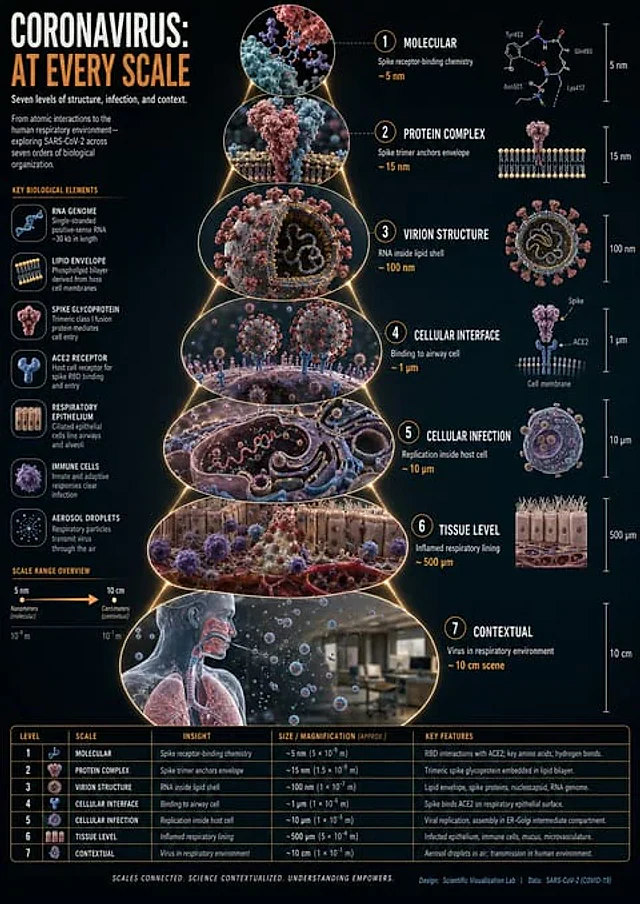
Original document
GPT Image 2 · en
instructions> [SUBJECT]=Coronavirus. A hyper-realistic 3D zoom-sequence infographic generated from a single input: [SUBJECT]. The system auto-detects scale layers from atomic/subcomponent to full contextual view. Layout Structure (CRITICAL) 6–8 circular or hexagonal frames arranged in expanding sequence Innermost frame = smallest detectable detail; outermost = full subject in environment Frames connected by subtle zoom-path lines No repeated scales — each frame shows new level of detail Frame Design Each zoom level includes: Hyper-detailed 3D render at that scale Micro label: scale name (e.g., "molecular," "cellular," "structural") + 3–5 word insight Optional: measurement tag or magnification factor Contextual Halo Around the sequence, include only scale-specific references: Measurement units, scientific notation, cultural scale metaphors (No generic magnifying glass icons) Scale Panel (Alternative Layout) Zoom level Key insight (3–5 words) Scale factor tag Detail icon (grid, wave, particle, etc.) Title "[SUBJECT]: AT EVERY SCALE" (or) "ZOOM: THE WORLD OF [SUBJECT]" Style: ultra-realistic 3D render, scientific editorial infographic, precise macro lighting, global illumination, shallow depth of field, clean sequential layout. </instructions>How to use
- Copy the complete original prompt, including any parameters.
- Replace the subject, text and composition with your own requirements.
- Use a compatible external tool; check its current access conditions and review the result.
Before you start
- Check whether a reference image is required. A compatible model label does not mean this example was generated with that model.
- Keep names, figures and visible text accurate; results can vary between model versions.