Original document
GPT Image 2 · en
{
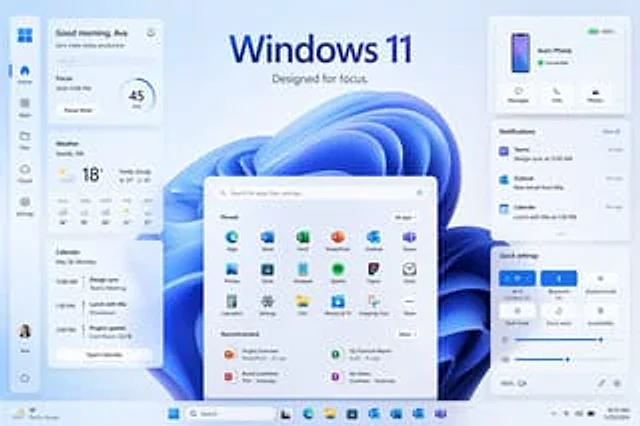
  "type": "Windows 11 promotional UI mockup",
  "style": "The product marketing presentation is clean and modern, featuring soft frosted glass cards, delicate shadows, rounded corners, a light blue and white color scheme, a clear vector-style interface, and exquisite presentation slides aesthetics.",
  "scene": {
    "background": "A light ice-blue gradient background sets off a large, abstract Windows 11 blue ribbon swirling wallpaper at the center of the interface.",
    "headline": {
      "text": "{argument name=\"headline text\" default=\"Windows 11\"}",
      "subtext": "{argument name=\"tagline\" default=\"Designed for focused attention.\"}",
      "position": "Centered at the top"
    }
  },
  "layout": {
    "type": "Desktop UI Display",
    "sections": [
      {
        "title": "Left sidebar",
        "position": "Leftmost vertical parking bar",
        "count": 8,
        "labels": [
          "Windows logo",
          "Homepage",
          "application",
          "document",
          "cloud",
          "set up",
          "Ava's Profile",
          "power supply"
        ]
      },
      {
        "title": "Efficiency Widgets",
        "position": "Left column cards",
        "count": 3,
        "labels": [
          "Good morning, Ava",
          "weather",
          "calendar"
        ]
      },
      {
        "title": "Center Start Menu",
        "position": "Centered at the bottom",
        "count": 3,
        "labels": [
          "Search bar",
          "Fixed",
          "recommend"
        ]
      },
      {
        "title": "Right column cards",
        "position": "upper right, middle, and lower right",
        "count": 3,
        "labels": [
          "Ava's phone",
          "notify",
          "Quick Setup"
        ]
      },
      {
        "title": "task bar",
        "position": "Bottom full width",
        "count": 10,
        "labels": [
          "Weather Summary",
          "start",
          "search",
          "Task View",
          "Microsoft Edge",
          "File Explorer",
          "Microsoft Store",
          "Outlook",
          "OneDrive",
          "Teams"
        ]
      }
    ],
    "centerpiece": "A huge Windows 11 Start Menu floats in front of a blue abstract wallpaper."
  },
  "widgets": {
    "greeting_card": {
      "title": "Good morning, Ava",
      "subtitle": "Let's get today's work done efficiently.",
      "focus_block": {
        "label": "Focus",
        "time": "By 12:00 noon",
        "timer": "45 minutes",
        "button": "Focus timer"
      }
    },
    "weather_card": {
      "location": "{argument name=\"weather location\" default=\"Seattle, Washington\"}",
      "temperature": "18°",
      "condition": "Cloudy turning sunny",
      "range": "Highest: 21°C Lowest: 13°C",
      "forecast_count": 5,
      "forecast_labels": [
        "18°C now",
        "11:19 AM",
        "12:20 PM",
        "1:21 PM",
        "2:21 PM"
      ]
    },
    "calendar_card": {
      "date": "Monday, May 20th",
      "events_count": 3,
      "event_labels": [
        "Design synchronization at 11:00 AM, Teams meeting.",
        "Lunch with Mia at 1:30 PM, downtown.",
        "Project update at 3:00 PM, Meeting Room 32/1B"
      ],
      "button": "Open the calendar"
    },
    "phone_card": {
      "device_name": "{argument name=\"device name\" default=\"Ava's phone\"}",
      "status": "Connected",
      "actions_count": 3,
      "action_labels": [
        "information",
        "call",
        "photo"
      ],
      "battery": "100%"
    },
    "notifications_card": {
      "title": "notify",
      "action": "Clear all",
      "items_count": 3,
      "item_labels": [
        "Teams — 11:00 AM Design Synchronization — 2 minutes ago",
        "Outlook — New email from Mia — 10 minutes ago",
        "Calendar — 1:30 PM Lunch with Mia — 30 minutes ago"
      ]
    },
    "quick_settings_card": {
      "title": "Quick Setup",
      "toggles_count": 6,
      "toggle_labels": [
        "Wi‑Fi",
        "Bluetooth",
        "Flight mode",
        "Dark mode",
        "Focus Assistant",
        "Accessibility"
      ],
      "active_toggles": [
        "Wi‑Fi",
        "Bluetooth"
      ],
      "sliders_count": 2,
      "slider_labels": [
        "brightness",
        "volume"
      ],
      "wifi_network": "Contoso_5G"
    },
    "start_menu": {
      "search_placeholder": "Search apps, files, settings...",
      "pinned_count": 18,
      "pinned_labels": [
        "Edge",
        "Word",
        "Excel",
        "PowerPoint",
        "Outlook",
        "Teams",
        "photo",
        "shop",
        "Notepad",
        "Spotify",
        "Figma",
        "clock",
        "calculator",
        "set up",
        "document",
        "Movies and television",
        "Screenshot tool",
        "More"
      ],
      "recommended_count": 4,
      "recommended_labels": [
        "Project Overview",
        "Second Quarter Financial Report",
        "Brand Guide",
        "My Notes"
      ]
    }
  },
  "composition": "The product display is symmetrical, with the start menu centered, three cards stacked on the left and three cards on the right, with ample spacing. All elements appear to float slightly above the background, and the bottom taskbar spans the edge.",
  "rendering": "High-resolution UI concept art for desktop operating system launch pages, featuring perfect typography, Microsoft-inspired icon design, and a clean, minimalist branding."
}
How to use
- Copy the complete original prompt, including any parameters.
- Replace the subject, text and composition with your own requirements.
- Use a compatible external tool; check its current access conditions and review the result.
Before you start
- Check whether a reference image is required. A compatible model label does not mean this example was generated with that model.
- Keep names, figures and visible text accurate; results can vary between model versions.