Original document
GPT Image 2 · en
{
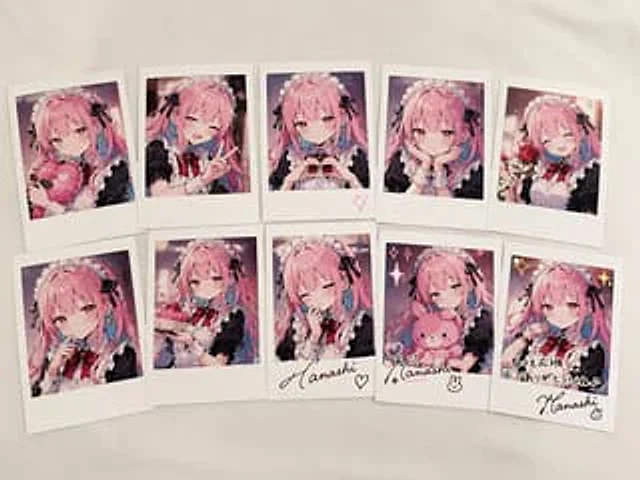
  "type": "Polaroid photo collection",
  "setting": "Lay flat on white fabric surface",
  "character": {
    "hair": "{argument name=\"hair color\" default=\"Long pink hair with blue inside.\"}",
    "outfit": "{argument name=\"outfit\" default=\"Black and white maid outfit, with ruffled headband and black ribbon\"}",
    "eyes": "pink"
  },
  "layout": {
    "arrangement": "Two rows of five Polaroid photos arranged",
    "count": 10,
    "photos": [
      {
        "position": "Page 1 of the first row",
        "description": "Hugging a pink heart-shaped cushion"
      },
      {
        "position": "Page 2 of the first row",
        "description": "wink, make a peace sign"
      },
      {
        "position": "Page 3 of the first row",
        "description": "Heart shape with pink heart-shaped graffiti at the bottom border."
      },
      {
        "position": "Page 4 of the first row",
        "description": "hands supporting her chin, a gentle smile"
      },
      {
        "position": "Page 5 of the first row",
        "description": "Holding a red rose, winking"
      },
      {
        "position": "Page 1 of the second row",
        "description": "Fingers to lips, a shy expression"
      },
      {
        "position": "Second row, second page",
        "description": "Holding a small pink cake"
      },
      {
        "position": "Page 3 of the second row",
        "description": "Blink, hand to face, signature on the border.{argument name=\"signature text\" default=\"Hanashi\"} 'and heart-shaped graffiti"
      },
      {
        "position": "Page 4 of the second row",
        "description": "Holding a pink bunny doll, with glittery graffiti and a signature on the border.{argument name=\"signature text\" default=\"Hanashi\"} 'And rabbit doodles'"
      },
      {
        "position": "Page 5 of the second row",
        "description": "Blink, flashing graffiti, a message on the border.{argument name=\"message text\" default=\"Thank you for your continued support! I look forward to your continued support in the future♪\"} 'and signature'{argument name=\"signature text\" default=\"Hanashi\"} '"
      }
    ]
  }
}
How to use
- Copy the complete original prompt, including any parameters.
- Replace the subject, text and composition with your own requirements.
- Use a compatible external tool; check its current access conditions and review the result.
Before you start
- Check whether a reference image is required. A compatible model label does not mean this example was generated with that model.
- Keep names, figures and visible text accurate; results can vary between model versions.