Original document
GPT Image 2 · en
{
  "type": "Japanese promotional poster",
  "purpose": "High-end cinematic advertising posters for creative agencies or video production brands.",
  "brand": {
    "name": "{argument name=\"brand name\" default=\"Arks\"}",
    "logoStyle": "The large white italicized logo is located in the lower center, with a bold underline below it."
  },
  "format": {
    "orientation": "Vertical",
    "aspectRatio": "John 2:3",
    "fullBleed": true
  },
  "style": {
    "overall": "High-end, futuristic Japanese commercial visual style, characterized by its glossy finish, dramatic effect, and exquisite detail, combining realistic photography with graphic design.",
    "mood": "Energetic, bold, cinematic, urban, high-impact",
    "colorPalette": [
      "Burning Orange",
      "amber",
      "Dark black",
      "Magenta-purple",
      "Electric Blue",
      "White layout"
    ],
    "lighting": "High contrast, neon light, sparkle, rim light, volumetric fog, reflected highlights",
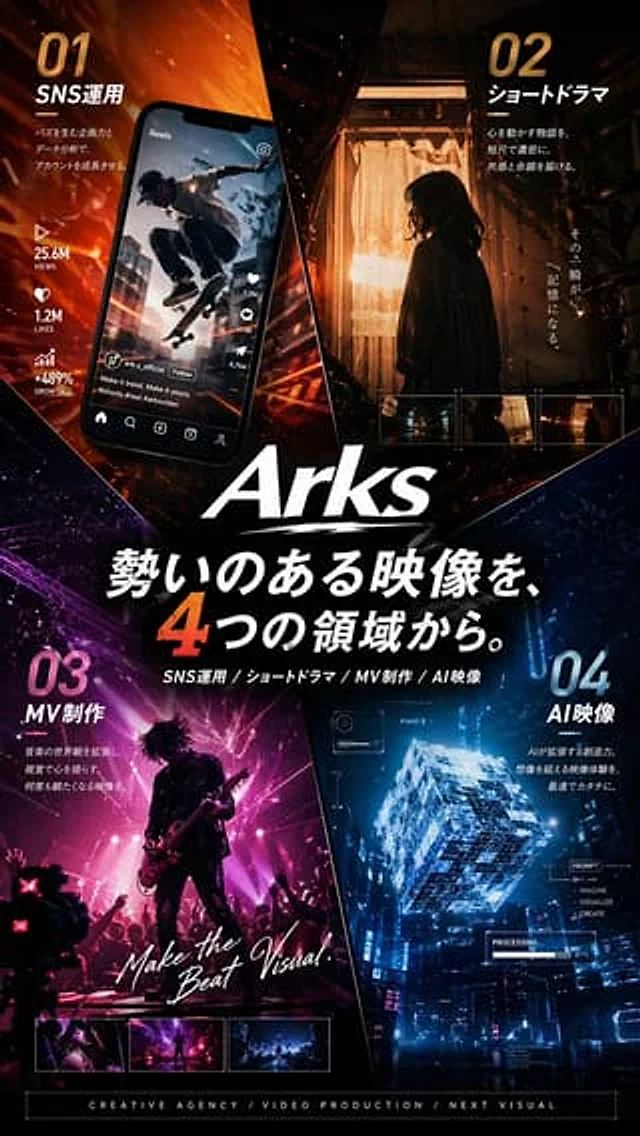
    "composition": "The poster is divided into four diagonal wedge-shaped areas that converge towards the logo and title in the center."
  },
  "layout": {
    "sections": [
      {
        "title": "01 SNS Operations",
        "position": "Top left",
        "count": 5,
        "labels": [
          "01",
          "SNS Operations",
          "25.6M page views",
          "1.2M Likes",
          "+489% growth"
        ],
        "scene": "A tilted smartphone displays an Instagram Reels-style interface featuring a skateboarder leaping through a city street; social media icons and engagement data are arranged vertically beside or on the phone; and a fiery orange dynamic beam of light radiates from the background."
      },
      {
        "title": "02 Short Drama",
        "position": "Top right",
        "count": 5,
        "labels": [
          "02",
          "short drama",
          "In that instant,",
          "It becomes a memory.",
          "3 small film thumbnails"
        ],
        "scene": "A still image with a cinematic feel: the profile of a woman stands indoors, back to a glowing curtained door, with warm tungsten light behind her. The dark corridor serves as the frame, and three small rectangular preview thumbnails are arranged at the bottom of the panel."
      },
      {
        "title": "03 MV Production",
        "position": "Bottom left",
        "count": 4,
        "labels": [
          "03",
          "MV production",
          "Make the Beat Visual.",
          "3 small preview thumbnails"
        ],
        "scene": "A live concert performance, a silhouette of a guitarist on stage, magenta and pink spotlights, audience members raising their hands, creating a dynamic rock music video atmosphere. The video features handwritten white script text and three preview thumbnails at the bottom edge."
      },
      {
        "title": "04 AI Image",
        "position": "Bottom right",
        "count": 6,
        "labels": [
          "04",
          "AI Image",
          "PROMPT",
          "IMAGINE",
          "VISUALIZE",
          "CREATE"
        ],
        "scene": "A glowing, transparent, futuristic cube floats above a cyberpunk cityscape at night, featuring a blue holographic interface overlay, tech-heavy HUD graphics, and a small progress display resembling \"PROCESSING\"."
      }
    ],
    "centerText": {
      "count": 3,
      "labels": [
        "{argument name=\"main headline\" default=\"Powerful visuals from four different fields.\"}",
        "Social networking operation / Short drama / Music video production / AI image",
        "CREATIVE AGENCY / VIDEO PRODUCTION / NEXT VISUAL"
      ]
    }
  },
  "typography": {
    "language": "Japanese, supplemented with some English subtitles",
    "headlineStyle": "Extra-large, bold white Japanese characters containing a very large orange number 4.",
    "sectionNumbers": "The huge gradient numbers in each quadrant",
    "supportText": "Each section title is accompanied by concise sans-serif text.",
    "englishAccents": "The bold sans-serif font is mixed with handwriting to enhance the emphasis."
  },
  "background": {
    "base": "Dark black background with abstract fragments and diagonal dividing lines",
    "effects": "Emitting particles, light trails, embers, lens flare, fine textures, neon reflections"
  },
  "rendering": {
    "quality": "Ultra-fine",
    "finish": "Commercial Poster Print Grade",
    "sharpness": "Clear text and graphics",
    "realism": "The integration of photorealistic scenes within each quadrant with the overall advertising campaign of the agency."
  }
}
How to use
- Copy the complete original prompt, including any parameters.
- Replace the subject, text and composition with your own requirements.
- Use a compatible external tool; check its current access conditions and review the result.
Before you start
- Check whether a reference image is required. A compatible model label does not mean this example was generated with that model.
- Keep names, figures and visible text accurate; results can vary between model versions.