See it in action
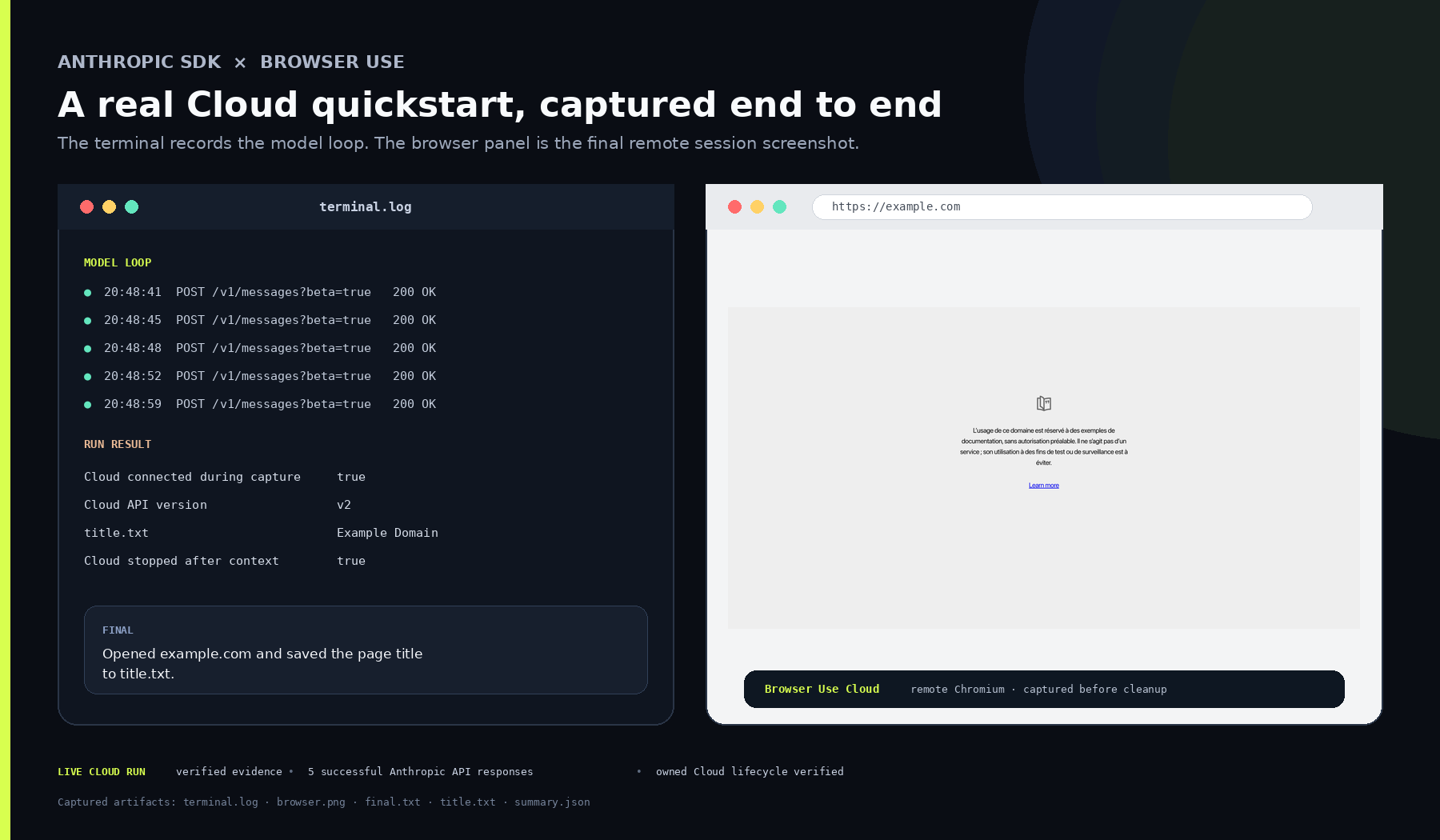
Earlier Cloud browser title-capture example
A retained author capture combines the terminal model loop and the final example.com page, with the saved title and session cleanup shown.
License
Lossless PNG-to-WebP conversion; original dimensions and decoded pixels preserved. No crop, upscale or independent site run. The pinned integration README explicitly calls this an earlier example.com smoke capture, not the current Hacker News quickstart. No current quickstart input, generation model or independent site execution is paired with it.
MIT License

Copyright (c) 2024 Gregor Zunic

Permission is hereby granted, free of charge, to any person obtaining a copy
of this software and associated documentation files (the "Software"), to deal
in the Software without restriction, including without limitation the rights
to use, copy, modify, merge, publish, distribute, sublicense, and/or sell
copies of the Software, and to permit persons to whom the Software is
furnished to do so, subject to the following conditions:

The above copyright notice and this permission notice shall be included in all
copies or substantial portions of the Software.

THE SOFTWARE IS PROVIDED "AS IS", WITHOUT WARRANTY OF ANY KIND, EXPRESS OR
IMPLIED, INCLUDING BUT NOT LIMITED TO THE WARRANTIES OF MERCHANTABILITY,
FITNESS FOR A PARTICULAR PURPOSE AND NONINFRINGEMENT. IN NO EVENT SHALL THE
AUTHORS OR COPYRIGHT HOLDERS BE LIABLE FOR ANY CLAIM, DAMAGES OR OTHER
LIABILITY, WHETHER IN AN ACTION OF CONTRACT, TORT OR OTHERWISE, ARISING FROM,
OUT OF OR IN CONNECTION WITH THE SOFTWARE OR THE USE OR OTHER DEALINGS IN THE
SOFTWARE.
Browser Use source example: search and report three results
Full original Python script searches Google and asks for three browser-automation results. Requires a compatible Browser Use Python environment, dotenv, browser setup and BROWSER_USE_API_KEY for the source bu-2-0-mini-preview model. Repository-relative path setup and source model spelling are unchanged; model availability is not established. This is the author’s recipe, not returned search results, a submitted form or an extracted dataset.
Example input
"""
Setup:
1. Get your API key from https://cloud.browser-use.com/new-api-key
2. Set environment variable: export BROWSER_USE_API_KEY="your-key"
"""

import asyncio
import os
import sys

# Add the parent directory to the path so we can import browser_use
sys.path.append(os.path.dirname(os.path.dirname(os.path.dirname(os.path.abspath(__file__)))))

from dotenv import load_dotenv

load_dotenv()

from browser_use import Agent, ChatBrowserUse


async def main():
	llm = ChatBrowserUse(model='bu-2-0-mini-preview')
	task = "Search Google for 'what is browser automation' and tell me the top 3 results"
	agent = Agent(task=task, llm=llm)
	await agent.run()


if __name__ == '__main__':
	asyncio.run(main())
License
Complete original source file unchanged; editorial title, context and prerequisites added. No installation, account operation, model call, form submission or claimed result was executed.
MIT License

Copyright (c) 2024 Gregor Zunic

Permission is hereby granted, free of charge, to any person obtaining a copy
of this software and associated documentation files (the "Software"), to deal
in the Software without restriction, including without limitation the rights
to use, copy, modify, merge, publish, distribute, sublicense, and/or sell
copies of the Software, and to permit persons to whom the Software is
furnished to do so, subject to the following conditions:

The above copyright notice and this permission notice shall be included in all
copies or substantial portions of the Software.

THE SOFTWARE IS PROVIDED "AS IS", WITHOUT WARRANTY OF ANY KIND, EXPRESS OR
IMPLIED, INCLUDING BUT NOT LIMITED TO THE WARRANTIES OF MERCHANTABILITY,
FITNESS FOR A PARTICULAR PURPOSE AND NONINFRINGEMENT. IN NO EVENT SHALL THE
AUTHORS OR COPYRIGHT HOLDERS BE LIABLE FOR ANY CLAIM, DAMAGES OR OTHER
LIABILITY, WHETHER IN AN ACTION OF CONTRACT, TORT OR OTHERWISE, ARISING FROM,
OUT OF OR IN CONNECTION WITH THE SOFTWARE OR THE USE OR OTHER DEALINGS IN THE
SOFTWARE.
Browser Use source example: fill a demo contact form
Full original Python script fills httpbin’s demo form with John Doe/example.com sample values and requests submission. Requires a compatible Browser Use Python environment, dotenv, browser setup and BROWSER_USE_API_KEY for the source bu-2-0-mini-preview model. Repository-relative path setup and source model spelling are unchanged; model availability is not established. This is the author’s recipe, not returned search results, a submitted form or an extracted dataset.
Example input
"""
Getting Started Example 2: Form Filling

This example demonstrates how to:
- Navigate to a website with forms
- Fill out input fields
- Submit forms
- Handle basic form interactions

This builds on the basic search example by showing more complex interactions.

Setup:
1. Get your API key from https://cloud.browser-use.com/new-api-key
2. Set environment variable: export BROWSER_USE_API_KEY="your-key"
"""

import asyncio
import os
import sys

# Add the parent directory to the path so we can import browser_use
sys.path.append(os.path.dirname(os.path.dirname(os.path.dirname(os.path.abspath(__file__)))))

from dotenv import load_dotenv

load_dotenv()

from browser_use import Agent, ChatBrowserUse


async def main():
	# Initialize the model
	llm = ChatBrowserUse(model='bu-2-0-mini-preview')

	# Define a form filling task
	task = """
    Go to https://httpbin.org/forms/post and fill out the contact form with:
    - Customer name: John Doe
    - Telephone: 555-123-4567
    - Email: john.doe@example.com
    - Size: Medium
    - Topping: cheese
    - Delivery time: now
    - Comments: This is a test form submission

    Then submit the form and tell me what response you get.
    """

	# Create and run the agent
	agent = Agent(task=task, llm=llm)
	await agent.run()


if __name__ == '__main__':
	asyncio.run(main())
License
Complete original source file unchanged; editorial title, context and prerequisites added. No installation, account operation, model call, form submission or claimed result was executed.
MIT License

Copyright (c) 2024 Gregor Zunic

Permission is hereby granted, free of charge, to any person obtaining a copy
of this software and associated documentation files (the "Software"), to deal
in the Software without restriction, including without limitation the rights
to use, copy, modify, merge, publish, distribute, sublicense, and/or sell
copies of the Software, and to permit persons to whom the Software is
furnished to do so, subject to the following conditions:

The above copyright notice and this permission notice shall be included in all
copies or substantial portions of the Software.

THE SOFTWARE IS PROVIDED "AS IS", WITHOUT WARRANTY OF ANY KIND, EXPRESS OR
IMPLIED, INCLUDING BUT NOT LIMITED TO THE WARRANTIES OF MERCHANTABILITY,
FITNESS FOR A PARTICULAR PURPOSE AND NONINFRINGEMENT. IN NO EVENT SHALL THE
AUTHORS OR COPYRIGHT HOLDERS BE LIABLE FOR ANY CLAIM, DAMAGES OR OTHER
LIABILITY, WHETHER IN AN ACTION OF CONTRACT, TORT OR OTHERWISE, ARISING FROM,
OUT OF OR IN CONNECTION WITH THE SOFTWARE OR THE USE OR OTHER DEALINGS IN THE
SOFTWARE.
Browser Use source example: collect five attributed quotes
Full original Python script asks quotes.toscrape.com for five quotes, authors and tags in a structured answer. Requires a compatible Browser Use Python environment, dotenv, browser setup and BROWSER_USE_API_KEY for the source bu-2-0-mini-preview model. Repository-relative path setup and source model spelling are unchanged; model availability is not established. This is the author’s recipe, not returned search results, a submitted form or an extracted dataset.
Example input
"""
Getting Started Example 3: Data Extraction

This example demonstrates how to:
- Navigate to a website with structured data
- Extract specific information from the page
- Process and organize the extracted data
- Return structured results

This builds on previous examples by showing how to get valuable data from websites.

Setup:
1. Get your API key from https://cloud.browser-use.com/new-api-key
2. Set environment variable: export BROWSER_USE_API_KEY="your-key"
"""

import asyncio
import os
import sys

# Add the parent directory to the path so we can import browser_use
sys.path.append(os.path.dirname(os.path.dirname(os.path.dirname(os.path.abspath(__file__)))))

from dotenv import load_dotenv

load_dotenv()

from browser_use import Agent, ChatBrowserUse


async def main():
	# Initialize the model
	llm = ChatBrowserUse(model='bu-2-0-mini-preview')

	# Define a data extraction task
	task = """
    Go to https://quotes.toscrape.com/ and extract the following information:
    - The first 5 quotes on the page
    - The author of each quote
    - The tags associated with each quote

    Present the information in a clear, structured format like:
    Quote 1: "[quote text]" - Author: [author name] - Tags: [tag1, tag2, ...]
    Quote 2: "[quote text]" - Author: [author name] - Tags: [tag1, tag2, ...]
    etc.
    """

	# Create and run the agent
	agent = Agent(task=task, llm=llm)
	await agent.run()


if __name__ == '__main__':
	asyncio.run(main())
License
Complete original source file unchanged; editorial title, context and prerequisites added. No installation, account operation, model call, form submission or claimed result was executed.
MIT License

Copyright (c) 2024 Gregor Zunic

Permission is hereby granted, free of charge, to any person obtaining a copy
of this software and associated documentation files (the "Software"), to deal
in the Software without restriction, including without limitation the rights
to use, copy, modify, merge, publish, distribute, sublicense, and/or sell
copies of the Software, and to permit persons to whom the Software is
furnished to do so, subject to the following conditions:

The above copyright notice and this permission notice shall be included in all
copies or substantial portions of the Software.

THE SOFTWARE IS PROVIDED "AS IS", WITHOUT WARRANTY OF ANY KIND, EXPRESS OR
IMPLIED, INCLUDING BUT NOT LIMITED TO THE WARRANTIES OF MERCHANTABILITY,
FITNESS FOR A PARTICULAR PURPOSE AND NONINFRINGEMENT. IN NO EVENT SHALL THE
AUTHORS OR COPYRIGHT HOLDERS BE LIABLE FOR ANY CLAIM, DAMAGES OR OTHER
LIABILITY, WHETHER IN AN ACTION OF CONTRACT, TORT OR OTHERWISE, ARISING FROM,
OUT OF OR IN CONNECTION WITH THE SOFTWARE OR THE USE OR OTHER DEALINGS IN THE
SOFTWARE.
Product overview
Browser agents and cloud browsers: the most-starred open-source browser agent, stealth cloud browsers at $0.02/browser-hour and Browser Harness. SOC 2 Type II, on-prem, US and EU. $1 free.
What Browser Use offers
- 01Run agents against browser tasks
- 02Connect custom agents to cloud browsers
- 03Build with an open-source browser agent library
What makes it different
The hosted agent service and browser infrastructure are distinct offerings. Browser sessions, model calls and traffic can carry separate costs; verify the applicable plan for your workload.
Who should consider it
- Developers automating browser workflows
- Teams building browser-based agents
What to verify
- Try one real task and compare its output with your requirements.
- Check what data the service stores, shares, or uses for training.
- Confirm current pricing, usage limits, and cancellation terms on the official site.
Official link checked on Nov 9, 2026. Feature claims have not been independently tested.