

See it in action
Product interface
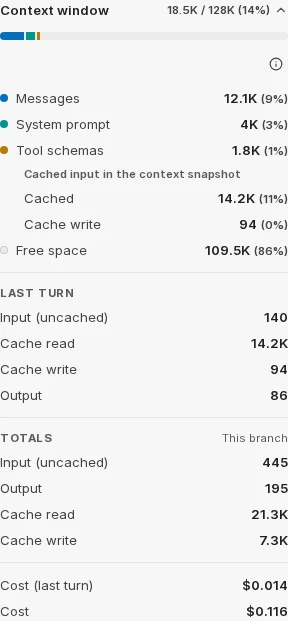
Inspect conversation context and token usage
An actual interface screenshot retained in the author’s repository tests. It shows the context breakdown and last-turn totals. Values are test data, not a price quotation or performance benchmark.
License
Re-encoded to WebP; original aspect ratio preserved; no upscaling.
MIT License

Copyright (c) 2026 LibreChat

Permission is hereby granted, free of charge, to any person obtaining a copy
of this software and associated documentation files (the "Software"), to deal
in the Software without restriction, including without limitation the rights
to use, copy, modify, merge, publish, distribute, sublicense, and/or sell
copies of the Software, and to permit persons to whom the Software is
furnished to do so, subject to the following conditions:

The above copyright notice and this permission notice shall be included in all
copies or substantial portions of the Software.

THE SOFTWARE IS PROVIDED "AS IS", WITHOUT WARRANTY OF ANY KIND, EXPRESS OR
IMPLIED, INCLUDING BUT NOT LIMITED TO THE WARRANTIES OF MERCHANTABILITY,
FITNESS FOR A PARTICULAR PURPOSE AND NONINFRINGEMENT. IN NO EVENT SHALL THE
AUTHORS OR COPYRIGHT HOLDERS BE LIABLE FOR ANY CLAIM, DAMAGES OR OTHER
LIABILITY, WHETHER IN AN ACTION OF CONTRACT, TORT OR OTHERWISE, ARISING FROM,
OUT OF OR IN CONNECTION WITH THE SOFTWARE OR THE USE OR OTHER DEALINGS IN THE
SOFTWARE.
Product overview
LibreChat is a customizable AI conversation platform that connects multiple model providers, agents and tools.
SOURCE-LISTED CAPABILITIES
What LibreChat offers
- 01Switch between configured model providers
- 02Build agents with instructions and tools
- 03Search and organize conversations
DIFFERENTIATION
What makes it different
A self-hosted deployment brings model access into a shared interface. Optional execution and workspace features require separate configuration and appropriate permissions.
BEST FOR
Who should consider it
- Teams managing a shared AI chat workspace
- Builders configuring tool-enabled assistants
BEFORE YOU CHOOSE
What to verify
- Try one real task and compare its output with your requirements.
- Check what data the service stores, shares, or uses for training.
- Confirm current pricing, usage limits, and cancellation terms on the official site.
Website checked
Official link checked on Oct 21, 2026. Feature claims have not been independently tested.