Document original
GPT Image 2 · en
{
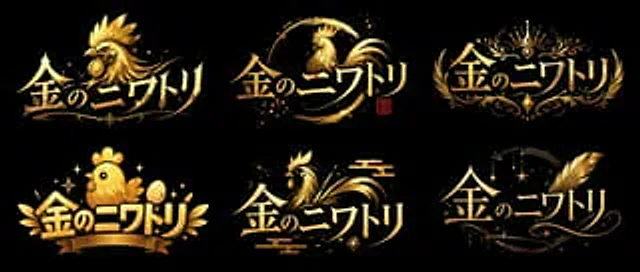
  "type": "Logo concept art",
  "layout": "2x3 grid",
  "global_attributes": {
    "text": "{argument name=\"logo text\" default=\"Golden Chicken\"}",
    "color_palette": [
      "{argument name=\"primary color\" default=\"gold\"}",
      "{argument name=\"background color\" default=\"black\"}"
    ],
    "style": "VTuber-style logo design, with a metallic texture, glossy finish, and high contrast."
  },
  "variants": [
    {
      "position": "Top left",
      "style": "Sharp and fierce",
      "icon": "Rich in detail{argument name=\"main subject\" default=\"Golden Rooster\"} Head, facing to the left",
      "typography": "Sharp, dynamic"
    },
    {
      "position": "Upper-middle",
      "style": "Brushstrokes / Roundness",
      "icon": "An elegant chicken silhouette in rounded brushstrokes, with a small red stamp.",
      "typography": "Elegant, fluid"
    },
    {
      "position": "Top right",
      "style": "Royal coat of arms",
      "icon": "Crown, symmetrical floral pattern",
      "typography": "Elegant, serif font"
    },
    {
      "position": "Bottom left",
      "style": "Cute/Q version",
      "icon": "Plump and cute chicks, golden eggs, ribbon banners",
      "typography": "Lively, bold"
    },
    {
      "position": "Middle to lower",
      "style": "Traditional Japanese",
      "icon": "Stylized chicken with traditional cloud patterns",
      "typography": "Smooth and dynamic"
    },
    {
      "position": "Bottom right",
      "style": "Magic/Elegance",
      "icon": "Huge golden feathers, twinkling stars, crescent moon pattern",
      "typography": "Elegant, cursive style"
    }
  ]
}
Mode d’emploi
- Copiez le prompt original complet, paramètres compris.
- Adaptez le sujet, le texte et la composition à vos besoins.
- Utilisez un outil externe compatible ; vérifiez l’accès et le résultat.
Avant de commencer
- Vérifiez si une image de référence est nécessaire. La compatibilité ne prouve pas le modèle utilisé pour cet exemple.
- Vérifiez noms, chiffres et textes ; les versions du modèle peuvent produire des résultats différents.