원본 문서
GPT Image 2 · en
{
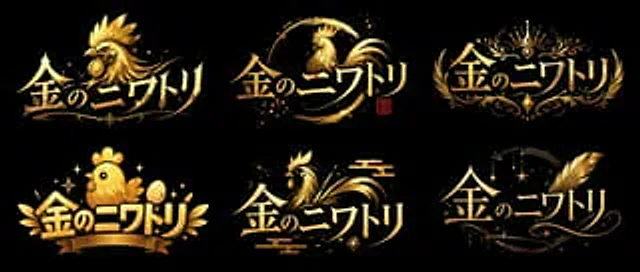
  "type": "Logo concept art",
  "layout": "2x3 grid",
  "global_attributes": {
    "text": "{argument name=\"logo text\" default=\"Golden Chicken\"}",
    "color_palette": [
      "{argument name=\"primary color\" default=\"gold\"}",
      "{argument name=\"background color\" default=\"black\"}"
    ],
    "style": "VTuber-style logo design, with a metallic texture, glossy finish, and high contrast."
  },
  "variants": [
    {
      "position": "Top left",
      "style": "Sharp and fierce",
      "icon": "Rich in detail{argument name=\"main subject\" default=\"Golden Rooster\"} Head, facing to the left",
      "typography": "Sharp, dynamic"
    },
    {
      "position": "Upper-middle",
      "style": "Brushstrokes / Roundness",
      "icon": "An elegant chicken silhouette in rounded brushstrokes, with a small red stamp.",
      "typography": "Elegant, fluid"
    },
    {
      "position": "Top right",
      "style": "Royal coat of arms",
      "icon": "Crown, symmetrical floral pattern",
      "typography": "Elegant, serif font"
    },
    {
      "position": "Bottom left",
      "style": "Cute/Q version",
      "icon": "Plump and cute chicks, golden eggs, ribbon banners",
      "typography": "Lively, bold"
    },
    {
      "position": "Middle to lower",
      "style": "Traditional Japanese",
      "icon": "Stylized chicken with traditional cloud patterns",
      "typography": "Smooth and dynamic"
    },
    {
      "position": "Bottom right",
      "style": "Magic/Elegance",
      "icon": "Huge golden feathers, twinkling stars, crescent moon pattern",
      "typography": "Elegant, cursive style"
    }
  ]
}
사용 방법
- 매개변수를 포함한 전체 원본 프롬프트를 복사하세요.
- 주제, 문구, 구도를 자신의 요구에 맞게 바꾸세요.
- 호환되는 외부 도구에서 사용하고 이용 조건과 결과를 확인하세요.
시작 전 확인
- 참조 이미지가 필요한지 확인하세요. 호환 표시는 해당 모델로 이 예시를 생성했다는 뜻이 아닙니다.
- 이름, 수치, 이미지 속 문구를 확인하세요. 모델 버전에 따라 결과가 다를 수 있습니다.