原文
GPT Image 2 · en
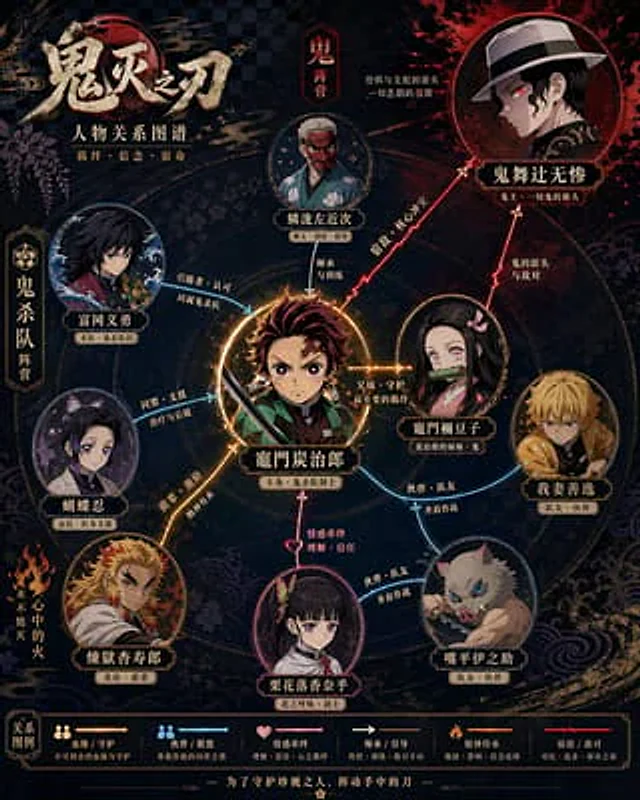
Please refer to{argument name="theme" default="Demon Slayer"} Generate a highly designed character relationship diagram poster. This image should not be just a simple illustration, but a character relationship diagram that combines information visualization, narrative structure, poster design aesthetics, and stylistic accuracy. Please automate the following steps: - Identify the relevant works and core settings. - Extract 6–12 key characters, up to 15 if necessary. - Identify and display key character relationships, including blood ties, love, friendship, allies, enemies, master-disciple, etc. - Automatically select the composition method based on the characteristics of the work, such as protagonist-centric, dual-core opposition, faction-based, family tree, or timeline evolution. - Automatically extract the stylistic DNA of the work, including color, worldview symbols, texture, atmosphere, typography, and representative elements. - Transform these stylistic elements into the overall visual design of the relationship diagram, rather than simply copying the official poster. - Use different colors, line types, and arrows to distinguish different relationships, ensuring clear lines and distinct layers to avoid clutter. - Make the core characters stand out, followed by secondary characters, and weaken subordinate characters to form a clear visual hierarchy. - Ensure that each character's name is clear and easy to read, and label their identity or faction if necessary. The final product should meet the following requirements: - Allow for immediate understanding of the character hierarchy and key relationships. - Highly consistent with the original work's style and setting. - Combine the clarity of an infographic with the sophisticated design of a poster. Consistent, refined, and complete, suitable for social media sharing or poster display - avoid cheap flowchart feel, cluttered piling up, and information overload.使い方
- パラメータを含む元のプロンプト全体をコピーします。
- 被写体、文字、構図を自分の要件に置き換えます。
- 対応する外部ツールで使用し、利用条件と結果を確認します。
開始前の確認
- 参考画像の要否を確認してください。互換モデルの表示は、そのモデルでの生成実績を意味しません。
- 名前、数値、画像内の文字を確認します。モデルの版で結果は変わります。