Oryginalny dokument
GPT Image 2 · en
{
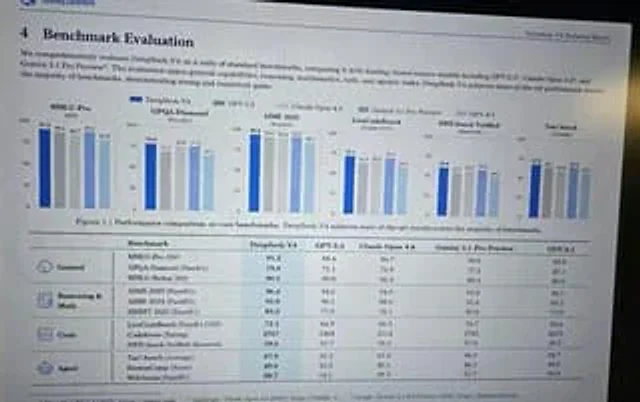
  "type": "Photograph of a computer monitor displaying academic and technical reports.",
  "style": "Slightly tilted screen photo, showing moiré patterns, LCD pixel grid, slight reflections, LaTeX document layout, serif font.",
  "document_header": {
    "left": "4. Benchmark Assessment",
    "right": "{argument name=\"report title\" default=\"DeepSeek-V4 Technical Report\"}"
  },
  "introductory_text": "Summarize{argument name=\"main model name\" default=\"DeepSeek-V4\"} contrast{argument name=\"competitor model 1\" default=\"GPT-5.3\"} ,{argument name=\"competitor model 2\" default=\"Claude Opus 4.6\"} as well as{argument name=\"competitor model 3\" default=\"Gemini 3.1 Pro Preview\"} The comprehensive evaluation section.",
  "visualizations": {
    "legend": "Five items with color codes: Dark blue, Gray, Light gray, Blue stripes, Light blue",
    "bar_charts": {
      "count": 6,
      "labels": [
        "MMLU-Pro (EM)",
        "GPQA-Diamond (Pass@1)",
        "AIME 2025 (Pass@1)",
        "LiveCodeBench (Pass@1-COT)",
        "SWE-bench Verified (Resolved)",
        "Tau-bench (Average)"
      ]
    },
    "caption": "Figure 1 | Performance comparison of core benchmarks. DeepSeek-V4 achieved industry-leading results in most benchmark tests."
  },
  "data_table": {
    "columns": [
      "Benchmarking",
      "{argument name=\"main model name\" default=\"DeepSeek-V4\"}",
      "{argument name=\"competitor model 1\" default=\"GPT-5.3\"}",
      "{argument name=\"competitor model 2\" default=\"Claude Opus 4.6\"}",
      "{argument name=\"competitor model 3\" default=\"Gemini 3.1 Pro Preview\"}",
      "GPT-4.1"
    ],
    "categories": {
      "count": 4,
      "rows": [
        {
          "label": "General",
          "icon": "globe/network",
          "sub_items": 3
        },
        {
          "label": "Reasoning and Mathematics",
          "icon": "calculator/clipboard",
          "sub_items": 3
        },
        {
          "label": "code",
          "icon": "code brackets",
          "sub_items": 3
        },
        {
          "label": "Agent",
          "icon": "robot face",
          "sub_items": 3
        }
      ]
    }
  }
}
Jak używać
- Skopiuj cały oryginalny prompt wraz z parametrami.
- Dostosuj temat, tekst i kompozycję do swoich potrzeb.
- Użyj zgodnego narzędzia zewnętrznego; sprawdź warunki dostępu i wynik.
Przed rozpoczęciem
- Sprawdź, czy potrzebny jest obraz referencyjny. Zgodność nie potwierdza modelu użytego do przykładu.
- Sprawdź nazwy, liczby i napisy; wyniki zależą od wersji modelu.