Original document
GPT Image 2 · en
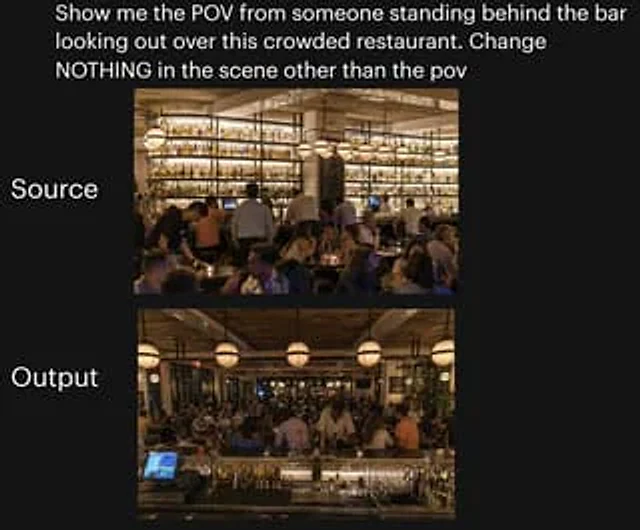
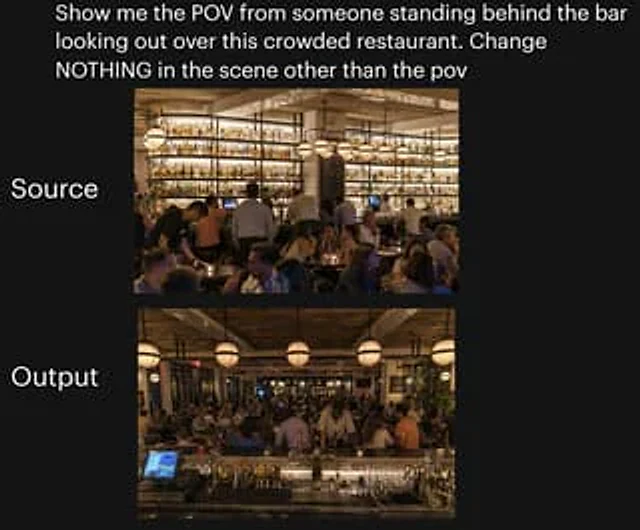
A side-by-side comparison image of social media posts against a dark background showcases a test of camera angle changes inside a busy restaurant. At the top is large white sans-serif text that reads:{argument name="headline text" default="Show me the view of this crowded restaurant from behind the bar. Don't change anything in the scene except the perspective."} Two rounded rectangular photos are stacked vertically in the center of the page. The upper image has the large white text "Source" on its left; the lower image has the large white text "Output" on its left. The upper image shows the original restaurant scene from the customer side, looking towards the bar at the back: a warm, upscale, and crowded restaurant at night, with a huge illuminated wall of bottles in the background, wooden ceiling beams, and hanging spherical chandeliers. Bartenders and servers are at work, and the foreground and midground are filled with customers. The lower image shows the same restaurant, maintaining the same lighting, decor, crowd density, bottle wall, chandeliers, and overall atmosphere, but with a changed perspective: the camera is now positioned behind the bar, looking out over the crowded restaurant. The foreground of the lower image includes the bar countertop, glassware, bottles, metal bar tools, and the illuminated POS touchscreen in the left front, reinforcing the "behind the bar" perspective. Both photos were designed to maintain photorealistic quality, warm amber lighting, and a vibrant nighttime atmosphere, ensuring the lower image appears to be the same scene as the upper one, only with a different camera angle. It features a clean social media posting style with ample margins and a neat layout, making it suitable for use as a tweet screenshot or AI image comparison sticker.How to use
- Copy the complete original prompt, including any parameters.
- Replace the subject, text and composition with your own requirements.
- Use a compatible external tool; check its current access conditions and review the result.
Before you start
- Check whether a reference image is required. A compatible model label does not mean this example was generated with that model.
- Keep names, figures and visible text accurate; results can vary between model versions.