Original document
GPT Image 2 · en
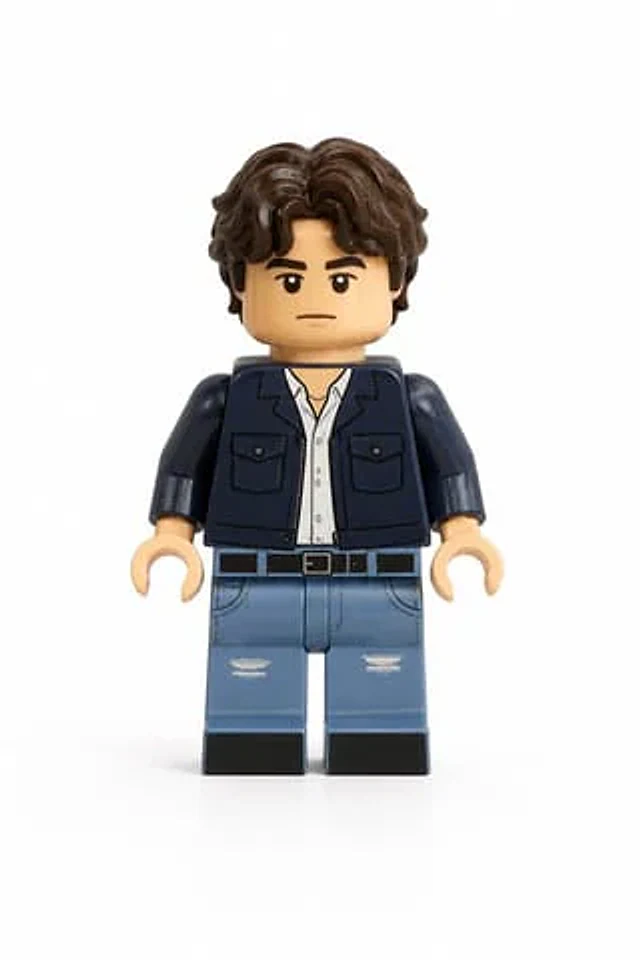
Use the user uploaded image as the only subject reference. Transform the person in the uploaded image into a realistic LEGO style minifigure while preserving their recognizable identity and outfit. Preserve the subject's facial likeness as much as possible within LEGO minifigure design limits, maintaining the same hairstyle and hair color adapted into a LEGO hairpiece, facial expression, clothing colors, clothing design and patterns, and any visible accessories. The result should clearly represent the same person translated into LEGO form. The character must follow authentic LEGO minifigure proportions, including a cylindrical yellow or skin tone LEGO style head, simple printed facial features adapted from the subject, a block shaped torso with printed clothing details, standard LEGO minifigure arms with curved hands, short LEGO minifigure legs, and a distinct molded plastic hairpiece matching the subject's hairstyle.
Render the figure using realistic LEGO plastic material with a slight glossy sheen, subtle molded seams, and natural toy surface reflections. The face and torso should include printed details typical of LEGO minifigures, and the hairpiece should appear as molded plastic. The final image should be a high quality realistic 3D toy render with soft diffused studio lighting, subtle shadows that emphasize shape and plastic texture, and clean sharp focus with crisp detail. The framing must show the full body minifigure from head to feet in a centered composition with the entire figure fully visible. Use a plain white background with no scenery, no props, and no additional elements. The final style should feel like a photorealistic LEGO minifigure toy render with highly detailed plastic texture and studio lighting.
How to use
- Copy the complete original prompt, including any parameters.
- Replace the subject, text and composition with your own requirements.
- Use a compatible external tool; check its current access conditions and review the result.
Before you start
- Check whether a reference image is required. A compatible model label does not mean this example was generated with that model.
- Keep names, figures and visible text accurate; results can vary between model versions.