원본 문서
GPT Image 2 · en
{
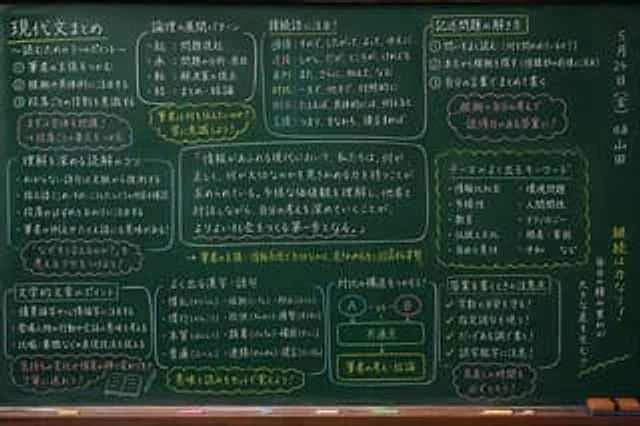
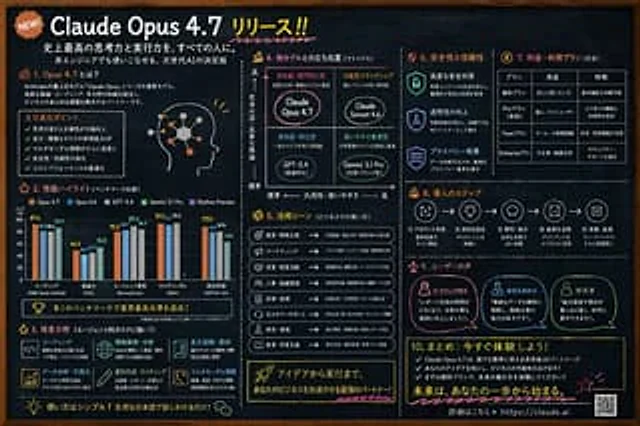
  "type": "Blackboard-style infographic",
  "style": "Dark slate background, white text, hand-drawn style decorations, simple layout.",
  "colors": {
    "background": "Deep slate limestone",
    "text": "White",
    "accents": [
      "{argument name=\"accent color 1\" default=\"orange color\"}",
      "{argument name=\"accent color 2\" default=\"light blue\"}",
      "yellow",
      "pink"
    ]
  },
  "header": {
    "badge": "Newly released!",
    "title": "{argument name=\"main headline\" default=\"Claude Opus 4.7 Released!!\"}",
    "subtitles": [
      "Providing everyone with the strongest thinking and execution capabilities in history.",
      "The next generation of AI, easily mastered even by non-technical personnel."
    ]
  },
  "layout": {
    "sections": [
      {
        "id": "1",
        "title": "1. What is Opus 4.7?",
        "content": "Description text, 5 key points, profile picture illustration with glowing neural nodes"
      },
      {
        "id": "2",
        "title": "2. Performance Highlights (Benchmark Comparison)",
        "content": "Grouped bar charts compare the performance of the five models across five categories: encoding, reasoning ability, agent search, multilingual ability, and overall evaluation."
      },
      {
        "id": "3",
        "title": "3. Areas of Expertise (Powerful agent task processing capabilities!)",
        "content": "A 2x3 grid is used to showcase six advantages and their corresponding icons: coding, information retrieval and analysis, long-form reading and summarizing, data analysis and visualization, document writing and composition, and multimodal understanding."
      },
      {
        "id": "4",
        "title": "4. Comparison of localization with other models (matrix diagram)",
        "content": "A 2x2 positioning matrix containing 4 quadrants:{argument name=\"product name\" default=\"Claude Opus 4.7\"} , Claude Sonnet 4.6, GPT-5.4, Gemini 3.1 Pro"
      },
      {
        "id": "5",
        "title": "5. Application Scenarios (Commercial Use)",
        "content": "A list containing 8 business use cases, accompanied by icons and arrows."
      },
      {
        "id": "6",
        "title": "6. Safety and Reliability",
        "content": "Three vertically arranged items, each with a shield/lock icon: Advanced Security, Increased Transparency, and Privacy Protection."
      },
      {
        "id": "7",
        "title": "7. Prices and Packages (for reference)",
        "content": "A 3-column, 4-row data table showing the pricing tiers: Free, Pro, Team, and Enterprise."
      },
      {
        "id": "8",
        "title": "8. Deployment Steps",
        "content": "A horizontal flowchart containing 5 numbered steps connected by arrows."
      },
      {
        "id": "9",
        "title": "9. User Reviews",
        "content": "Three user testimonials, each accompanied by a profile icon: Marketing Personnel, Business Planning Personnel, and Researcher."
      },
      {
        "id": "10",
        "title": "10. Summary: Try it now!",
        "content": "3 key points, call to action, URL{argument name=\"website url\" default=\"https://claude.ai\"} and a QR code"
      }
    ]
  }
}
사용 방법
- 매개변수를 포함한 전체 원본 프롬프트를 복사하세요.
- 주제, 문구, 구도를 자신의 요구에 맞게 바꾸세요.
- 호환되는 외부 도구에서 사용하고 이용 조건과 결과를 확인하세요.
시작 전 확인
- 참조 이미지가 필요한지 확인하세요. 호환 표시는 해당 모델로 이 예시를 생성했다는 뜻이 아닙니다.
- 이름, 수치, 이미지 속 문구를 확인하세요. 모델 버전에 따라 결과가 다를 수 있습니다.