
In Aktion ansehen
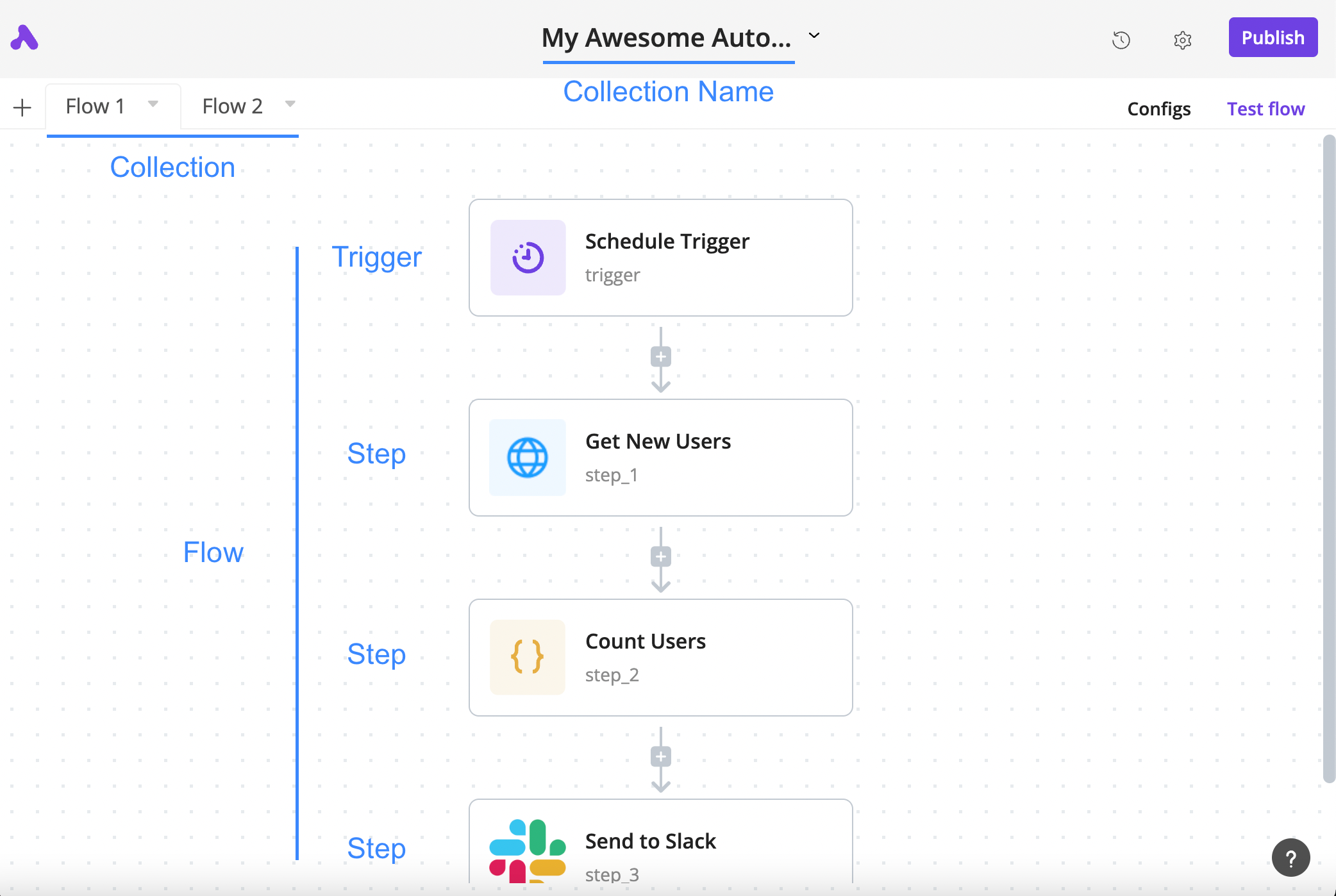
How a flow is arranged
The author’s annotated tutorial connects a schedule trigger, an HTTP step, a code step and a Slack step.
Lizenz
Lossless PNG-to-WebP conversion; original dimensions and decoded pixels preserved. No crop, generated input, execution claim or site test. Existing interface marks remain visible. Original tutorial annotations and validation states are retained; UI eras may differ between the source documentation screens.
Copyright (c) 2020-2024 Activepieces Inc.

Portions of this software are licensed as follows:

* All content that resides under the "packages/ee/" and "packages/server/api/src/app/ee" directory of this repository, if that directory exists, is licensed under the license defined in packages/ee/LICENSE
* All third party components incorporated into the Activepieces Inc Software are licensed under the original license provided by the owner of the applicable component.
* Content outside of the above mentioned directories or restrictions above is available under the "MIT Expat" license as defined below.

Permission is hereby granted, free of charge, to any person obtaining a copy
of this software and associated documentation files (the "Software"), to deal
in the Software without restriction, including without limitation the rights
to use, copy, modify, merge, publish, distribute, sublicense, and/or sell
copies of the Software, and to permit persons to whom the Software is
furnished to do so, subject to the following conditions:

The above copyright notice and this permission notice shall be included in all
copies or substantial portions of the Software.

THE SOFTWARE IS PROVIDED "AS IS", WITHOUT WARRANTY OF ANY KIND, EXPRESS OR
IMPLIED, INCLUDING BUT NOT LIMITED TO THE WARRANTIES OF MERCHANTABILITY,
FITNESS FOR A PARTICULAR PURPOSE AND NONINFRINGEMENT. IN NO EVENT SHALL THE
AUTHORS OR COPYRIGHT HOLDERS BE LIABLE FOR ANY CLAIM, DAMAGES OR OTHER
LIABILITY, WHETHER IN AN ACTION OF CONTRACT, TORT OR OTHERWISE, ARISING FROM,
OUT OF OR IN CONNECTION WITH THE SOFTWARE OR THE USE OR OTHER DEALINGS IN THE
SOFTWARE.
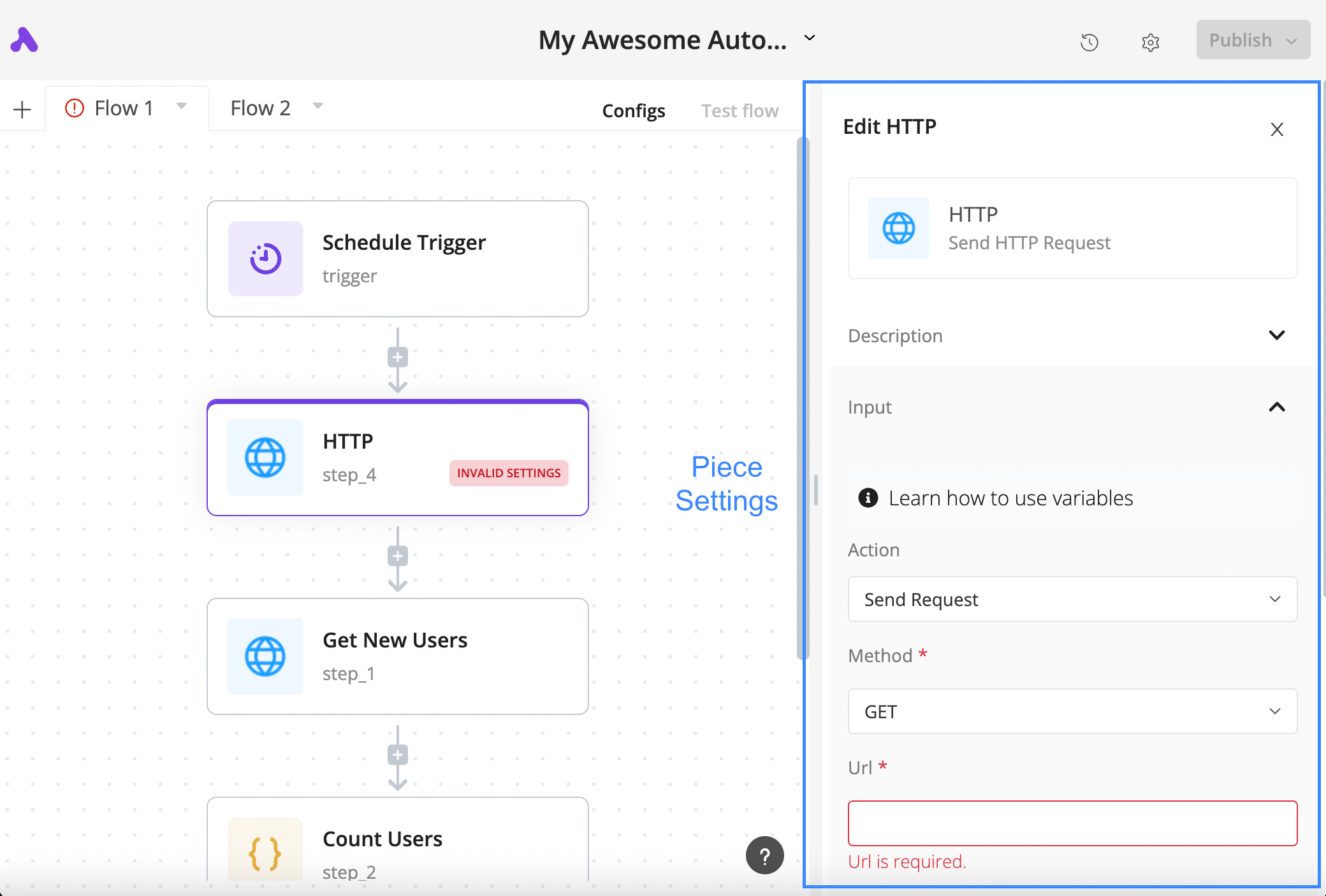
Configure an HTTP step
The author’s tutorial shows a selected HTTP block, its settings panel and the required URL field in a validation state.
Lizenz
Lossless PNG-to-WebP conversion; original dimensions and decoded pixels preserved. No crop, generated input, execution claim or site test. Existing interface marks remain visible. Original tutorial annotations and validation states are retained; UI eras may differ between the source documentation screens.
Copyright (c) 2020-2024 Activepieces Inc.

Portions of this software are licensed as follows:

* All content that resides under the "packages/ee/" and "packages/server/api/src/app/ee" directory of this repository, if that directory exists, is licensed under the license defined in packages/ee/LICENSE
* All third party components incorporated into the Activepieces Inc Software are licensed under the original license provided by the owner of the applicable component.
* Content outside of the above mentioned directories or restrictions above is available under the "MIT Expat" license as defined below.

Permission is hereby granted, free of charge, to any person obtaining a copy
of this software and associated documentation files (the "Software"), to deal
in the Software without restriction, including without limitation the rights
to use, copy, modify, merge, publish, distribute, sublicense, and/or sell
copies of the Software, and to permit persons to whom the Software is
furnished to do so, subject to the following conditions:

The above copyright notice and this permission notice shall be included in all
copies or substantial portions of the Software.

THE SOFTWARE IS PROVIDED "AS IS", WITHOUT WARRANTY OF ANY KIND, EXPRESS OR
IMPLIED, INCLUDING BUT NOT LIMITED TO THE WARRANTIES OF MERCHANTABILITY,
FITNESS FOR A PARTICULAR PURPOSE AND NONINFRINGEMENT. IN NO EVENT SHALL THE
AUTHORS OR COPYRIGHT HOLDERS BE LIABLE FOR ANY CLAIM, DAMAGES OR OTHER
LIABILITY, WHETHER IN AN ACTION OF CONTRACT, TORT OR OTHERWISE, ARISING FROM,
OUT OF OR IN CONNECTION WITH THE SOFTWARE OR THE USE OR OTHER DEALINGS IN THE
SOFTWARE.
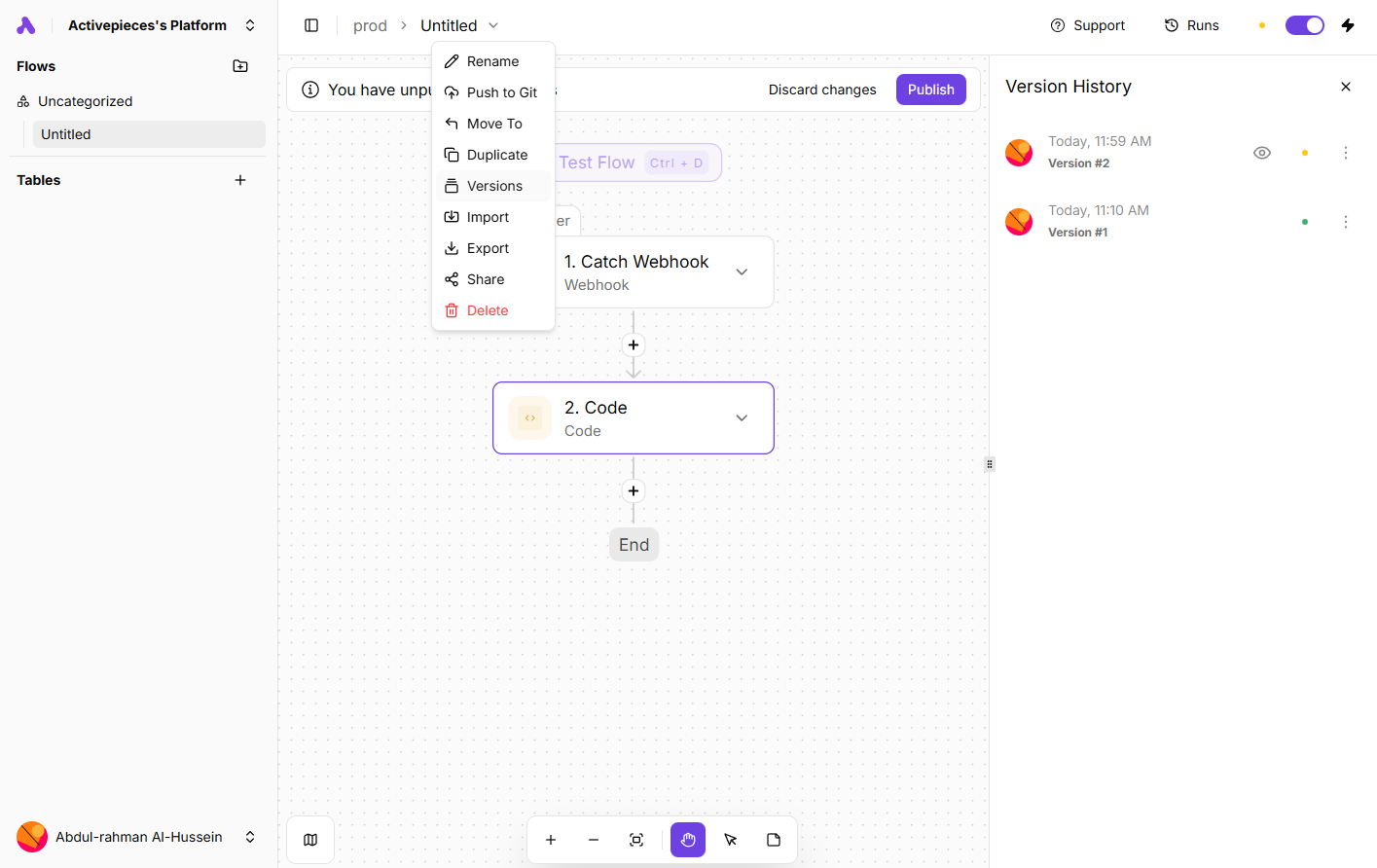
Inspect saved flow versions
An author-documentation screenshot shows the Versions menu and history panel alongside a webhook-and-code flow.
Lizenz
Lossless PNG-to-WebP conversion; original dimensions and decoded pixels preserved. No crop, generated input, execution claim or site test. Existing interface marks remain visible. Original tutorial annotations and validation states are retained; UI eras may differ between the source documentation screens.
Copyright (c) 2020-2024 Activepieces Inc.

Portions of this software are licensed as follows:

* All content that resides under the "packages/ee/" and "packages/server/api/src/app/ee" directory of this repository, if that directory exists, is licensed under the license defined in packages/ee/LICENSE
* All third party components incorporated into the Activepieces Inc Software are licensed under the original license provided by the owner of the applicable component.
* Content outside of the above mentioned directories or restrictions above is available under the "MIT Expat" license as defined below.

Permission is hereby granted, free of charge, to any person obtaining a copy
of this software and associated documentation files (the "Software"), to deal
in the Software without restriction, including without limitation the rights
to use, copy, modify, merge, publish, distribute, sublicense, and/or sell
copies of the Software, and to permit persons to whom the Software is
furnished to do so, subject to the following conditions:

The above copyright notice and this permission notice shall be included in all
copies or substantial portions of the Software.

THE SOFTWARE IS PROVIDED "AS IS", WITHOUT WARRANTY OF ANY KIND, EXPRESS OR
IMPLIED, INCLUDING BUT NOT LIMITED TO THE WARRANTIES OF MERCHANTABILITY,
FITNESS FOR A PARTICULAR PURPOSE AND NONINFRINGEMENT. IN NO EVENT SHALL THE
AUTHORS OR COPYRIGHT HOLDERS BE LIABLE FOR ANY CLAIM, DAMAGES OR OTHER
LIABILITY, WHETHER IN AN ACTION OF CONTRACT, TORT OR OTHERWISE, ARISING FROM,
OUT OF OR IN CONNECTION WITH THE SOFTWARE OR THE USE OR OTHER DEALINGS IN THE
SOFTWARE.
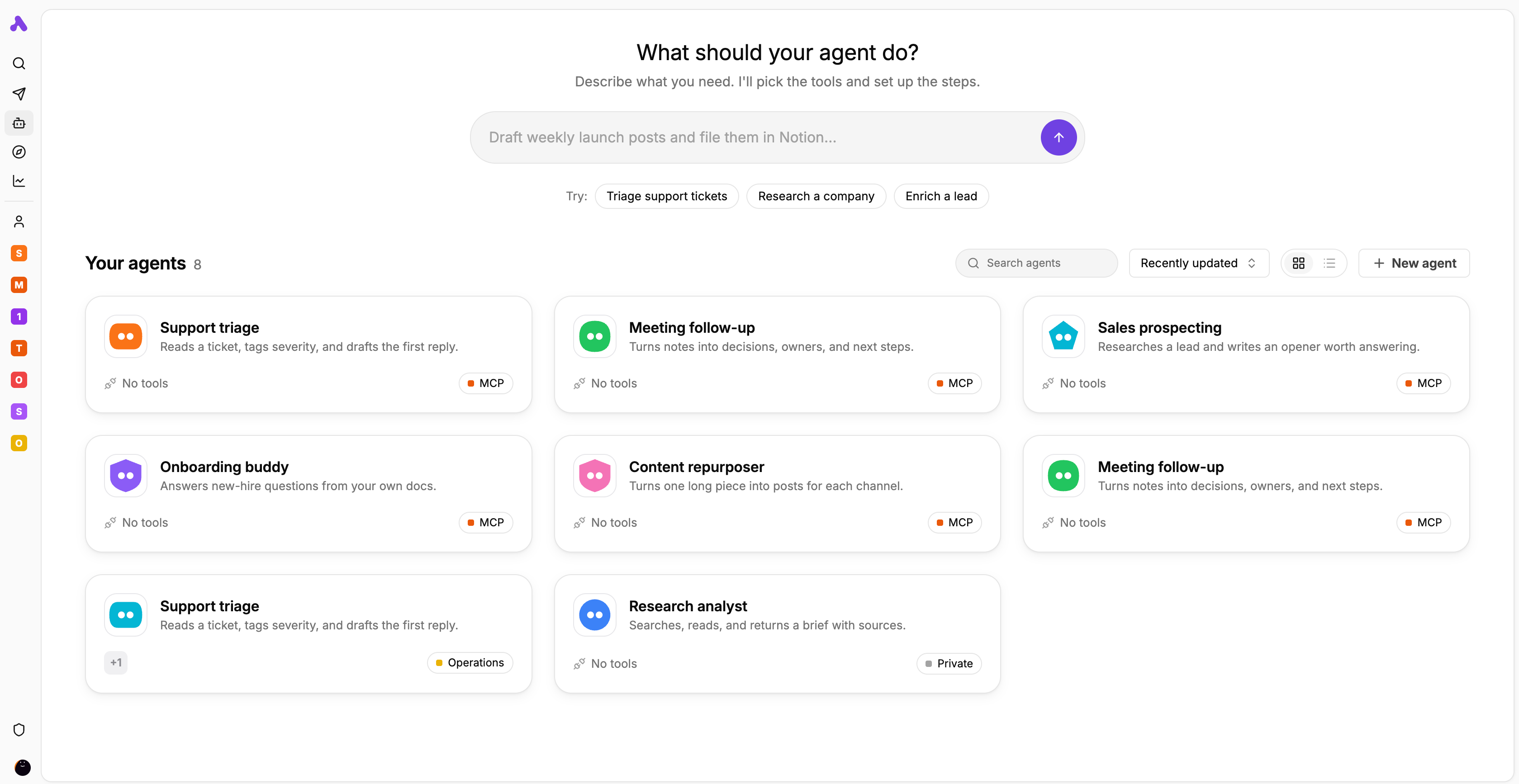
Agent library and task starters
The author’s interface preview displays agent cards for support, meeting follow-up, research and other tasks.
Lizenz
Lossless PNG-to-WebP conversion; original dimensions and decoded pixels preserved. No crop, generated input, execution claim or site test. Existing interface marks remain visible. Original tutorial annotations and validation states are retained; UI eras may differ between the source documentation screens.
Copyright (c) 2020-2024 Activepieces Inc.

Portions of this software are licensed as follows:

* All content that resides under the "packages/ee/" and "packages/server/api/src/app/ee" directory of this repository, if that directory exists, is licensed under the license defined in packages/ee/LICENSE
* All third party components incorporated into the Activepieces Inc Software are licensed under the original license provided by the owner of the applicable component.
* Content outside of the above mentioned directories or restrictions above is available under the "MIT Expat" license as defined below.

Permission is hereby granted, free of charge, to any person obtaining a copy
of this software and associated documentation files (the "Software"), to deal
in the Software without restriction, including without limitation the rights
to use, copy, modify, merge, publish, distribute, sublicense, and/or sell
copies of the Software, and to permit persons to whom the Software is
furnished to do so, subject to the following conditions:

The above copyright notice and this permission notice shall be included in all
copies or substantial portions of the Software.

THE SOFTWARE IS PROVIDED "AS IS", WITHOUT WARRANTY OF ANY KIND, EXPRESS OR
IMPLIED, INCLUDING BUT NOT LIMITED TO THE WARRANTIES OF MERCHANTABILITY,
FITNESS FOR A PARTICULAR PURPOSE AND NONINFRINGEMENT. IN NO EVENT SHALL THE
AUTHORS OR COPYRIGHT HOLDERS BE LIABLE FOR ANY CLAIM, DAMAGES OR OTHER
LIABILITY, WHETHER IN AN ACTION OF CONTRACT, TORT OR OTHERWISE, ARISING FROM,
OUT OF OR IN CONNECTION WITH THE SOFTWARE OR THE USE OR OTHER DEALINGS IN THE
SOFTWARE.
Produktüberblick
Activepieces verbindet Geschäftsanwendungen über Flows aus einem Auslöser und nachfolgenden Aktionen. Zeitplan, Webhook oder ein unterstütztes Ereignis starten den Ablauf. Spätere Schritte verwenden Ausgaben ihrer übergeordneten Schritte. Entscheidend sind die konkrete Aktion, die Rechte des verbundenen Kontos und passende Datentypen. Ein App-Name im Katalog beweist noch keine bestimmte Funktion.
Bei der Annahme von Supportanfragen könnte ein veröffentlichter Agent eine Kategorie und ein Feld für menschliche Prüfung liefern. Nachfolgende Aktionen übernehmen diese Werte. Der Flow bestimmt die Reihenfolge, der Agent interpretiert die Anfrage. Das ist ein Entwurfsbeispiel ohne Praxismessung. Prüfen Sie Ausgaben und Änderungen im Zielsystem vor der Aktivierung. Cloud und eigener Betrieb sind möglich; Hosting und Funktionsrechte bleiben getrennte Entscheidungen.
Was Activepieces bietet
- 01Abläufe durch Zeitplan, Webhook oder Ereignisse eines Dienstes starten.
- 02Ausgaben vorheriger Schritte mit der Datenauswahl zuordnen und jeden Schritt testen.
- 03Veröffentlichte Agenten mit Run Agent aufrufen und strukturierte Ergebnisse weiterreichen.
- 04Status sowie Ein- und Ausgaben unter Runs prüfen; pieces mit TypeScript erweitern.
Ein praktischer Ablauf
- 01Für Supportanfragen Auslöser und Zielaktion mit den tatsächlichen Konten prüfen; kontrollierte Beispieldaten verwenden.
- 02Den Auslöser testen, Ausgaben ansehen und eine Anfrage-ID erhalten. Betreff und Nachricht über die Datenauswahl zuordnen.
- 03Bei Bedarf zuerst den Agenten veröffentlichen und Felder wie category und needs_human anfordern. Typen und fehlende Werte prüfen.
- 04Die Zielaktion mit begrenzten Rechten konfigurieren und den erzeugten Datensatz oder die Nachricht kontrollieren. Wiederholte Anfragen erkennbar machen.
- 05Geprüfte Änderungen veröffentlichen. Unter Runs Ein- und Ausgaben sowie Fehler prüfen und Zuständigkeit und Budget festlegen.
Zusammenfassung auf Basis der Quelle; Produktangaben wurden nicht unabhängig getestet.
Was es unterscheidet
Activepieces kommt infrage, wenn Sie Apps visuell verbinden und bei Bedarf den Code der Anbindung selbst pflegen möchten. Für den MIT-Kern und kommerzielle Funktionen gelten unterschiedliche Lizenzen. Eigener Betrieb bedeutet Verantwortung für die Infrastruktur und schaltet weder alle Funktionen frei noch beseitigt er laufende Kosten.
Für wen es geeignet ist
- Betriebsteams mit klar definierten App-Aktionen und prüfbaren Ergebnissen.
- Teams, die einen festen Prozess um eine Klassifikation durch Agenten ergänzen.
- Entwickler, die eigene pieces oder selbst betriebene Instanzen pflegen können.
Was zu prüfen ist
- Ein gespeicherter Entwurf ändert den veröffentlichten Flow noch nicht. Sensible Projekte können eine Freigabe verlangen.
- Ein noch nicht veröffentlichter Agent kann auswählbar sein, lässt sich aber erst nach seiner Veröffentlichung ausführen.
- Vor erneutem Schreiben unklare Ergebnisse im Zielsystem auf vorhandene Datensätze oder Nachrichten prüfen.
- Bei eigenem Betrieb Webhook-Zugriff, DB-Sicherungen und Updates planen. Die Kopie des Installationsordners sichert das DB-Volume nicht.
Häufige Fragen
Wird eine gespeicherte Änderung sofort aktiv?
Erst die Veröffentlichung aktiviert den geänderten Flow. In sensiblen Projekten kann eine Person mit dem passenden Recht die Änderung freigeben müssen.
Sind alle Funktionen auf eigenen Servern MIT-lizenziert?
Nein. Der Kern steht unter MIT; Unternehmens- und Cloudfunktionen unterliegen kommerziellen Bedingungen. Edition, Nutzungsrechte, Infrastruktur und externe KI-Kosten sind getrennt zu prüfen.
Wie untersuche ich einen Fehler?
Unter Runs die Ausführung öffnen und Status sowie Ein- und Ausgaben je Schritt prüfen. Vor einem erneuten Versuch kontrollieren, ob extern bereits geschrieben wurde. Eine Fehlermeldung beweist keine Rücknahme früherer Aktionen.
Was tun bei einer fehlenden Aktion?
Zunächst die verfügbaren Operationen des piece prüfen. Eigene Anbindungen lassen sich mit TypeScript bauen; Authentifizierung, API-Limits, Tests und Pflege bleiben erforderlich.
Die Produktinformationen wurden am 7. Nov. 2026 mit der offiziellen Website oder Primärdokumentation abgeglichen.