
See it in action
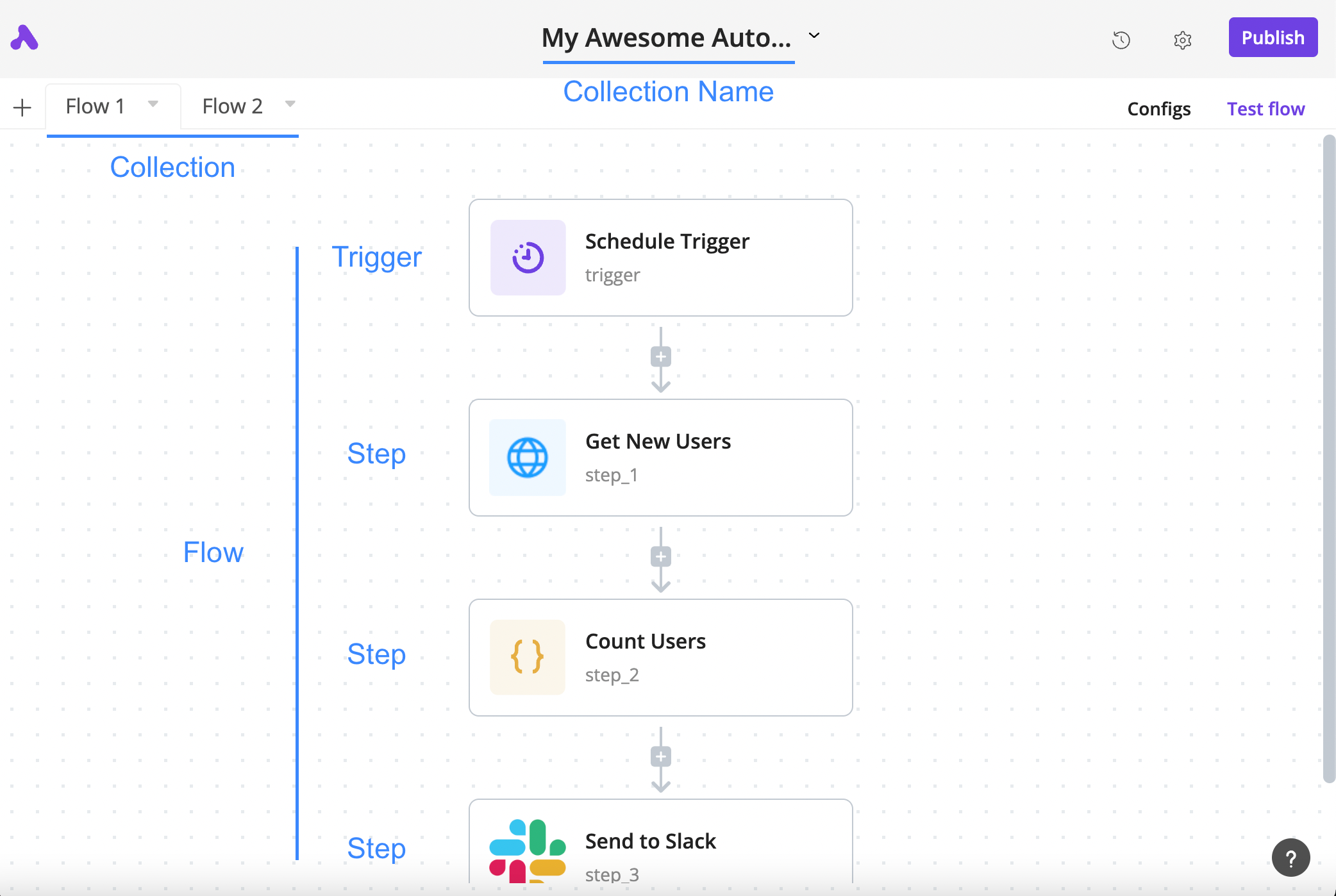
How a flow is arranged
The author’s annotated tutorial connects a schedule trigger, an HTTP step, a code step and a Slack step.
License
Lossless PNG-to-WebP conversion; original dimensions and decoded pixels preserved. No crop, generated input, execution claim or site test. Existing interface marks remain visible. Original tutorial annotations and validation states are retained; UI eras may differ between the source documentation screens.
Copyright (c) 2020-2024 Activepieces Inc.

Portions of this software are licensed as follows:

* All content that resides under the "packages/ee/" and "packages/server/api/src/app/ee" directory of this repository, if that directory exists, is licensed under the license defined in packages/ee/LICENSE
* All third party components incorporated into the Activepieces Inc Software are licensed under the original license provided by the owner of the applicable component.
* Content outside of the above mentioned directories or restrictions above is available under the "MIT Expat" license as defined below.

Permission is hereby granted, free of charge, to any person obtaining a copy
of this software and associated documentation files (the "Software"), to deal
in the Software without restriction, including without limitation the rights
to use, copy, modify, merge, publish, distribute, sublicense, and/or sell
copies of the Software, and to permit persons to whom the Software is
furnished to do so, subject to the following conditions:

The above copyright notice and this permission notice shall be included in all
copies or substantial portions of the Software.

THE SOFTWARE IS PROVIDED "AS IS", WITHOUT WARRANTY OF ANY KIND, EXPRESS OR
IMPLIED, INCLUDING BUT NOT LIMITED TO THE WARRANTIES OF MERCHANTABILITY,
FITNESS FOR A PARTICULAR PURPOSE AND NONINFRINGEMENT. IN NO EVENT SHALL THE
AUTHORS OR COPYRIGHT HOLDERS BE LIABLE FOR ANY CLAIM, DAMAGES OR OTHER
LIABILITY, WHETHER IN AN ACTION OF CONTRACT, TORT OR OTHERWISE, ARISING FROM,
OUT OF OR IN CONNECTION WITH THE SOFTWARE OR THE USE OR OTHER DEALINGS IN THE
SOFTWARE.
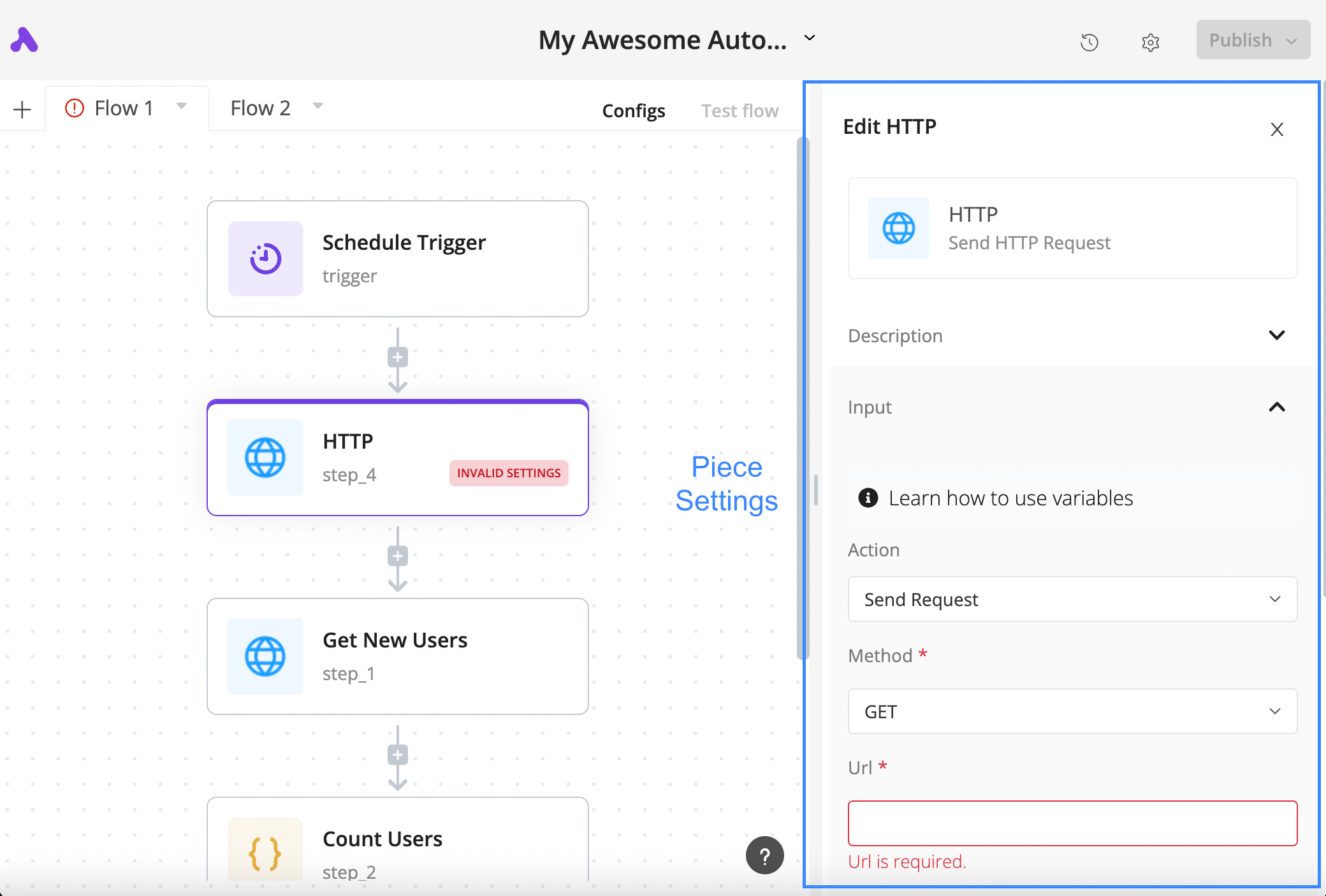
Configure an HTTP step
The author’s tutorial shows a selected HTTP block, its settings panel and the required URL field in a validation state.
License
Lossless PNG-to-WebP conversion; original dimensions and decoded pixels preserved. No crop, generated input, execution claim or site test. Existing interface marks remain visible. Original tutorial annotations and validation states are retained; UI eras may differ between the source documentation screens.
Copyright (c) 2020-2024 Activepieces Inc.

Portions of this software are licensed as follows:

* All content that resides under the "packages/ee/" and "packages/server/api/src/app/ee" directory of this repository, if that directory exists, is licensed under the license defined in packages/ee/LICENSE
* All third party components incorporated into the Activepieces Inc Software are licensed under the original license provided by the owner of the applicable component.
* Content outside of the above mentioned directories or restrictions above is available under the "MIT Expat" license as defined below.

Permission is hereby granted, free of charge, to any person obtaining a copy
of this software and associated documentation files (the "Software"), to deal
in the Software without restriction, including without limitation the rights
to use, copy, modify, merge, publish, distribute, sublicense, and/or sell
copies of the Software, and to permit persons to whom the Software is
furnished to do so, subject to the following conditions:

The above copyright notice and this permission notice shall be included in all
copies or substantial portions of the Software.

THE SOFTWARE IS PROVIDED "AS IS", WITHOUT WARRANTY OF ANY KIND, EXPRESS OR
IMPLIED, INCLUDING BUT NOT LIMITED TO THE WARRANTIES OF MERCHANTABILITY,
FITNESS FOR A PARTICULAR PURPOSE AND NONINFRINGEMENT. IN NO EVENT SHALL THE
AUTHORS OR COPYRIGHT HOLDERS BE LIABLE FOR ANY CLAIM, DAMAGES OR OTHER
LIABILITY, WHETHER IN AN ACTION OF CONTRACT, TORT OR OTHERWISE, ARISING FROM,
OUT OF OR IN CONNECTION WITH THE SOFTWARE OR THE USE OR OTHER DEALINGS IN THE
SOFTWARE.
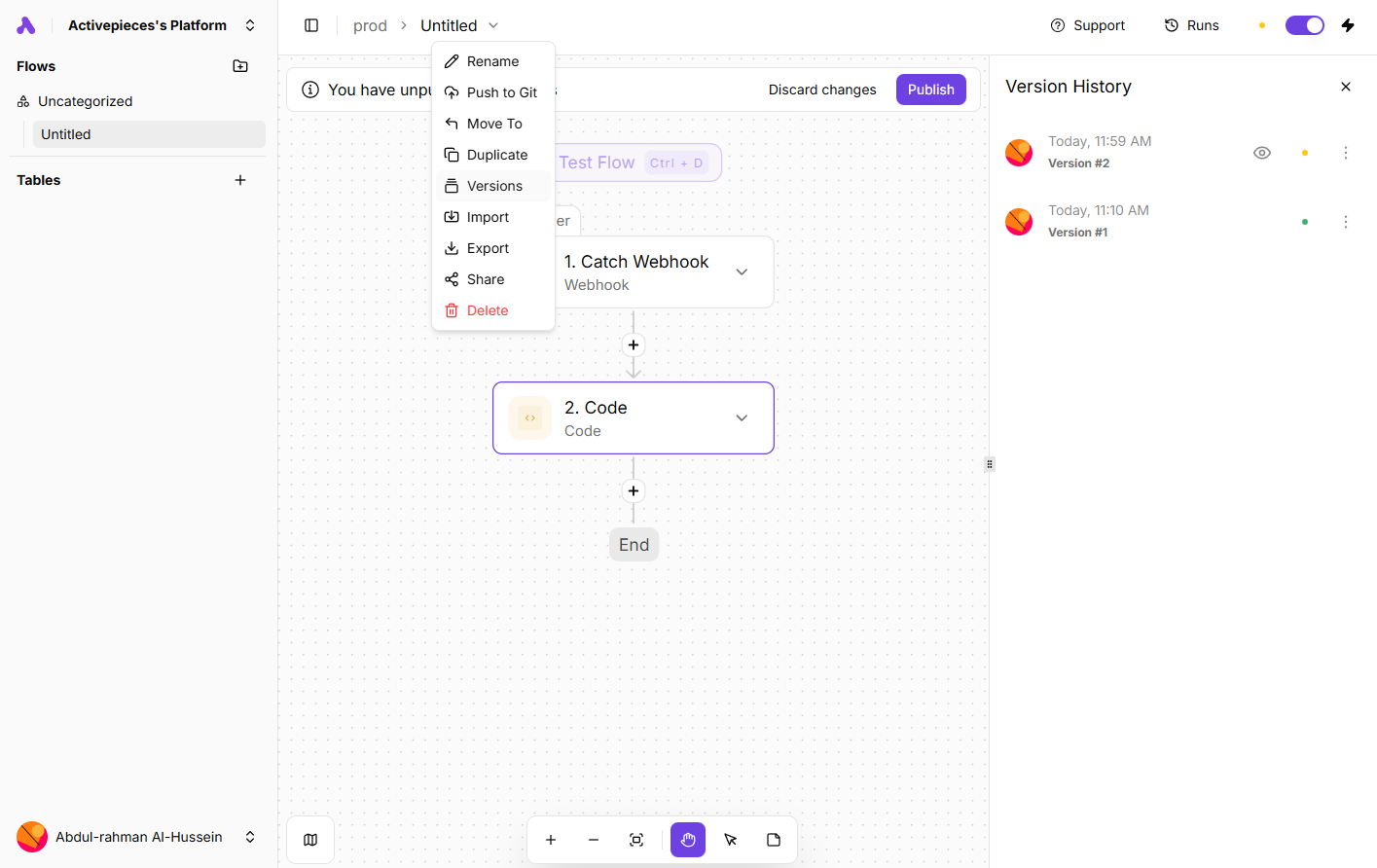
Inspect saved flow versions
An author-documentation screenshot shows the Versions menu and history panel alongside a webhook-and-code flow.
License
Lossless PNG-to-WebP conversion; original dimensions and decoded pixels preserved. No crop, generated input, execution claim or site test. Existing interface marks remain visible. Original tutorial annotations and validation states are retained; UI eras may differ between the source documentation screens.
Copyright (c) 2020-2024 Activepieces Inc.

Portions of this software are licensed as follows:

* All content that resides under the "packages/ee/" and "packages/server/api/src/app/ee" directory of this repository, if that directory exists, is licensed under the license defined in packages/ee/LICENSE
* All third party components incorporated into the Activepieces Inc Software are licensed under the original license provided by the owner of the applicable component.
* Content outside of the above mentioned directories or restrictions above is available under the "MIT Expat" license as defined below.

Permission is hereby granted, free of charge, to any person obtaining a copy
of this software and associated documentation files (the "Software"), to deal
in the Software without restriction, including without limitation the rights
to use, copy, modify, merge, publish, distribute, sublicense, and/or sell
copies of the Software, and to permit persons to whom the Software is
furnished to do so, subject to the following conditions:

The above copyright notice and this permission notice shall be included in all
copies or substantial portions of the Software.

THE SOFTWARE IS PROVIDED "AS IS", WITHOUT WARRANTY OF ANY KIND, EXPRESS OR
IMPLIED, INCLUDING BUT NOT LIMITED TO THE WARRANTIES OF MERCHANTABILITY,
FITNESS FOR A PARTICULAR PURPOSE AND NONINFRINGEMENT. IN NO EVENT SHALL THE
AUTHORS OR COPYRIGHT HOLDERS BE LIABLE FOR ANY CLAIM, DAMAGES OR OTHER
LIABILITY, WHETHER IN AN ACTION OF CONTRACT, TORT OR OTHERWISE, ARISING FROM,
OUT OF OR IN CONNECTION WITH THE SOFTWARE OR THE USE OR OTHER DEALINGS IN THE
SOFTWARE.
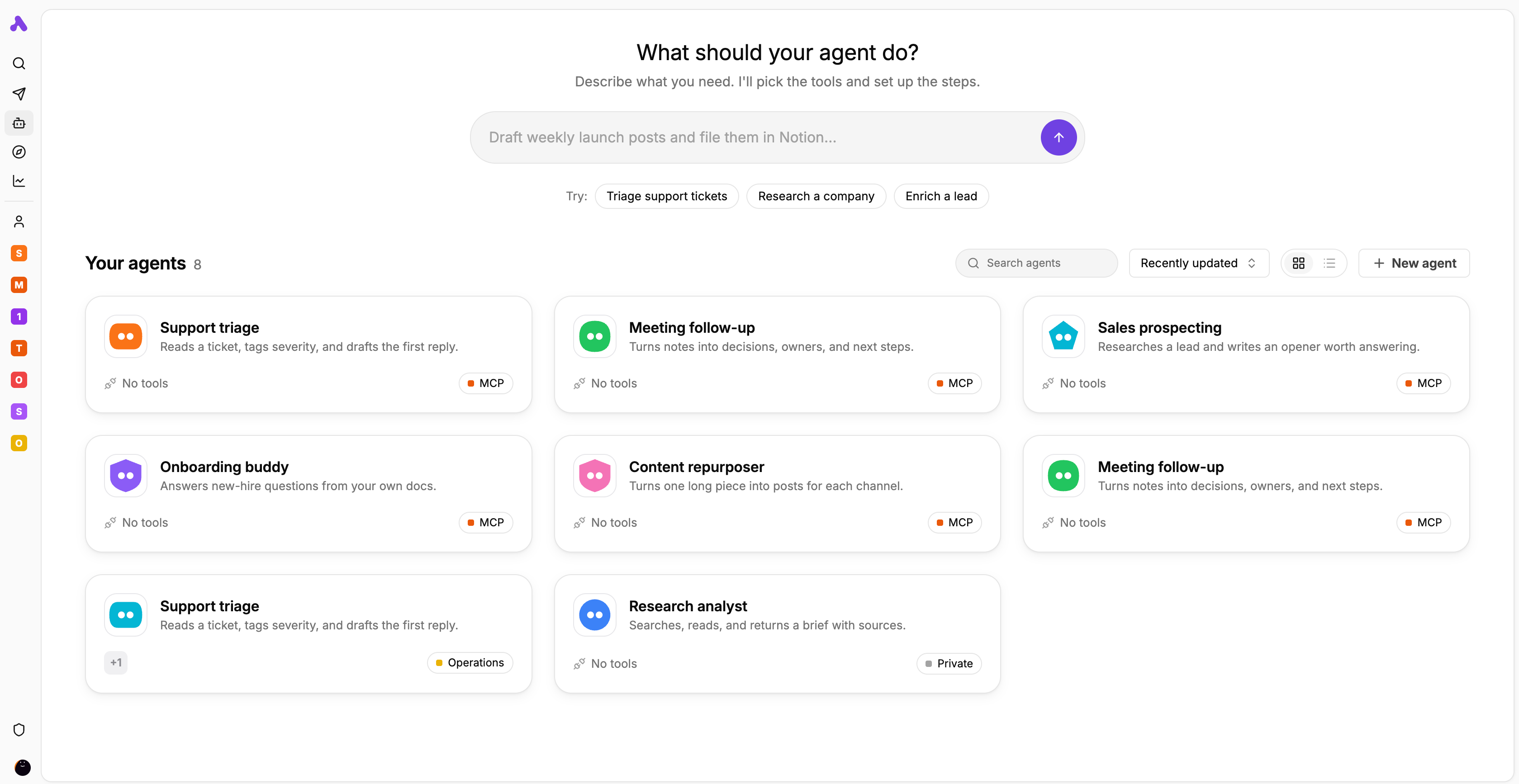
Agent library and task starters
The author’s interface preview displays agent cards for support, meeting follow-up, research and other tasks.
License
Lossless PNG-to-WebP conversion; original dimensions and decoded pixels preserved. No crop, generated input, execution claim or site test. Existing interface marks remain visible. Original tutorial annotations and validation states are retained; UI eras may differ between the source documentation screens.
Copyright (c) 2020-2024 Activepieces Inc.

Portions of this software are licensed as follows:

* All content that resides under the "packages/ee/" and "packages/server/api/src/app/ee" directory of this repository, if that directory exists, is licensed under the license defined in packages/ee/LICENSE
* All third party components incorporated into the Activepieces Inc Software are licensed under the original license provided by the owner of the applicable component.
* Content outside of the above mentioned directories or restrictions above is available under the "MIT Expat" license as defined below.

Permission is hereby granted, free of charge, to any person obtaining a copy
of this software and associated documentation files (the "Software"), to deal
in the Software without restriction, including without limitation the rights
to use, copy, modify, merge, publish, distribute, sublicense, and/or sell
copies of the Software, and to permit persons to whom the Software is
furnished to do so, subject to the following conditions:

The above copyright notice and this permission notice shall be included in all
copies or substantial portions of the Software.

THE SOFTWARE IS PROVIDED "AS IS", WITHOUT WARRANTY OF ANY KIND, EXPRESS OR
IMPLIED, INCLUDING BUT NOT LIMITED TO THE WARRANTIES OF MERCHANTABILITY,
FITNESS FOR A PARTICULAR PURPOSE AND NONINFRINGEMENT. IN NO EVENT SHALL THE
AUTHORS OR COPYRIGHT HOLDERS BE LIABLE FOR ANY CLAIM, DAMAGES OR OTHER
LIABILITY, WHETHER IN AN ACTION OF CONTRACT, TORT OR OTHERWISE, ARISING FROM,
OUT OF OR IN CONNECTION WITH THE SOFTWARE OR THE USE OR OTHER DEALINGS IN THE
SOFTWARE.
Product overview
Activepieces joins business applications through flows made of a trigger and subsequent actions. A schedule, webhook or supported service event starts the flow; each later step can use outputs from its parent steps. The practical work is selecting the supported action, authorizing the connected account and mapping the correct field types. An integration name by itself does not establish that it supports your required operation.
An illustrative support-intake flow can receive a request, call a published agent for structured classification, then pass the category and a human-review flag to a destination action. The flow defines the sequence while the agent interprets the request. This is a design example, not a measured implementation: inspect sample outputs and destination changes before enabling it. Cloud and self-hosted deployment are available, but hosting choice and feature entitlement are separate decisions.
What Activepieces offers
- 01Use schedule, webhook or service-event triggers followed by app actions.
- 02Map earlier outputs with the data selector; test steps so downstream fields have representative data.
- 03Add a Run Agent action for a published agent and consume structured fields in later steps.
- 04Inspect step status, input and output in Runs; extend integrations with TypeScript pieces.
A practical workflow
- 01For support intake, verify the source trigger and destination action against the actual connected accounts; start with controlled sample requests.
- 02Test the trigger, inspect its output and preserve a request identifier. Map the subject and message using the data selector.
- 03If classification is needed, publish the agent first and request fields such as category and needs_human. Check types and missing values before using them.
- 04Configure the destination action, restrict account permissions and verify the resulting record or message. Decide how repeated requests should be recognized.
- 05Publish the reviewed flow changes, then inspect Runs for step inputs, outputs and failures. Confirm a recovery owner and usage budget.
Summary based on source material; product claims have not been independently tested.
What makes it different
Evaluate Activepieces when you want visual app automation with an option to maintain or extend the integration code. Its MIT-licensed core and commercial features have different terms. Self-hosting gives you deployment responsibility; it does not automatically unlock enterprise governance or make operations free.
Who should consider it
- Operations teams connecting supported app actions and reviewing their outputs.
- Teams combining an explicit process with an agent classification step.
- Developers able to maintain custom pieces or own a self-hosted deployment.
What to verify
- Changing a draft does not change the published flow until publishing; sensitive projects may require approval.
- An unpublished agent may appear in the picker but cannot run from a flow until published.
- Before repeating an uncertain action, inspect the destination to avoid duplicate records or messages.
- For self-hosting, plan public webhook reachability, database backups and upgrades. Copying only the installation folder does not back up the database volume.
Frequently asked questions
Does saving a change update the live flow?
No. The publishing step activates edited flow changes. In a sensitive project the control may request approval from a user with the required permission.
Can every self-hosted feature be used under MIT?
No. The core uses MIT, while enterprise and cloud features have commercial licensing. Check the exact edition and entitlements; infrastructure, maintenance and external AI services can also cost money.
How do I investigate a failed flow?
Open Runs, select the execution and inspect each step’s status, input and output. Determine whether an external write already happened before retrying; viewing a failed run is not proof that prior actions were undone.
What if an app or action is missing?
Verify the current piece and its operations first. Developers can build pieces in TypeScript, but authentication, API limits, testing and maintenance still need an owner.
Product facts were checked against the official product website or its first-party documentation on Nov 7, 2026.