
Voir en action
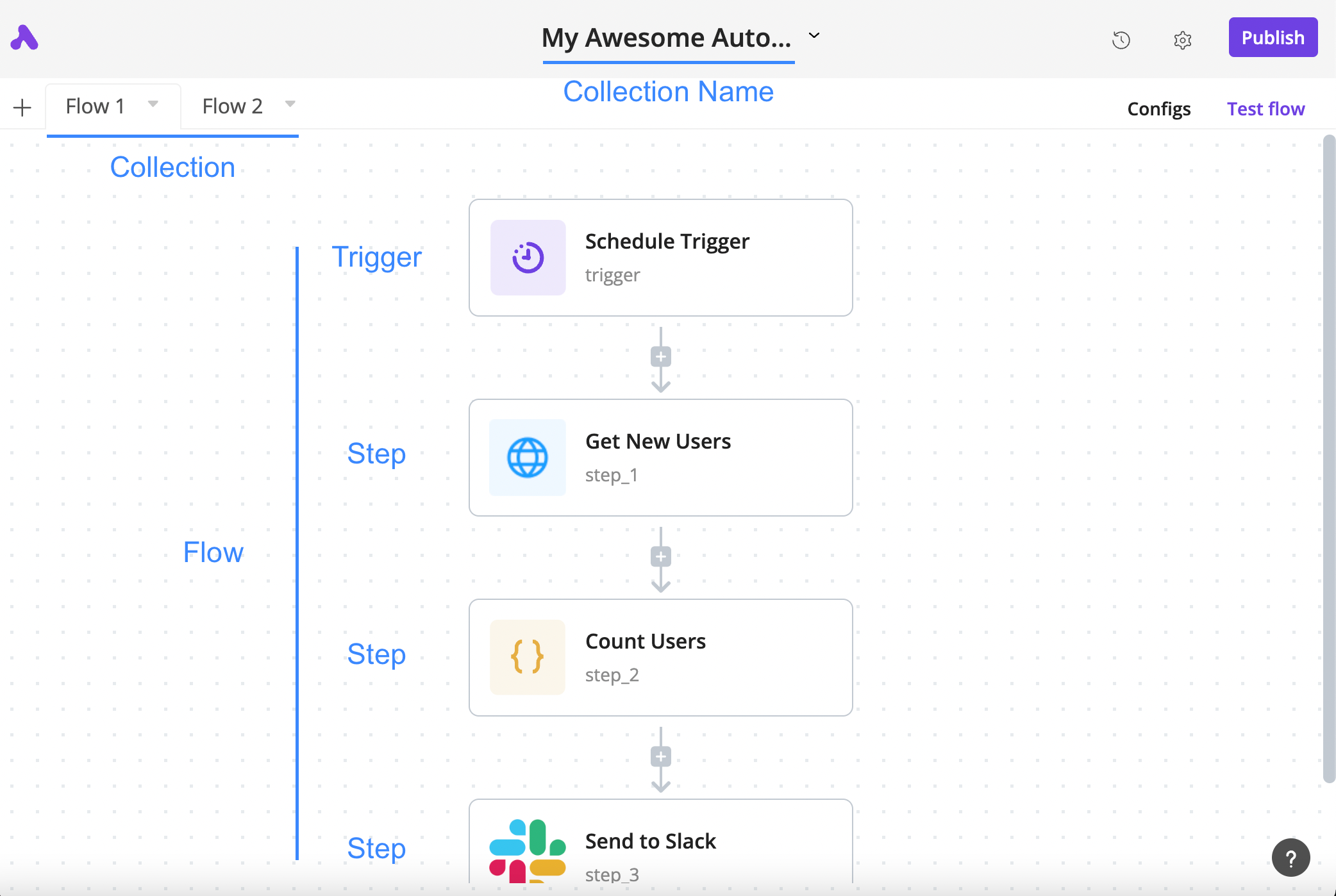
How a flow is arranged
The author’s annotated tutorial connects a schedule trigger, an HTTP step, a code step and a Slack step.
Licence
Lossless PNG-to-WebP conversion; original dimensions and decoded pixels preserved. No crop, generated input, execution claim or site test. Existing interface marks remain visible. Original tutorial annotations and validation states are retained; UI eras may differ between the source documentation screens.
Copyright (c) 2020-2024 Activepieces Inc.

Portions of this software are licensed as follows:

* All content that resides under the "packages/ee/" and "packages/server/api/src/app/ee" directory of this repository, if that directory exists, is licensed under the license defined in packages/ee/LICENSE
* All third party components incorporated into the Activepieces Inc Software are licensed under the original license provided by the owner of the applicable component.
* Content outside of the above mentioned directories or restrictions above is available under the "MIT Expat" license as defined below.

Permission is hereby granted, free of charge, to any person obtaining a copy
of this software and associated documentation files (the "Software"), to deal
in the Software without restriction, including without limitation the rights
to use, copy, modify, merge, publish, distribute, sublicense, and/or sell
copies of the Software, and to permit persons to whom the Software is
furnished to do so, subject to the following conditions:

The above copyright notice and this permission notice shall be included in all
copies or substantial portions of the Software.

THE SOFTWARE IS PROVIDED "AS IS", WITHOUT WARRANTY OF ANY KIND, EXPRESS OR
IMPLIED, INCLUDING BUT NOT LIMITED TO THE WARRANTIES OF MERCHANTABILITY,
FITNESS FOR A PARTICULAR PURPOSE AND NONINFRINGEMENT. IN NO EVENT SHALL THE
AUTHORS OR COPYRIGHT HOLDERS BE LIABLE FOR ANY CLAIM, DAMAGES OR OTHER
LIABILITY, WHETHER IN AN ACTION OF CONTRACT, TORT OR OTHERWISE, ARISING FROM,
OUT OF OR IN CONNECTION WITH THE SOFTWARE OR THE USE OR OTHER DEALINGS IN THE
SOFTWARE.
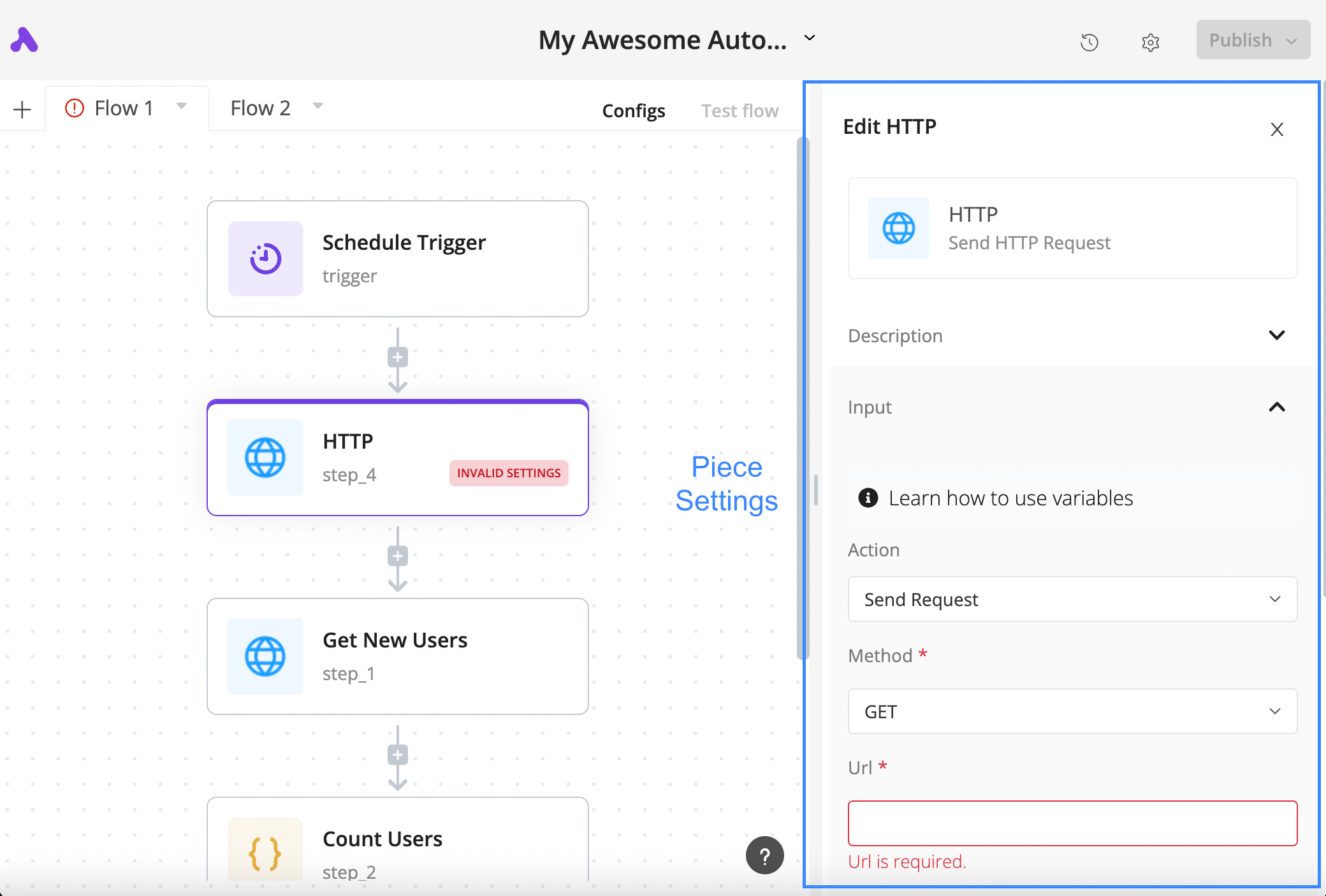
Configure an HTTP step
The author’s tutorial shows a selected HTTP block, its settings panel and the required URL field in a validation state.
Licence
Lossless PNG-to-WebP conversion; original dimensions and decoded pixels preserved. No crop, generated input, execution claim or site test. Existing interface marks remain visible. Original tutorial annotations and validation states are retained; UI eras may differ between the source documentation screens.
Copyright (c) 2020-2024 Activepieces Inc.

Portions of this software are licensed as follows:

* All content that resides under the "packages/ee/" and "packages/server/api/src/app/ee" directory of this repository, if that directory exists, is licensed under the license defined in packages/ee/LICENSE
* All third party components incorporated into the Activepieces Inc Software are licensed under the original license provided by the owner of the applicable component.
* Content outside of the above mentioned directories or restrictions above is available under the "MIT Expat" license as defined below.

Permission is hereby granted, free of charge, to any person obtaining a copy
of this software and associated documentation files (the "Software"), to deal
in the Software without restriction, including without limitation the rights
to use, copy, modify, merge, publish, distribute, sublicense, and/or sell
copies of the Software, and to permit persons to whom the Software is
furnished to do so, subject to the following conditions:

The above copyright notice and this permission notice shall be included in all
copies or substantial portions of the Software.

THE SOFTWARE IS PROVIDED "AS IS", WITHOUT WARRANTY OF ANY KIND, EXPRESS OR
IMPLIED, INCLUDING BUT NOT LIMITED TO THE WARRANTIES OF MERCHANTABILITY,
FITNESS FOR A PARTICULAR PURPOSE AND NONINFRINGEMENT. IN NO EVENT SHALL THE
AUTHORS OR COPYRIGHT HOLDERS BE LIABLE FOR ANY CLAIM, DAMAGES OR OTHER
LIABILITY, WHETHER IN AN ACTION OF CONTRACT, TORT OR OTHERWISE, ARISING FROM,
OUT OF OR IN CONNECTION WITH THE SOFTWARE OR THE USE OR OTHER DEALINGS IN THE
SOFTWARE.
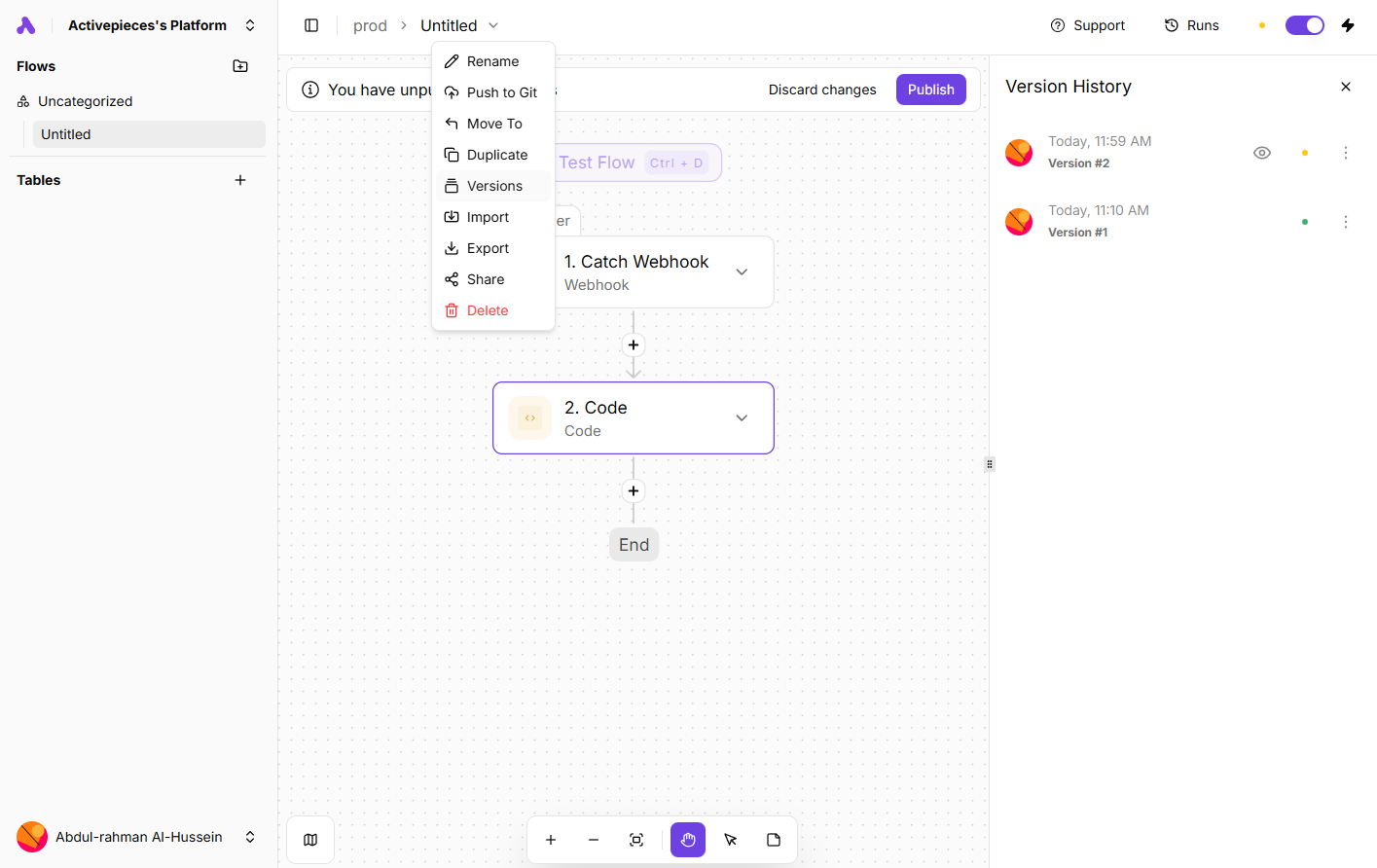
Inspect saved flow versions
An author-documentation screenshot shows the Versions menu and history panel alongside a webhook-and-code flow.
Licence
Lossless PNG-to-WebP conversion; original dimensions and decoded pixels preserved. No crop, generated input, execution claim or site test. Existing interface marks remain visible. Original tutorial annotations and validation states are retained; UI eras may differ between the source documentation screens.
Copyright (c) 2020-2024 Activepieces Inc.

Portions of this software are licensed as follows:

* All content that resides under the "packages/ee/" and "packages/server/api/src/app/ee" directory of this repository, if that directory exists, is licensed under the license defined in packages/ee/LICENSE
* All third party components incorporated into the Activepieces Inc Software are licensed under the original license provided by the owner of the applicable component.
* Content outside of the above mentioned directories or restrictions above is available under the "MIT Expat" license as defined below.

Permission is hereby granted, free of charge, to any person obtaining a copy
of this software and associated documentation files (the "Software"), to deal
in the Software without restriction, including without limitation the rights
to use, copy, modify, merge, publish, distribute, sublicense, and/or sell
copies of the Software, and to permit persons to whom the Software is
furnished to do so, subject to the following conditions:

The above copyright notice and this permission notice shall be included in all
copies or substantial portions of the Software.

THE SOFTWARE IS PROVIDED "AS IS", WITHOUT WARRANTY OF ANY KIND, EXPRESS OR
IMPLIED, INCLUDING BUT NOT LIMITED TO THE WARRANTIES OF MERCHANTABILITY,
FITNESS FOR A PARTICULAR PURPOSE AND NONINFRINGEMENT. IN NO EVENT SHALL THE
AUTHORS OR COPYRIGHT HOLDERS BE LIABLE FOR ANY CLAIM, DAMAGES OR OTHER
LIABILITY, WHETHER IN AN ACTION OF CONTRACT, TORT OR OTHERWISE, ARISING FROM,
OUT OF OR IN CONNECTION WITH THE SOFTWARE OR THE USE OR OTHER DEALINGS IN THE
SOFTWARE.
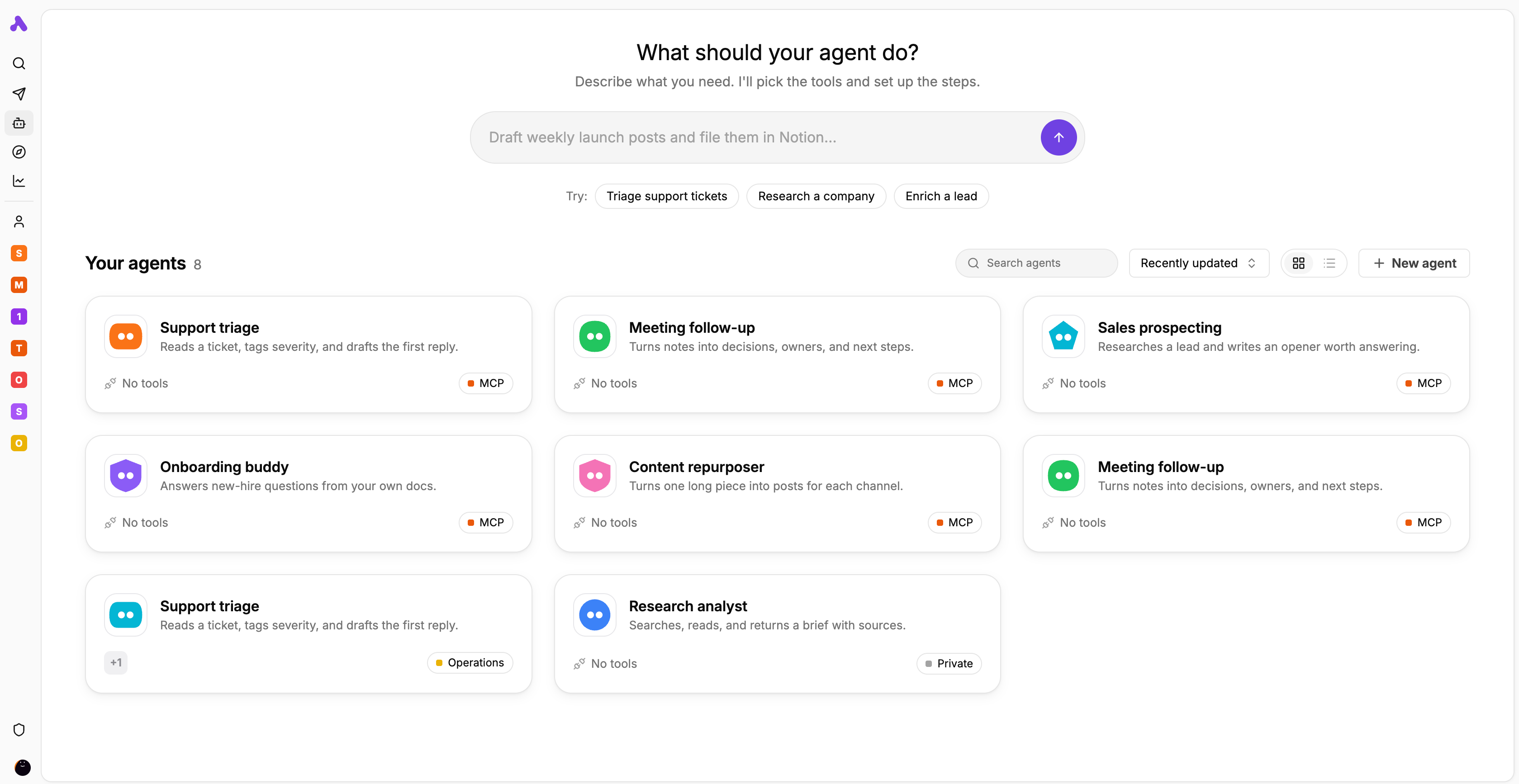
Agent library and task starters
The author’s interface preview displays agent cards for support, meeting follow-up, research and other tasks.
Licence
Lossless PNG-to-WebP conversion; original dimensions and decoded pixels preserved. No crop, generated input, execution claim or site test. Existing interface marks remain visible. Original tutorial annotations and validation states are retained; UI eras may differ between the source documentation screens.
Copyright (c) 2020-2024 Activepieces Inc.

Portions of this software are licensed as follows:

* All content that resides under the "packages/ee/" and "packages/server/api/src/app/ee" directory of this repository, if that directory exists, is licensed under the license defined in packages/ee/LICENSE
* All third party components incorporated into the Activepieces Inc Software are licensed under the original license provided by the owner of the applicable component.
* Content outside of the above mentioned directories or restrictions above is available under the "MIT Expat" license as defined below.

Permission is hereby granted, free of charge, to any person obtaining a copy
of this software and associated documentation files (the "Software"), to deal
in the Software without restriction, including without limitation the rights
to use, copy, modify, merge, publish, distribute, sublicense, and/or sell
copies of the Software, and to permit persons to whom the Software is
furnished to do so, subject to the following conditions:

The above copyright notice and this permission notice shall be included in all
copies or substantial portions of the Software.

THE SOFTWARE IS PROVIDED "AS IS", WITHOUT WARRANTY OF ANY KIND, EXPRESS OR
IMPLIED, INCLUDING BUT NOT LIMITED TO THE WARRANTIES OF MERCHANTABILITY,
FITNESS FOR A PARTICULAR PURPOSE AND NONINFRINGEMENT. IN NO EVENT SHALL THE
AUTHORS OR COPYRIGHT HOLDERS BE LIABLE FOR ANY CLAIM, DAMAGES OR OTHER
LIABILITY, WHETHER IN AN ACTION OF CONTRACT, TORT OR OTHERWISE, ARISING FROM,
OUT OF OR IN CONNECTION WITH THE SOFTWARE OR THE USE OR OTHER DEALINGS IN THE
SOFTWARE.
Présentation du produit
Activepieces relie les applications métier par un déclencheur et des actions successives. Une planification, un webhook ou un événement pris en charge lance le flux. Les étapes suivantes utilisent les sorties de leurs étapes parentes. Il faut vérifier l’opération précise, les droits du compte et les types de champs : le nom d’une application au catalogue ne garantit pas chaque action souhaitée.
Pour traiter une demande d’assistance, on peut envisager un agent publié qui renvoie une catégorie et un indicateur de contrôle humain, transmis ensuite à une action de destination. Le flux fixe la séquence et l’agent interprète la demande. Il s’agit d’un exemple de conception, sans mesure pratique. Vérifiez les sorties et les changements réels avant activation. Le choix du cloud ou d’un serveur propre reste distinct des droits sur les fonctionnalités.
Ce que propose Activepieces
- 01Déclencher des actions par planification, webhook ou événement de service.
- 02Associer les sorties avec le sélecteur de données et tester chaque étape pour vérifier les champs.
- 03Appeler un agent publié avec Run Agent et transmettre ses résultats structurés.
- 04Examiner états, entrées et sorties dans Runs ; développer des pieces en TypeScript.
Un parcours concret
- 01Pour les demandes d’assistance, vérifiez déclencheur et action cible avec les comptes réels ; préparez des exemples contrôlés.
- 02Testez le déclencheur, examinez sa sortie et conservez l’identifiant de demande. Associez objet et message.
- 03Si une classification est nécessaire, publiez l’agent et demandez des champs comme category et needs_human. Contrôlez types et valeurs manquantes.
- 04Configurez l’action cible avec des droits limités et vérifiez le résultat réel. Définissez la reconnaissance des demandes répétées.
- 05Publiez les modifications relues, inspectez Runs et désignez le responsable du rétablissement ainsi que le budget.
Résumé fondé sur la source ; les affirmations sur le produit n’ont pas été testées indépendamment.
Ce qui le distingue
Activepieces mérite examen si vous voulez relier visuellement des applications tout en pouvant maintenir le code des intégrations. Le cœur MIT et les fonctions commerciales obéissent à des licences différentes. Héberger soi-même implique une responsabilité opérationnelle, sans débloquer toutes les fonctions d’entreprise ni supprimer les coûts.
À qui il convient
- Équipes opérationnelles reliant des actions précises et contrôlant leurs résultats.
- Équipes ajoutant une classification par agent à une procédure définie.
- Développeurs pouvant maintenir des pieces ou une installation autonome.
Points à vérifier
- Enregistrer un brouillon ne change pas le flux publié ; un projet sensible peut demander une approbation.
- Un agent non publié peut figurer dans le sélecteur, mais doit être publié avant son exécution par un flux.
- Avant de répéter une action au résultat incertain, recherchez les enregistrements ou messages déjà créés.
- En auto-hébergement, prévoyez accès aux webhooks, sauvegardes et mises à jour. Copier le dossier d’installation ne sauvegarde pas le volume de la base.
Questions fréquentes
Enregistrer active-t-il immédiatement les changements ?
Non, il faut publier le flux. Dans un projet sensible, une personne disposant de la permission requise peut devoir approuver cette publication.
Toutes les fonctions auto-hébergées sont-elles sous MIT ?
Non. Le cœur est sous MIT, les fonctions d’entreprise et cloud ont des licences commerciales. Vérifiez édition, droits, infrastructure, maintenance et factures des services IA externes.
Comment examiner un échec ?
Ouvrez l’exécution dans Runs et contrôlez état, entrées et sorties de chaque étape. Avant de réessayer, vérifiez les écritures externes : un échec ne prouve pas l’annulation des actions précédentes.
Que faire si une action manque ?
Vérifiez les opérations du piece actuel. Un développeur peut créer un piece en TypeScript, mais doit gérer authentification, limites API, tests et maintenance.
Les informations ont été vérifiées le 7 nov. 2026 sur le site officiel ou la documentation primaire.