
Veja em ação
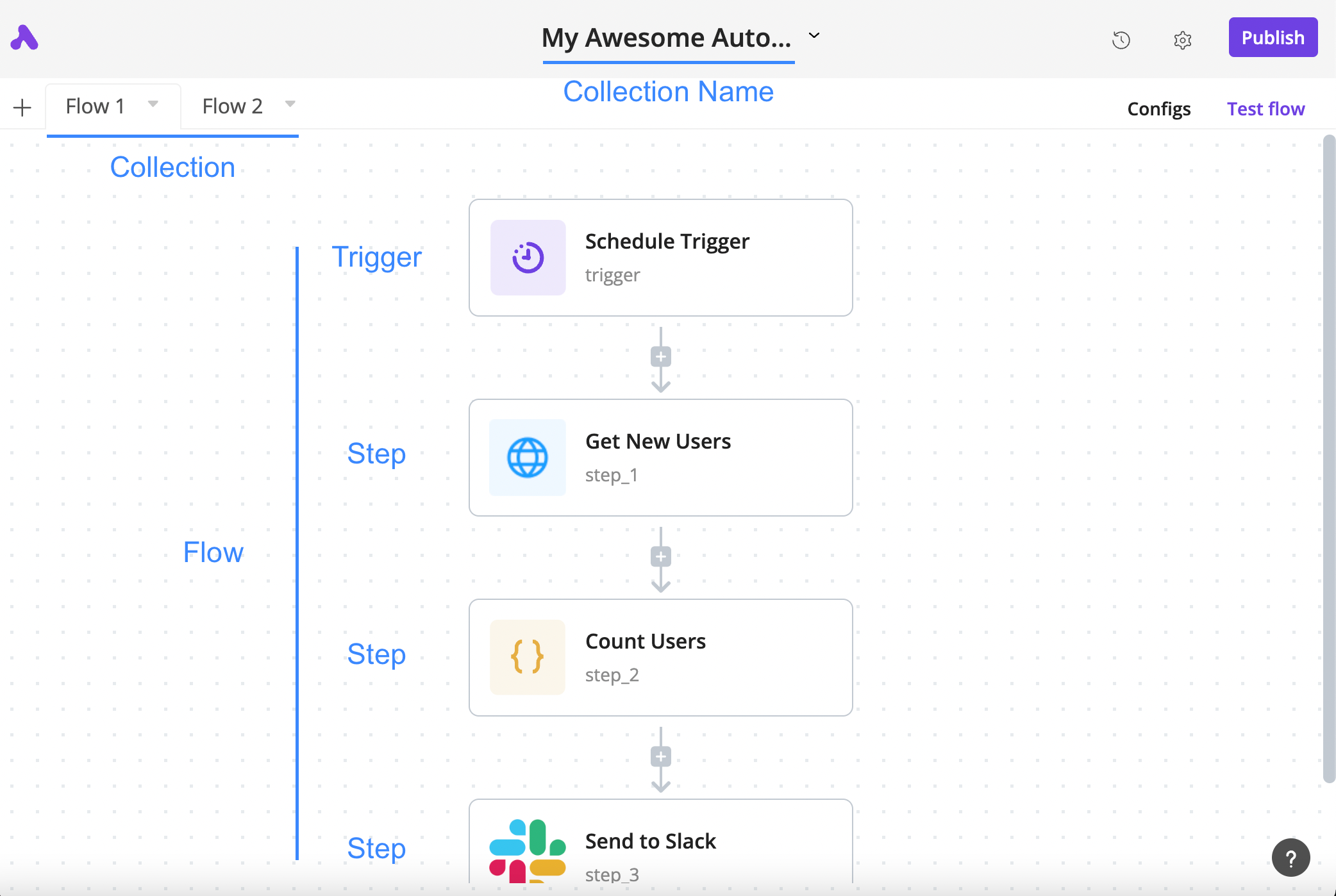
How a flow is arranged
The author’s annotated tutorial connects a schedule trigger, an HTTP step, a code step and a Slack step.
Licença
Lossless PNG-to-WebP conversion; original dimensions and decoded pixels preserved. No crop, generated input, execution claim or site test. Existing interface marks remain visible. Original tutorial annotations and validation states are retained; UI eras may differ between the source documentation screens.
Copyright (c) 2020-2024 Activepieces Inc.

Portions of this software are licensed as follows:

* All content that resides under the "packages/ee/" and "packages/server/api/src/app/ee" directory of this repository, if that directory exists, is licensed under the license defined in packages/ee/LICENSE
* All third party components incorporated into the Activepieces Inc Software are licensed under the original license provided by the owner of the applicable component.
* Content outside of the above mentioned directories or restrictions above is available under the "MIT Expat" license as defined below.

Permission is hereby granted, free of charge, to any person obtaining a copy
of this software and associated documentation files (the "Software"), to deal
in the Software without restriction, including without limitation the rights
to use, copy, modify, merge, publish, distribute, sublicense, and/or sell
copies of the Software, and to permit persons to whom the Software is
furnished to do so, subject to the following conditions:

The above copyright notice and this permission notice shall be included in all
copies or substantial portions of the Software.

THE SOFTWARE IS PROVIDED "AS IS", WITHOUT WARRANTY OF ANY KIND, EXPRESS OR
IMPLIED, INCLUDING BUT NOT LIMITED TO THE WARRANTIES OF MERCHANTABILITY,
FITNESS FOR A PARTICULAR PURPOSE AND NONINFRINGEMENT. IN NO EVENT SHALL THE
AUTHORS OR COPYRIGHT HOLDERS BE LIABLE FOR ANY CLAIM, DAMAGES OR OTHER
LIABILITY, WHETHER IN AN ACTION OF CONTRACT, TORT OR OTHERWISE, ARISING FROM,
OUT OF OR IN CONNECTION WITH THE SOFTWARE OR THE USE OR OTHER DEALINGS IN THE
SOFTWARE.
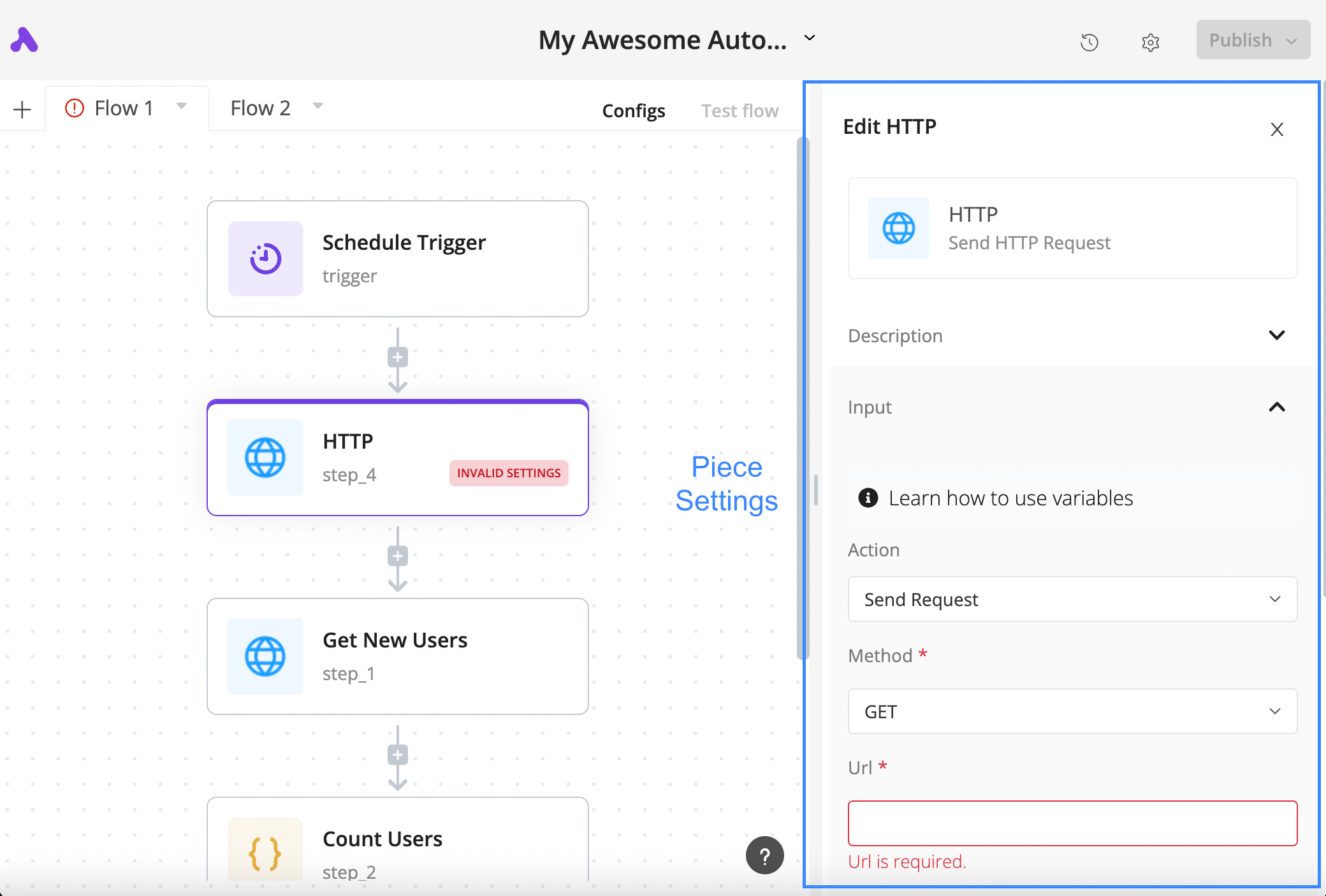
Configure an HTTP step
The author’s tutorial shows a selected HTTP block, its settings panel and the required URL field in a validation state.
Licença
Lossless PNG-to-WebP conversion; original dimensions and decoded pixels preserved. No crop, generated input, execution claim or site test. Existing interface marks remain visible. Original tutorial annotations and validation states are retained; UI eras may differ between the source documentation screens.
Copyright (c) 2020-2024 Activepieces Inc.

Portions of this software are licensed as follows:

* All content that resides under the "packages/ee/" and "packages/server/api/src/app/ee" directory of this repository, if that directory exists, is licensed under the license defined in packages/ee/LICENSE
* All third party components incorporated into the Activepieces Inc Software are licensed under the original license provided by the owner of the applicable component.
* Content outside of the above mentioned directories or restrictions above is available under the "MIT Expat" license as defined below.

Permission is hereby granted, free of charge, to any person obtaining a copy
of this software and associated documentation files (the "Software"), to deal
in the Software without restriction, including without limitation the rights
to use, copy, modify, merge, publish, distribute, sublicense, and/or sell
copies of the Software, and to permit persons to whom the Software is
furnished to do so, subject to the following conditions:

The above copyright notice and this permission notice shall be included in all
copies or substantial portions of the Software.

THE SOFTWARE IS PROVIDED "AS IS", WITHOUT WARRANTY OF ANY KIND, EXPRESS OR
IMPLIED, INCLUDING BUT NOT LIMITED TO THE WARRANTIES OF MERCHANTABILITY,
FITNESS FOR A PARTICULAR PURPOSE AND NONINFRINGEMENT. IN NO EVENT SHALL THE
AUTHORS OR COPYRIGHT HOLDERS BE LIABLE FOR ANY CLAIM, DAMAGES OR OTHER
LIABILITY, WHETHER IN AN ACTION OF CONTRACT, TORT OR OTHERWISE, ARISING FROM,
OUT OF OR IN CONNECTION WITH THE SOFTWARE OR THE USE OR OTHER DEALINGS IN THE
SOFTWARE.
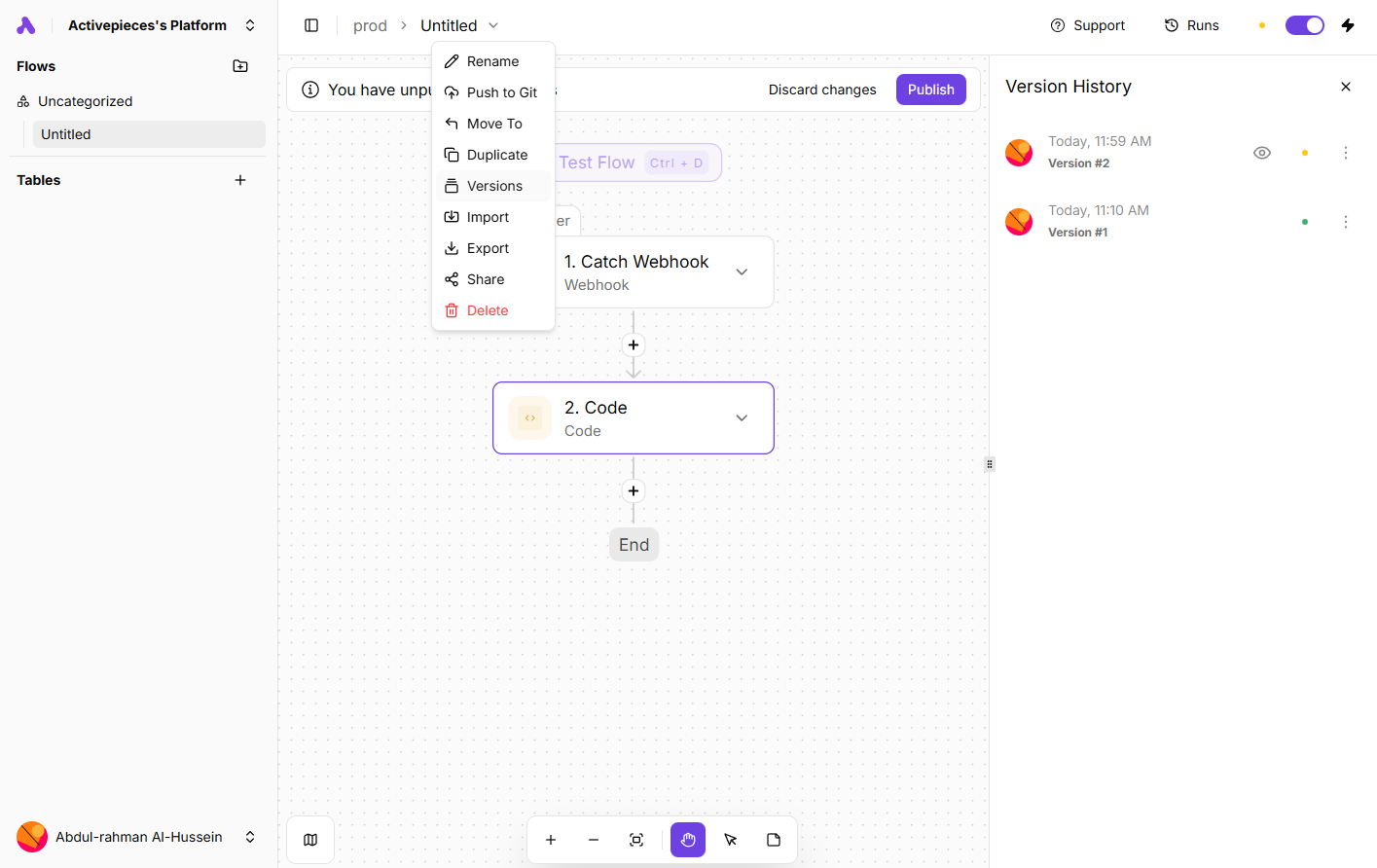
Inspect saved flow versions
An author-documentation screenshot shows the Versions menu and history panel alongside a webhook-and-code flow.
Licença
Lossless PNG-to-WebP conversion; original dimensions and decoded pixels preserved. No crop, generated input, execution claim or site test. Existing interface marks remain visible. Original tutorial annotations and validation states are retained; UI eras may differ between the source documentation screens.
Copyright (c) 2020-2024 Activepieces Inc.

Portions of this software are licensed as follows:

* All content that resides under the "packages/ee/" and "packages/server/api/src/app/ee" directory of this repository, if that directory exists, is licensed under the license defined in packages/ee/LICENSE
* All third party components incorporated into the Activepieces Inc Software are licensed under the original license provided by the owner of the applicable component.
* Content outside of the above mentioned directories or restrictions above is available under the "MIT Expat" license as defined below.

Permission is hereby granted, free of charge, to any person obtaining a copy
of this software and associated documentation files (the "Software"), to deal
in the Software without restriction, including without limitation the rights
to use, copy, modify, merge, publish, distribute, sublicense, and/or sell
copies of the Software, and to permit persons to whom the Software is
furnished to do so, subject to the following conditions:

The above copyright notice and this permission notice shall be included in all
copies or substantial portions of the Software.

THE SOFTWARE IS PROVIDED "AS IS", WITHOUT WARRANTY OF ANY KIND, EXPRESS OR
IMPLIED, INCLUDING BUT NOT LIMITED TO THE WARRANTIES OF MERCHANTABILITY,
FITNESS FOR A PARTICULAR PURPOSE AND NONINFRINGEMENT. IN NO EVENT SHALL THE
AUTHORS OR COPYRIGHT HOLDERS BE LIABLE FOR ANY CLAIM, DAMAGES OR OTHER
LIABILITY, WHETHER IN AN ACTION OF CONTRACT, TORT OR OTHERWISE, ARISING FROM,
OUT OF OR IN CONNECTION WITH THE SOFTWARE OR THE USE OR OTHER DEALINGS IN THE
SOFTWARE.
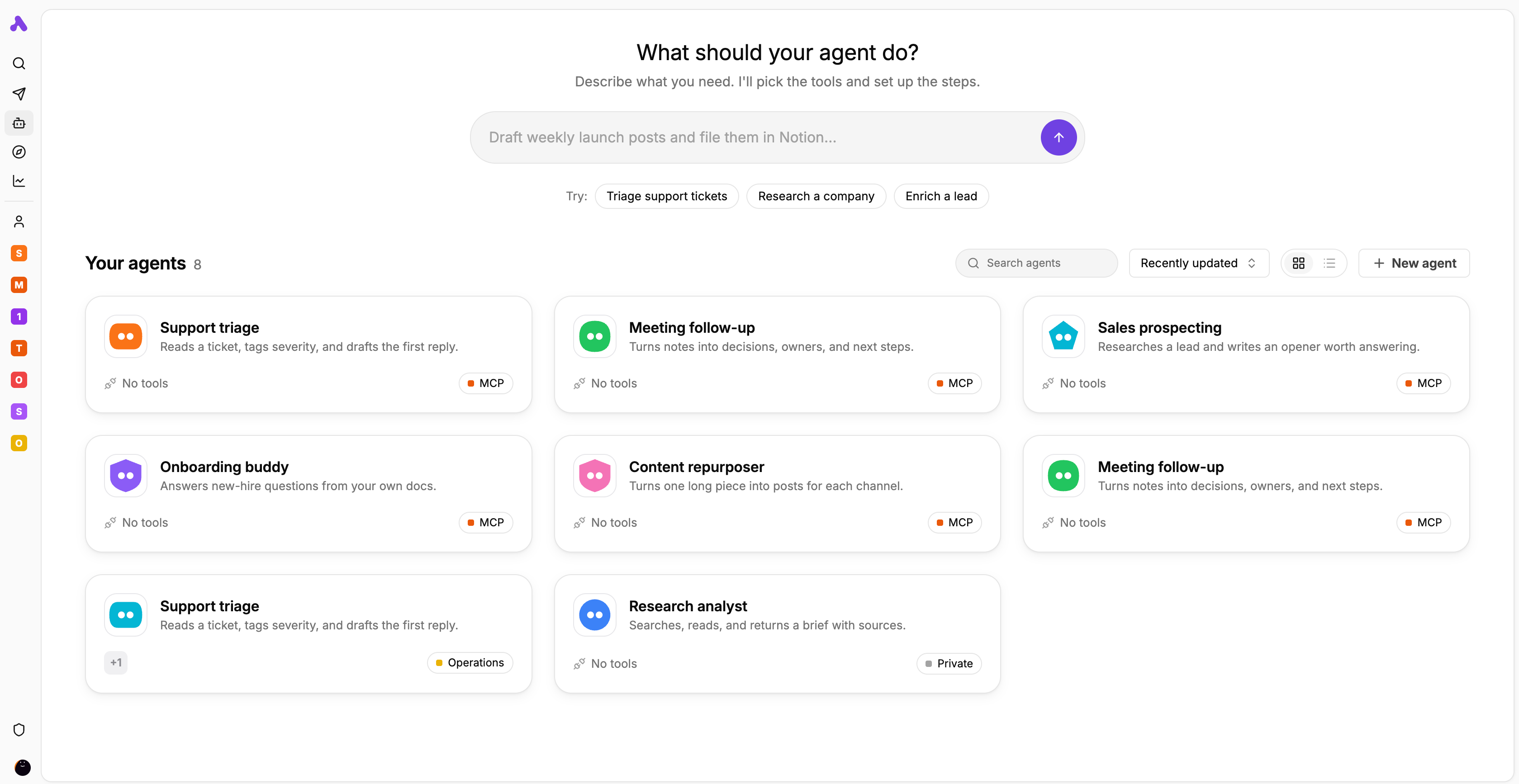
Agent library and task starters
The author’s interface preview displays agent cards for support, meeting follow-up, research and other tasks.
Licença
Lossless PNG-to-WebP conversion; original dimensions and decoded pixels preserved. No crop, generated input, execution claim or site test. Existing interface marks remain visible. Original tutorial annotations and validation states are retained; UI eras may differ between the source documentation screens.
Copyright (c) 2020-2024 Activepieces Inc.

Portions of this software are licensed as follows:

* All content that resides under the "packages/ee/" and "packages/server/api/src/app/ee" directory of this repository, if that directory exists, is licensed under the license defined in packages/ee/LICENSE
* All third party components incorporated into the Activepieces Inc Software are licensed under the original license provided by the owner of the applicable component.
* Content outside of the above mentioned directories or restrictions above is available under the "MIT Expat" license as defined below.

Permission is hereby granted, free of charge, to any person obtaining a copy
of this software and associated documentation files (the "Software"), to deal
in the Software without restriction, including without limitation the rights
to use, copy, modify, merge, publish, distribute, sublicense, and/or sell
copies of the Software, and to permit persons to whom the Software is
furnished to do so, subject to the following conditions:

The above copyright notice and this permission notice shall be included in all
copies or substantial portions of the Software.

THE SOFTWARE IS PROVIDED "AS IS", WITHOUT WARRANTY OF ANY KIND, EXPRESS OR
IMPLIED, INCLUDING BUT NOT LIMITED TO THE WARRANTIES OF MERCHANTABILITY,
FITNESS FOR A PARTICULAR PURPOSE AND NONINFRINGEMENT. IN NO EVENT SHALL THE
AUTHORS OR COPYRIGHT HOLDERS BE LIABLE FOR ANY CLAIM, DAMAGES OR OTHER
LIABILITY, WHETHER IN AN ACTION OF CONTRACT, TORT OR OTHERWISE, ARISING FROM,
OUT OF OR IN CONNECTION WITH THE SOFTWARE OR THE USE OR OTHER DEALINGS IN THE
SOFTWARE.
Visão geral do produto
O Activepieces liga aplicações de negócio através de um acionador e de ações seguintes. Um horário, webhook ou evento suportado inicia o fluxo. Os passos posteriores usam os resultados dos seus passos anteriores na sequência. É preciso confirmar a operação concreta, as permissões da conta e os tipos dos campos; o nome de uma aplicação no catálogo não garante uma ação específica.
Num exemplo de receção de pedidos de apoio, um agente publicado pode devolver uma categoria e um indicador de revisão humana, que seguem para uma ação de destino. O fluxo define a sequência e o agente interpreta o pedido. Trata-se de um exemplo de desenho, sem medições práticas. Antes de ativar, verifique os resultados e as alterações no destino. A escolha entre cloud e instalação própria é distinta dos direitos de utilização das funções.
O que o Activepieces oferece
- 01Iniciar ações através de horário, webhook ou evento de um serviço.
- 02Mapear resultados no seletor de dados e testar cada passo para obter campos representativos.
- 03Usar Run Agent com um agente publicado e aproveitar os seus resultados estruturados.
- 04Consultar estado, entradas e saídas em Runs; desenvolver pieces em TypeScript.
Um fluxo prático
- 01Para pedidos de apoio, confirme o acionador e a ação de destino nas contas reais e prepare exemplos controlados.
- 02Teste o acionador, examine os resultados e preserve o identificador do pedido. Mapeie assunto e mensagem.
- 03Se precisar de classificação, publique primeiro o agente e peça campos como category e needs_human. Verifique tipos e valores ausentes.
- 04Limite as permissões da ação de destino e confirme o registo ou mensagem criados. Defina como reconhecer pedidos repetidos.
- 05Publique as alterações revistas, consulte Runs e determine o responsável pela recuperação e o orçamento.
Resumo baseado na fonte; as afirmações do produto não foram testadas de forma independente.
O que o diferencia
Considere o Activepieces se pretende ligação visual de aplicações com possibilidade de manter o código das integrações. O núcleo MIT e as funções comerciais têm condições diferentes. O alojamento próprio implica gerir a infraestrutura; não desbloqueia todas as funções empresariais nem elimina os custos.
Para quem é indicado
- Equipas operacionais que ligam ações concretas e verificam resultados.
- Equipas que acrescentam classificação por agentes a um processo definido.
- Programadores capazes de manter pieces ou uma instalação própria.
O que confirmar
- Guardar um rascunho não altera o fluxo publicado; projetos sensíveis podem exigir aprovação.
- Um agente ainda não publicado pode aparecer na lista, mas não pode ser executado pelo fluxo.
- Antes de repetir uma ação com resultado incerto, procure registos ou mensagens já criados.
- No alojamento próprio, planeie acesso externo aos webhooks, cópias da base de dados e atualizações. Copiar a pasta de instalação não copia o volume da base de dados.
Perguntas frequentes
Guardar ativa logo a alteração?
Não. É necessário publicar o fluxo. Em projetos sensíveis, a publicação pode depender de aprovação por alguém com a permissão necessária.
Toda a instalação própria tem licença MIT?
Não. O núcleo tem MIT; as funções empresariais e cloud têm licenças comerciais. Confirme a edição, os direitos e os custos de infraestrutura, manutenção e serviços externos de IA.
Como investigar uma falha?
Abra a execução em Runs e consulte estado, entradas e saídas por passo. Antes de repetir, confirme se já houve uma escrita externa; uma falha não prova que as ações anteriores foram anuladas.
E se faltar uma operação?
Verifique primeiro as ações do piece atual. Pode desenvolver uma integração em TypeScript, mas terá de gerir autenticação, limites da API, testes e manutenção.
As informações foram conferidas em 7 de nov. de 2026 com o site oficial ou documentação primária.