
Ver en acción
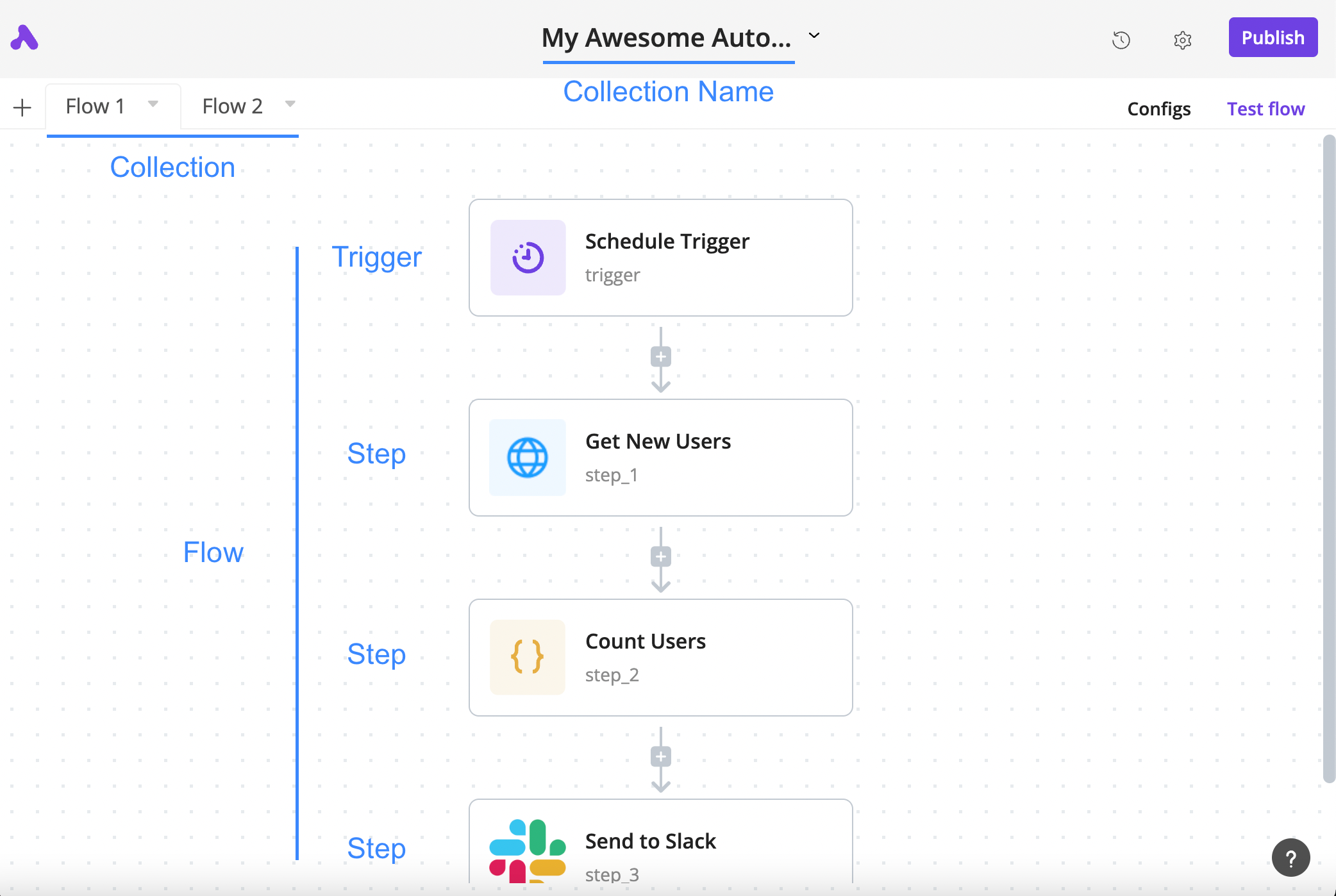
How a flow is arranged
The author’s annotated tutorial connects a schedule trigger, an HTTP step, a code step and a Slack step.
Licencia
Lossless PNG-to-WebP conversion; original dimensions and decoded pixels preserved. No crop, generated input, execution claim or site test. Existing interface marks remain visible. Original tutorial annotations and validation states are retained; UI eras may differ between the source documentation screens.
Copyright (c) 2020-2024 Activepieces Inc.

Portions of this software are licensed as follows:

* All content that resides under the "packages/ee/" and "packages/server/api/src/app/ee" directory of this repository, if that directory exists, is licensed under the license defined in packages/ee/LICENSE
* All third party components incorporated into the Activepieces Inc Software are licensed under the original license provided by the owner of the applicable component.
* Content outside of the above mentioned directories or restrictions above is available under the "MIT Expat" license as defined below.

Permission is hereby granted, free of charge, to any person obtaining a copy
of this software and associated documentation files (the "Software"), to deal
in the Software without restriction, including without limitation the rights
to use, copy, modify, merge, publish, distribute, sublicense, and/or sell
copies of the Software, and to permit persons to whom the Software is
furnished to do so, subject to the following conditions:

The above copyright notice and this permission notice shall be included in all
copies or substantial portions of the Software.

THE SOFTWARE IS PROVIDED "AS IS", WITHOUT WARRANTY OF ANY KIND, EXPRESS OR
IMPLIED, INCLUDING BUT NOT LIMITED TO THE WARRANTIES OF MERCHANTABILITY,
FITNESS FOR A PARTICULAR PURPOSE AND NONINFRINGEMENT. IN NO EVENT SHALL THE
AUTHORS OR COPYRIGHT HOLDERS BE LIABLE FOR ANY CLAIM, DAMAGES OR OTHER
LIABILITY, WHETHER IN AN ACTION OF CONTRACT, TORT OR OTHERWISE, ARISING FROM,
OUT OF OR IN CONNECTION WITH THE SOFTWARE OR THE USE OR OTHER DEALINGS IN THE
SOFTWARE.
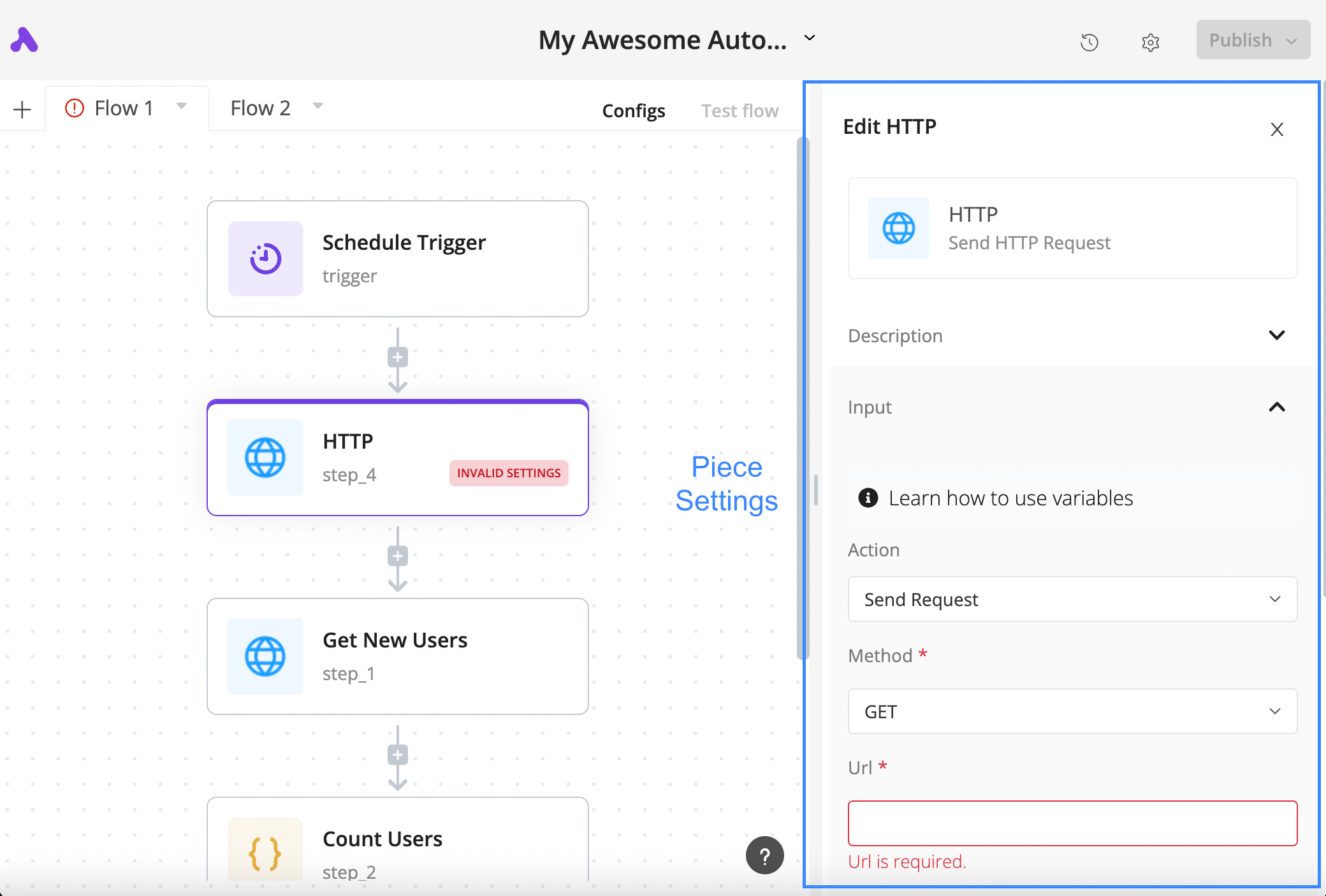
Configure an HTTP step
The author’s tutorial shows a selected HTTP block, its settings panel and the required URL field in a validation state.
Licencia
Lossless PNG-to-WebP conversion; original dimensions and decoded pixels preserved. No crop, generated input, execution claim or site test. Existing interface marks remain visible. Original tutorial annotations and validation states are retained; UI eras may differ between the source documentation screens.
Copyright (c) 2020-2024 Activepieces Inc.

Portions of this software are licensed as follows:

* All content that resides under the "packages/ee/" and "packages/server/api/src/app/ee" directory of this repository, if that directory exists, is licensed under the license defined in packages/ee/LICENSE
* All third party components incorporated into the Activepieces Inc Software are licensed under the original license provided by the owner of the applicable component.
* Content outside of the above mentioned directories or restrictions above is available under the "MIT Expat" license as defined below.

Permission is hereby granted, free of charge, to any person obtaining a copy
of this software and associated documentation files (the "Software"), to deal
in the Software without restriction, including without limitation the rights
to use, copy, modify, merge, publish, distribute, sublicense, and/or sell
copies of the Software, and to permit persons to whom the Software is
furnished to do so, subject to the following conditions:

The above copyright notice and this permission notice shall be included in all
copies or substantial portions of the Software.

THE SOFTWARE IS PROVIDED "AS IS", WITHOUT WARRANTY OF ANY KIND, EXPRESS OR
IMPLIED, INCLUDING BUT NOT LIMITED TO THE WARRANTIES OF MERCHANTABILITY,
FITNESS FOR A PARTICULAR PURPOSE AND NONINFRINGEMENT. IN NO EVENT SHALL THE
AUTHORS OR COPYRIGHT HOLDERS BE LIABLE FOR ANY CLAIM, DAMAGES OR OTHER
LIABILITY, WHETHER IN AN ACTION OF CONTRACT, TORT OR OTHERWISE, ARISING FROM,
OUT OF OR IN CONNECTION WITH THE SOFTWARE OR THE USE OR OTHER DEALINGS IN THE
SOFTWARE.
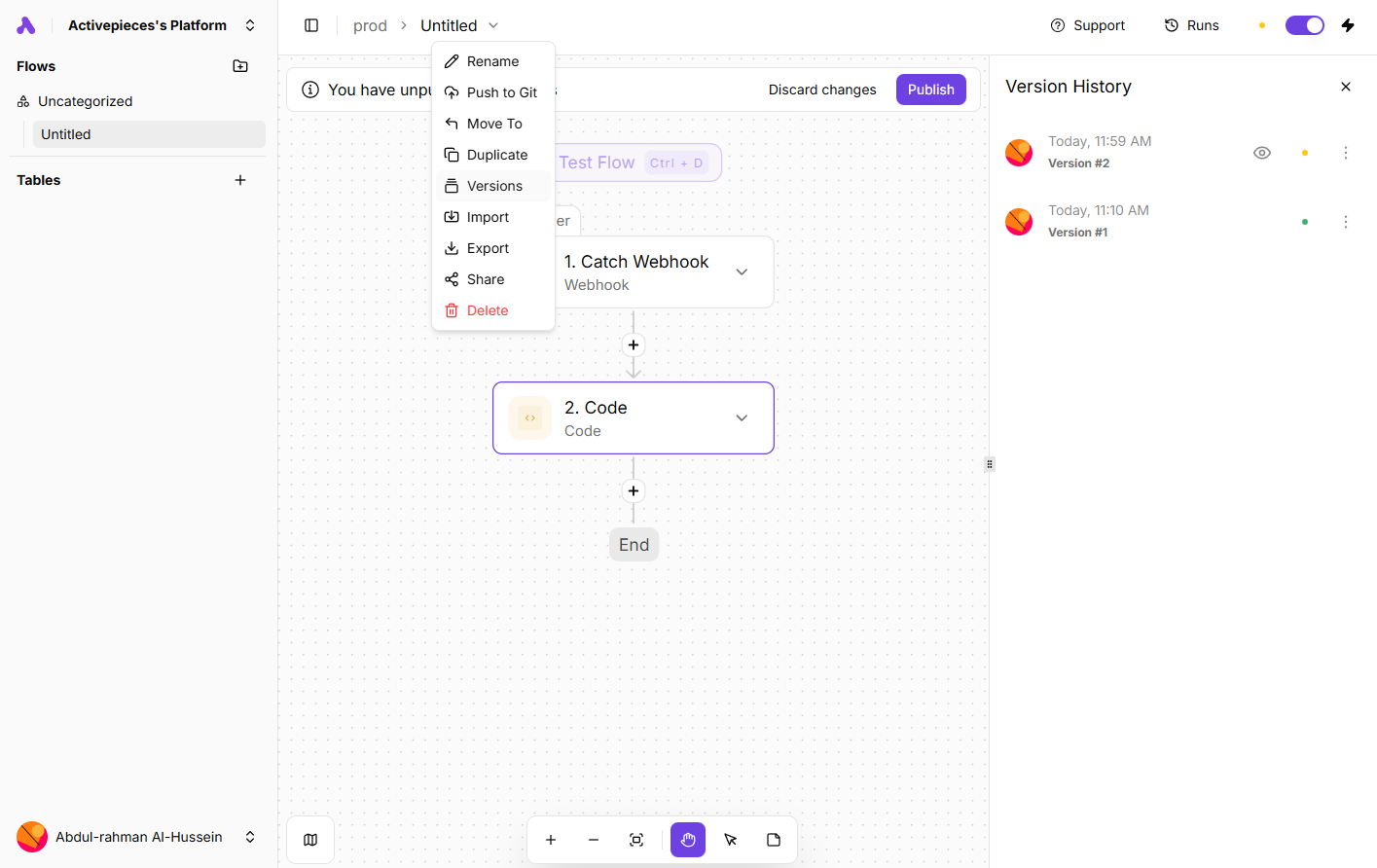
Inspect saved flow versions
An author-documentation screenshot shows the Versions menu and history panel alongside a webhook-and-code flow.
Licencia
Lossless PNG-to-WebP conversion; original dimensions and decoded pixels preserved. No crop, generated input, execution claim or site test. Existing interface marks remain visible. Original tutorial annotations and validation states are retained; UI eras may differ between the source documentation screens.
Copyright (c) 2020-2024 Activepieces Inc.

Portions of this software are licensed as follows:

* All content that resides under the "packages/ee/" and "packages/server/api/src/app/ee" directory of this repository, if that directory exists, is licensed under the license defined in packages/ee/LICENSE
* All third party components incorporated into the Activepieces Inc Software are licensed under the original license provided by the owner of the applicable component.
* Content outside of the above mentioned directories or restrictions above is available under the "MIT Expat" license as defined below.

Permission is hereby granted, free of charge, to any person obtaining a copy
of this software and associated documentation files (the "Software"), to deal
in the Software without restriction, including without limitation the rights
to use, copy, modify, merge, publish, distribute, sublicense, and/or sell
copies of the Software, and to permit persons to whom the Software is
furnished to do so, subject to the following conditions:

The above copyright notice and this permission notice shall be included in all
copies or substantial portions of the Software.

THE SOFTWARE IS PROVIDED "AS IS", WITHOUT WARRANTY OF ANY KIND, EXPRESS OR
IMPLIED, INCLUDING BUT NOT LIMITED TO THE WARRANTIES OF MERCHANTABILITY,
FITNESS FOR A PARTICULAR PURPOSE AND NONINFRINGEMENT. IN NO EVENT SHALL THE
AUTHORS OR COPYRIGHT HOLDERS BE LIABLE FOR ANY CLAIM, DAMAGES OR OTHER
LIABILITY, WHETHER IN AN ACTION OF CONTRACT, TORT OR OTHERWISE, ARISING FROM,
OUT OF OR IN CONNECTION WITH THE SOFTWARE OR THE USE OR OTHER DEALINGS IN THE
SOFTWARE.
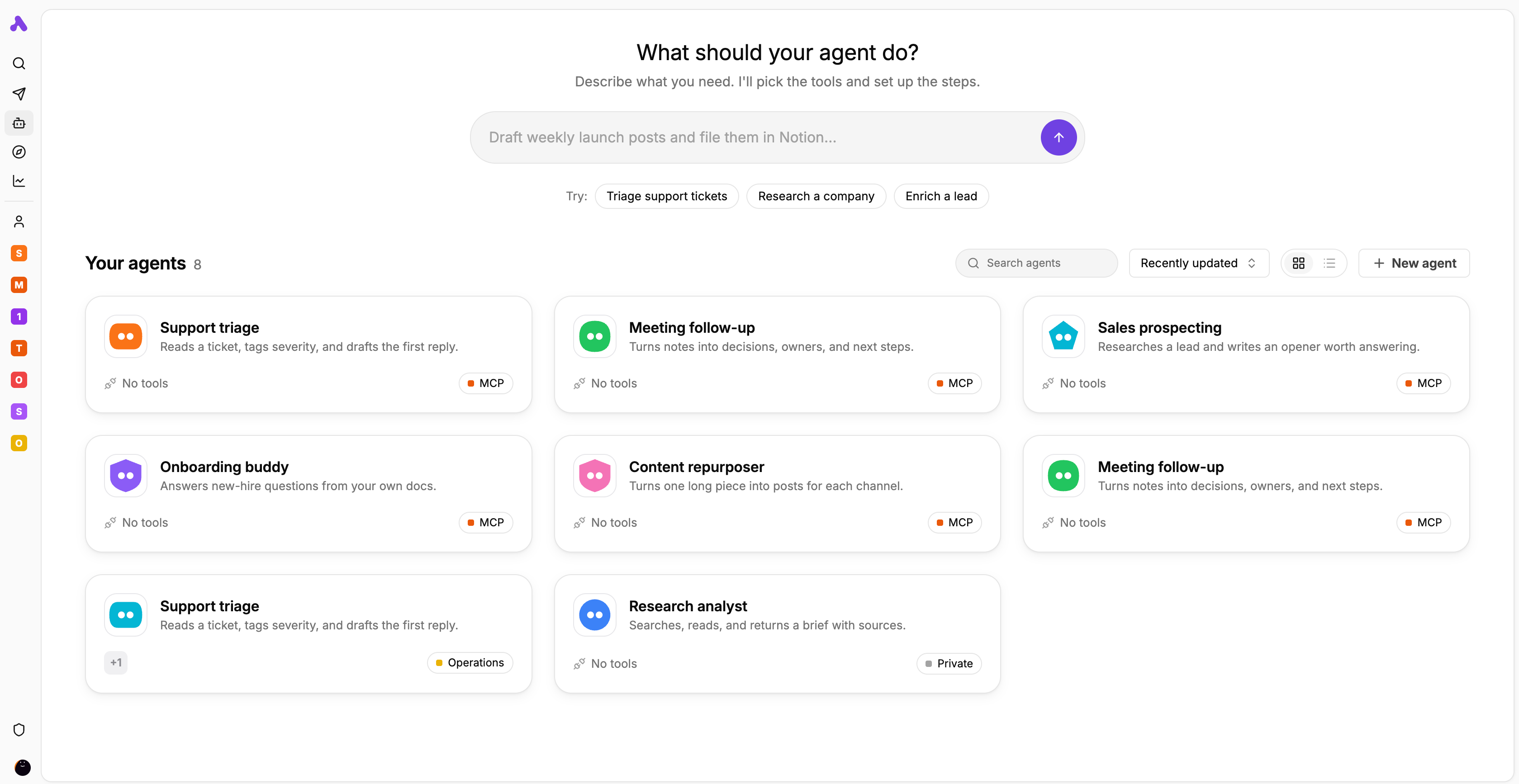
Agent library and task starters
The author’s interface preview displays agent cards for support, meeting follow-up, research and other tasks.
Licencia
Lossless PNG-to-WebP conversion; original dimensions and decoded pixels preserved. No crop, generated input, execution claim or site test. Existing interface marks remain visible. Original tutorial annotations and validation states are retained; UI eras may differ between the source documentation screens.
Copyright (c) 2020-2024 Activepieces Inc.

Portions of this software are licensed as follows:

* All content that resides under the "packages/ee/" and "packages/server/api/src/app/ee" directory of this repository, if that directory exists, is licensed under the license defined in packages/ee/LICENSE
* All third party components incorporated into the Activepieces Inc Software are licensed under the original license provided by the owner of the applicable component.
* Content outside of the above mentioned directories or restrictions above is available under the "MIT Expat" license as defined below.

Permission is hereby granted, free of charge, to any person obtaining a copy
of this software and associated documentation files (the "Software"), to deal
in the Software without restriction, including without limitation the rights
to use, copy, modify, merge, publish, distribute, sublicense, and/or sell
copies of the Software, and to permit persons to whom the Software is
furnished to do so, subject to the following conditions:

The above copyright notice and this permission notice shall be included in all
copies or substantial portions of the Software.

THE SOFTWARE IS PROVIDED "AS IS", WITHOUT WARRANTY OF ANY KIND, EXPRESS OR
IMPLIED, INCLUDING BUT NOT LIMITED TO THE WARRANTIES OF MERCHANTABILITY,
FITNESS FOR A PARTICULAR PURPOSE AND NONINFRINGEMENT. IN NO EVENT SHALL THE
AUTHORS OR COPYRIGHT HOLDERS BE LIABLE FOR ANY CLAIM, DAMAGES OR OTHER
LIABILITY, WHETHER IN AN ACTION OF CONTRACT, TORT OR OTHERWISE, ARISING FROM,
OUT OF OR IN CONNECTION WITH THE SOFTWARE OR THE USE OR OTHER DEALINGS IN THE
SOFTWARE.
Descripción del producto
Activepieces conecta aplicaciones empresariales mediante un disparador y acciones posteriores. Una programación, un webhook o un evento compatible inicia el flujo. Los pasos siguientes utilizan las salidas de sus pasos anteriores en la jerarquía. Hay que comprobar la operación concreta, los permisos y los tipos de datos; que una aplicación figure en el catálogo no garantiza cualquier acción.
Como ejemplo de recepción de consultas, un agente publicado podría devolver una categoría y una indicación de revisión humana para una acción de destino. El flujo establece la secuencia y el agente interpreta la solicitud. Es un ejemplo de diseño, sin mediciones prácticas. Revisa las salidas y los cambios reales antes de activarlo. Elegir entre nube y alojamiento propio es una decisión distinta de los derechos sobre las funciones.
Qué ofrece Activepieces
- 01Iniciar acciones desde una programación, un webhook o un evento de servicio.
- 02Asignar salidas con el selector de datos y probar cada paso para comprobar los campos disponibles.
- 03Llamar a un agente publicado con Run Agent y aprovechar resultados estructurados.
- 04Revisar estado, entradas y salidas en Runs; desarrollar pieces en TypeScript.
Un flujo práctico
- 01Para consultas de soporte, comprueba el disparador y la acción de destino con las cuentas reales; usa ejemplos controlados.
- 02Prueba el disparador, examina sus salidas y conserva el identificador de consulta. Asigna asunto y mensaje.
- 03Si necesitas clasificación, publica primero el agente y solicita campos como category y needs_human. Valida tipos y valores ausentes.
- 04Limita los permisos de la acción de destino y verifica el registro o mensaje creado. Define cómo reconocer solicitudes repetidas.
- 05Publica los cambios revisados, consulta Runs y establece responsable de recuperación y presupuesto.
Resumen basado en la fuente; las afirmaciones del producto no se han probado de forma independiente.
Qué lo diferencia
Considera Activepieces si quieres automatización visual con la opción de mantener el código de las integraciones. El núcleo MIT y las funciones comerciales tienen condiciones distintas. Alojarlo implica asumir la infraestructura; no desbloquea todas las funciones empresariales ni elimina los costes.
Para quién es adecuado
- Equipos operativos que conectan acciones concretas y verifican resultados.
- Equipos que añaden clasificación por agentes a un proceso definido.
- Desarrolladores capaces de mantener pieces o una instalación propia.
Qué comprobar
- Guardar un borrador no modifica el flujo publicado; un proyecto sensible puede exigir aprobación.
- Un agente sin publicar puede aparecer en la lista, pero necesita publicarse antes de ejecutarse desde un flujo.
- Antes de repetir una acción con resultado incierto, busca registros o mensajes ya creados.
- En alojamiento propio, planifica acceso a webhooks, copias de la base de datos y actualizaciones. Copiar la carpeta de instalación no respalda el volumen de datos.
Preguntas frecuentes
¿Guardar activa inmediatamente los cambios?
No. Debes publicar el flujo. En proyectos sensibles puede requerirse aprobación de un usuario con el permiso correspondiente.
¿Todas las funciones autoalojadas tienen licencia MIT?
No. El núcleo usa MIT, mientras las funciones empresariales y de nube tienen licencias comerciales. Revisa edición, derechos, infraestructura, mantenimiento y costes externos de IA.
¿Cómo investigo un fallo?
Abre la ejecución en Runs y examina estado, entradas y salidas de cada paso. Comprueba las escrituras externas antes de reintentar: el fallo no demuestra que las acciones anteriores se hayan deshecho.
¿Qué pasa si falta una acción?
Comprueba las operaciones del piece actual. Puedes desarrollar uno con TypeScript, pero debes ocuparte de autenticación, límites de API, pruebas y mantenimiento.
La información se contrastó el 7 nov 2026 con el sitio oficial o documentación primaria.