In Aktion ansehen
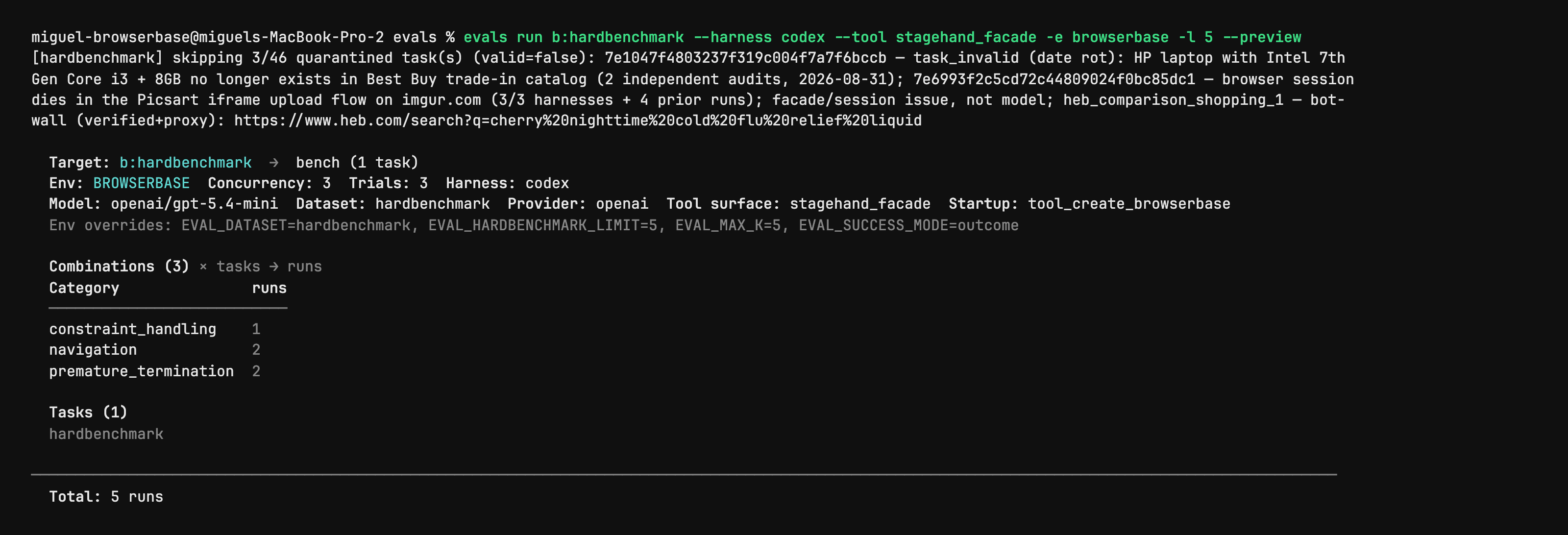
Stagehand Evals: inspect the plan before starting browsers
Author CLI capture shows evals run with --preview, selected harness/model, task counts and quarantined cases. It is a dry-run plan from the evaluation utility, not a browser action, a successful benchmark or an independent performance result. Full native capture is retained.
Lizenz
PNG converted to lossless WebP with entire native RGBA equal. No crop, resize or new test. Author shell prompt, model label and dataset notes remain part of the capture.
MIT License

Copyright (c) 2024 Browserbase Inc.

Permission is hereby granted, free of charge, to any person obtaining a copy
of this software and associated documentation files (the "Software"), to deal
in the Software without restriction, including without limitation the rights
to use, copy, modify, merge, publish, distribute, sublicense, and/or sell
copies of the Software, and to permit persons to whom the Software is
furnished to do so, subject to the following conditions:

The above copyright notice and this permission notice shall be included in all
copies or substantial portions of the Software.

THE SOFTWARE IS PROVIDED "AS IS", WITHOUT WARRANTY OF ANY KIND, EXPRESS OR
IMPLIED, INCLUDING BUT NOT LIMITED TO THE WARRANTIES OF MERCHANTABILITY,
FITNESS FOR A PARTICULAR PURPOSE AND NONINFRINGEMENT. IN NO EVENT SHALL THE
AUTHORS OR COPYRIGHT HOLDERS BE LIABLE FOR ANY CLAIM, DAMAGES OR OTHER
LIABILITY, WHETHER IN AN ACTION OF CONTRACT, TORT OR OTHERWISE, ARISING FROM,
OUT OF OR IN CONNECTION WITH THE SOFTWARE OR THE USE OR OTHER DEALINGS IN THE
SOFTWARE.
Stagehand source example: act on an Example Domain link
Full original TypeScript file asks the agent to click the More information link and checks its returned success field. Run from the matching Stagehand SDK repository: it imports ../src/index.js and dotenv, needs local Chrome and OPENAI_API_KEY; extract also needs zod/v4. Source model label is preserved without an availability or successful-run claim.
Beispieleingabe
import "dotenv/config";
import { localBrowser, Stagehand } from "../src/index.js";

const { OPENAI_API_KEY } = process.env;
if (!OPENAI_API_KEY) throw new Error();

const browser = await localBrowser.launch({ headless: true });
const stagehand = await Stagehand.create({
  browser,
  model: {
    modelName: "openai/gpt-5.4-mini",
    apiKey: OPENAI_API_KEY,
  },
});

const [page] = await browser.context.pages();
await page.goto("https://example.com");

const result = await stagehand.act(
  "Click the link that provides more information about Example Domain",
);

console.log(JSON.stringify(result.data, null, 2));

if (!result.data.success) {
  throw new Error(`act() failed: ${result.data.message}`);
}

await stagehand.close();
await browser.close();
Lizenz
Complete original source file unchanged; editorial title, context and prerequisites added. No installation, account operation, model call, form submission or claimed result was executed.
MIT License

Copyright (c) 2024 Browserbase Inc.

Permission is hereby granted, free of charge, to any person obtaining a copy
of this software and associated documentation files (the "Software"), to deal
in the Software without restriction, including without limitation the rights
to use, copy, modify, merge, publish, distribute, sublicense, and/or sell
copies of the Software, and to permit persons to whom the Software is
furnished to do so, subject to the following conditions:

The above copyright notice and this permission notice shall be included in all
copies or substantial portions of the Software.

THE SOFTWARE IS PROVIDED "AS IS", WITHOUT WARRANTY OF ANY KIND, EXPRESS OR
IMPLIED, INCLUDING BUT NOT LIMITED TO THE WARRANTIES OF MERCHANTABILITY,
FITNESS FOR A PARTICULAR PURPOSE AND NONINFRINGEMENT. IN NO EVENT SHALL THE
AUTHORS OR COPYRIGHT HOLDERS BE LIABLE FOR ANY CLAIM, DAMAGES OR OTHER
LIABILITY, WHETHER IN AN ACTION OF CONTRACT, TORT OR OTHERWISE, ARISING FROM,
OUT OF OR IN CONNECTION WITH THE SOFTWARE OR THE USE OR OTHER DEALINGS IN THE
SOFTWARE.
Stagehand source example: inspect candidate page actions
Full original TypeScript file asks for the Example Domain link and checks that matching actions were returned. Run from the matching Stagehand SDK repository: it imports ../src/index.js and dotenv, needs local Chrome and OPENAI_API_KEY; extract also needs zod/v4. Source model label is preserved without an availability or successful-run claim.
Beispieleingabe
import "dotenv/config";
import { localBrowser, Stagehand } from "../src/index.js";

const { OPENAI_API_KEY } = process.env;
if (!OPENAI_API_KEY) throw new Error();

const browser = await localBrowser.launch({ headless: true });
const stagehand = await Stagehand.create({
  browser,
  model: {
    modelName: "openai/gpt-5.4-mini",
    apiKey: OPENAI_API_KEY,
  },
});

const [page] = await browser.context.pages();
await page.goto("https://example.com");

const result = await stagehand.observe(
  "Find the link that provides more information about Example Domain",
);

console.log(JSON.stringify(result.data, null, 2));

if (result.data.length === 0) {
  throw new Error("observe() returned no matching actions");
}

await stagehand.close();
await browser.close();
Lizenz
Complete original source file unchanged; editorial title, context and prerequisites added. No installation, account operation, model call, form submission or claimed result was executed.
MIT License

Copyright (c) 2024 Browserbase Inc.

Permission is hereby granted, free of charge, to any person obtaining a copy
of this software and associated documentation files (the "Software"), to deal
in the Software without restriction, including without limitation the rights
to use, copy, modify, merge, publish, distribute, sublicense, and/or sell
copies of the Software, and to permit persons to whom the Software is
furnished to do so, subject to the following conditions:

The above copyright notice and this permission notice shall be included in all
copies or substantial portions of the Software.

THE SOFTWARE IS PROVIDED "AS IS", WITHOUT WARRANTY OF ANY KIND, EXPRESS OR
IMPLIED, INCLUDING BUT NOT LIMITED TO THE WARRANTIES OF MERCHANTABILITY,
FITNESS FOR A PARTICULAR PURPOSE AND NONINFRINGEMENT. IN NO EVENT SHALL THE
AUTHORS OR COPYRIGHT HOLDERS BE LIABLE FOR ANY CLAIM, DAMAGES OR OTHER
LIABILITY, WHETHER IN AN ACTION OF CONTRACT, TORT OR OTHERWISE, ARISING FROM,
OUT OF OR IN CONNECTION WITH THE SOFTWARE OR THE USE OR OTHER DEALINGS IN THE
SOFTWARE.
Stagehand source example: extract a typed page heading
Full original TypeScript file extracts the heading and description from the author’s evaluation site using a Zod schema. Run from the matching Stagehand SDK repository: it imports ../src/index.js and dotenv, needs local Chrome and OPENAI_API_KEY; extract also needs zod/v4. Source model label is preserved without an availability or successful-run claim.
Beispieleingabe
import "dotenv/config";
import { z } from "zod/v4";
import { localBrowser, Stagehand } from "../src/index.js";

const { OPENAI_API_KEY } = process.env;
if (!OPENAI_API_KEY) throw new Error();

const browser = await localBrowser.launch({ headless: true });
const stagehand = await Stagehand.create({
  browser,
  model: {
    modelName: "openai/gpt-5.4-mini",
    apiKey: OPENAI_API_KEY,
  },
});

const [page] = await browser.context.pages();
await page.goto("https://stagehand-eval-sites.vercel.app/sites/example/");

const result = await stagehand.extract(
  "Extract the page heading and description",
  z.object({
    heading: z.string(),
    description: z.string(),
  }),
);

console.log(JSON.stringify(result.data, null, 2));

await stagehand.close();
await browser.close();
Lizenz
Complete original source file unchanged; editorial title, context and prerequisites added. No installation, account operation, model call, form submission or claimed result was executed.
MIT License

Copyright (c) 2024 Browserbase Inc.

Permission is hereby granted, free of charge, to any person obtaining a copy
of this software and associated documentation files (the "Software"), to deal
in the Software without restriction, including without limitation the rights
to use, copy, modify, merge, publish, distribute, sublicense, and/or sell
copies of the Software, and to permit persons to whom the Software is
furnished to do so, subject to the following conditions:

The above copyright notice and this permission notice shall be included in all
copies or substantial portions of the Software.

THE SOFTWARE IS PROVIDED "AS IS", WITHOUT WARRANTY OF ANY KIND, EXPRESS OR
IMPLIED, INCLUDING BUT NOT LIMITED TO THE WARRANTIES OF MERCHANTABILITY,
FITNESS FOR A PARTICULAR PURPOSE AND NONINFRINGEMENT. IN NO EVENT SHALL THE
AUTHORS OR COPYRIGHT HOLDERS BE LIABLE FOR ANY CLAIM, DAMAGES OR OTHER
LIABILITY, WHETHER IN AN ACTION OF CONTRACT, TORT OR OTHERWISE, ARISING FROM,
OUT OF OR IN CONNECTION WITH THE SOFTWARE OR THE USE OR OTHER DEALINGS IN THE
SOFTWARE.
Produktüberblick
Stagehand richtet sich an Entwickler, die Browserabläufe im Code steuern möchten. Bekannte Navigation bleibt ein fest programmierter Schritt; KI kann Beschriftungen interpretieren, Elemente auswählen oder Felder extrahieren. Ein Beispiel ist ein Datensammler, der eine Produktseite per Code öffnet und anschließend Produktangaben nach einem Schema ausliest.
Die drei Grundfunktionen haben getrennte Aufgaben: act führt eine beschriebene Aktion aus, extract liefert Daten und observe ermittelt mögliche Aktionen. Sie lassen sich mit Navigation, Locators und Screenshots im Stil von Playwright kombinieren. Die Anwendung definiert weiterhin Geschäftslogik, Erfolgskriterien und Ergebniskontrollen.
Was Stagehand bietet
- 01Feste Browseroperationen mit KI-gestützter Interpretation verbinden.
- 02Daten nach einem vorgegebenen Schema extrahieren.
- 03Mit observe mögliche Aktionen vor der Auswahl untersuchen.
Ein praktischer Ablauf
- 01Eine konkrete Aufgabe und messbare Felder oder Seitenzustände als Erfolg definieren.
- 02Bekannte Navigation programmieren und act, extract oder observe gezielt einsetzen.
- 03Felder und Endzustand prüfen und Fehlerbehandlung vor einer regelmäßigen Ausführung ergänzen.
Zusammenfassung auf Basis der Quelle; Produktangaben wurden nicht unabhängig getestet.
Was es unterscheidet
Sinnvoll für Skripte, bei denen nur einzelne Schritte flexible Interpretation benötigen. Vorhersagbare Schritte bleiben explizit; KI-Schritte müssen anhand des Seitenzustands und des Ergebnisses geprüft werden.
Für wen es geeignet ist
- Entwickler von Browserabläufen mit wechselnden Seitenlayouts.
- Teams, die strukturierte Webdaten in bestehende Anwendungen übernehmen.
Was zu prüfen ist
- Die benötigte SDK-Umgebung sowie Modell- und Browserkonfiguration vorbereiten.
- Modellkosten und gehostete Browser getrennt kalkulieren; ein verfügbares SDK bedeutet keinen kostenlosen Gesamtbetrieb.
- Layoutänderungen und Anmeldestatus prüfen; eine KI-Aktion kann das falsche Element wählen.
Häufige Fragen
Ist Stagehand eine Browsererweiterung?
Die offizielle Dokumentation beschreibt ein Entwicklungs-SDK, das in eigenen Code integriert wird.
Was unterscheidet act, extract und observe?
act führt Interaktionen aus, extract liest strukturierte Informationen und observe findet mögliche Aktionen. Vorhersagbare Navigation kann normaler Browsercode bleiben.
Die Produktinformationen wurden am 26. Okt. 2026 mit der offiziellen Website oder Primärdokumentation abgeglichen.