Guarda in azione
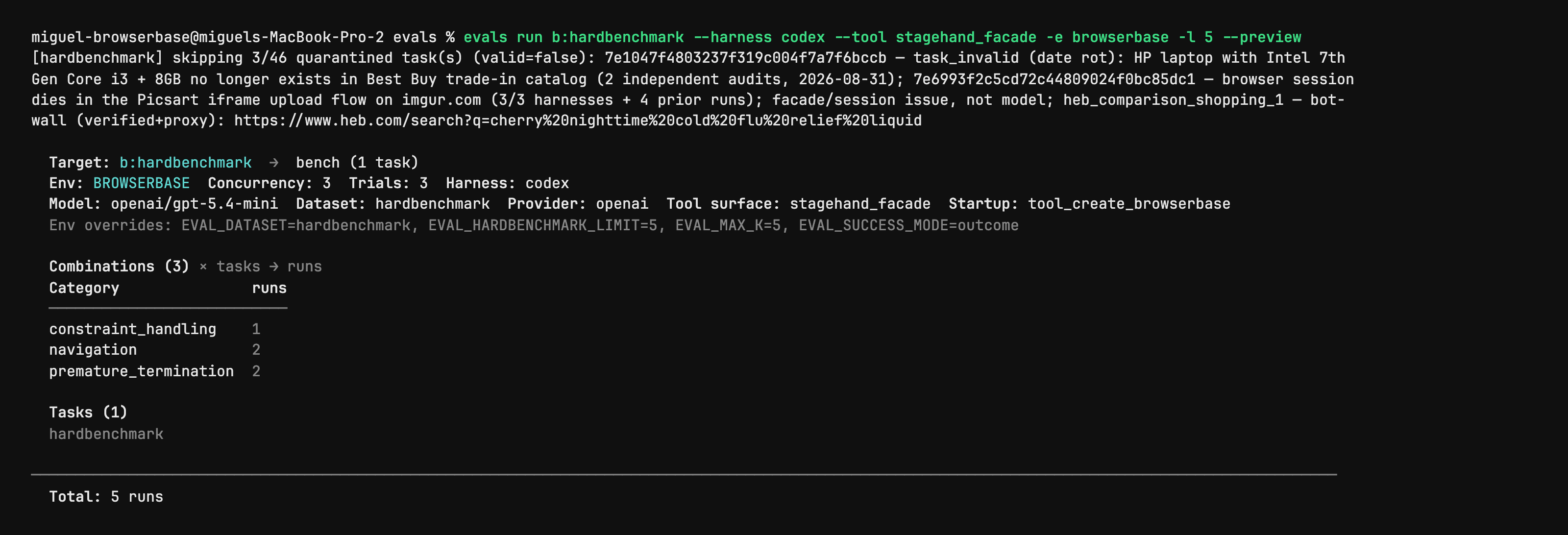
Stagehand Evals: inspect the plan before starting browsers
Author CLI capture shows evals run with --preview, selected harness/model, task counts and quarantined cases. It is a dry-run plan from the evaluation utility, not a browser action, a successful benchmark or an independent performance result. Full native capture is retained.
Licenza
PNG converted to lossless WebP with entire native RGBA equal. No crop, resize or new test. Author shell prompt, model label and dataset notes remain part of the capture.
MIT License

Copyright (c) 2024 Browserbase Inc.

Permission is hereby granted, free of charge, to any person obtaining a copy
of this software and associated documentation files (the "Software"), to deal
in the Software without restriction, including without limitation the rights
to use, copy, modify, merge, publish, distribute, sublicense, and/or sell
copies of the Software, and to permit persons to whom the Software is
furnished to do so, subject to the following conditions:

The above copyright notice and this permission notice shall be included in all
copies or substantial portions of the Software.

THE SOFTWARE IS PROVIDED "AS IS", WITHOUT WARRANTY OF ANY KIND, EXPRESS OR
IMPLIED, INCLUDING BUT NOT LIMITED TO THE WARRANTIES OF MERCHANTABILITY,
FITNESS FOR A PARTICULAR PURPOSE AND NONINFRINGEMENT. IN NO EVENT SHALL THE
AUTHORS OR COPYRIGHT HOLDERS BE LIABLE FOR ANY CLAIM, DAMAGES OR OTHER
LIABILITY, WHETHER IN AN ACTION OF CONTRACT, TORT OR OTHERWISE, ARISING FROM,
OUT OF OR IN CONNECTION WITH THE SOFTWARE OR THE USE OR OTHER DEALINGS IN THE
SOFTWARE.
Stagehand source example: act on an Example Domain link
Full original TypeScript file asks the agent to click the More information link and checks its returned success field. Run from the matching Stagehand SDK repository: it imports ../src/index.js and dotenv, needs local Chrome and OPENAI_API_KEY; extract also needs zod/v4. Source model label is preserved without an availability or successful-run claim.
Input di esempio
import "dotenv/config";
import { localBrowser, Stagehand } from "../src/index.js";

const { OPENAI_API_KEY } = process.env;
if (!OPENAI_API_KEY) throw new Error();

const browser = await localBrowser.launch({ headless: true });
const stagehand = await Stagehand.create({
  browser,
  model: {
    modelName: "openai/gpt-5.4-mini",
    apiKey: OPENAI_API_KEY,
  },
});

const [page] = await browser.context.pages();
await page.goto("https://example.com");

const result = await stagehand.act(
  "Click the link that provides more information about Example Domain",
);

console.log(JSON.stringify(result.data, null, 2));

if (!result.data.success) {
  throw new Error(`act() failed: ${result.data.message}`);
}

await stagehand.close();
await browser.close();
Licenza
Complete original source file unchanged; editorial title, context and prerequisites added. No installation, account operation, model call, form submission or claimed result was executed.
MIT License

Copyright (c) 2024 Browserbase Inc.

Permission is hereby granted, free of charge, to any person obtaining a copy
of this software and associated documentation files (the "Software"), to deal
in the Software without restriction, including without limitation the rights
to use, copy, modify, merge, publish, distribute, sublicense, and/or sell
copies of the Software, and to permit persons to whom the Software is
furnished to do so, subject to the following conditions:

The above copyright notice and this permission notice shall be included in all
copies or substantial portions of the Software.

THE SOFTWARE IS PROVIDED "AS IS", WITHOUT WARRANTY OF ANY KIND, EXPRESS OR
IMPLIED, INCLUDING BUT NOT LIMITED TO THE WARRANTIES OF MERCHANTABILITY,
FITNESS FOR A PARTICULAR PURPOSE AND NONINFRINGEMENT. IN NO EVENT SHALL THE
AUTHORS OR COPYRIGHT HOLDERS BE LIABLE FOR ANY CLAIM, DAMAGES OR OTHER
LIABILITY, WHETHER IN AN ACTION OF CONTRACT, TORT OR OTHERWISE, ARISING FROM,
OUT OF OR IN CONNECTION WITH THE SOFTWARE OR THE USE OR OTHER DEALINGS IN THE
SOFTWARE.
Stagehand source example: inspect candidate page actions
Full original TypeScript file asks for the Example Domain link and checks that matching actions were returned. Run from the matching Stagehand SDK repository: it imports ../src/index.js and dotenv, needs local Chrome and OPENAI_API_KEY; extract also needs zod/v4. Source model label is preserved without an availability or successful-run claim.
Input di esempio
import "dotenv/config";
import { localBrowser, Stagehand } from "../src/index.js";

const { OPENAI_API_KEY } = process.env;
if (!OPENAI_API_KEY) throw new Error();

const browser = await localBrowser.launch({ headless: true });
const stagehand = await Stagehand.create({
  browser,
  model: {
    modelName: "openai/gpt-5.4-mini",
    apiKey: OPENAI_API_KEY,
  },
});

const [page] = await browser.context.pages();
await page.goto("https://example.com");

const result = await stagehand.observe(
  "Find the link that provides more information about Example Domain",
);

console.log(JSON.stringify(result.data, null, 2));

if (result.data.length === 0) {
  throw new Error("observe() returned no matching actions");
}

await stagehand.close();
await browser.close();
Licenza
Complete original source file unchanged; editorial title, context and prerequisites added. No installation, account operation, model call, form submission or claimed result was executed.
MIT License

Copyright (c) 2024 Browserbase Inc.

Permission is hereby granted, free of charge, to any person obtaining a copy
of this software and associated documentation files (the "Software"), to deal
in the Software without restriction, including without limitation the rights
to use, copy, modify, merge, publish, distribute, sublicense, and/or sell
copies of the Software, and to permit persons to whom the Software is
furnished to do so, subject to the following conditions:

The above copyright notice and this permission notice shall be included in all
copies or substantial portions of the Software.

THE SOFTWARE IS PROVIDED "AS IS", WITHOUT WARRANTY OF ANY KIND, EXPRESS OR
IMPLIED, INCLUDING BUT NOT LIMITED TO THE WARRANTIES OF MERCHANTABILITY,
FITNESS FOR A PARTICULAR PURPOSE AND NONINFRINGEMENT. IN NO EVENT SHALL THE
AUTHORS OR COPYRIGHT HOLDERS BE LIABLE FOR ANY CLAIM, DAMAGES OR OTHER
LIABILITY, WHETHER IN AN ACTION OF CONTRACT, TORT OR OTHERWISE, ARISING FROM,
OUT OF OR IN CONNECTION WITH THE SOFTWARE OR THE USE OR OTHER DEALINGS IN THE
SOFTWARE.
Stagehand source example: extract a typed page heading
Full original TypeScript file extracts the heading and description from the author’s evaluation site using a Zod schema. Run from the matching Stagehand SDK repository: it imports ../src/index.js and dotenv, needs local Chrome and OPENAI_API_KEY; extract also needs zod/v4. Source model label is preserved without an availability or successful-run claim.
Input di esempio
import "dotenv/config";
import { z } from "zod/v4";
import { localBrowser, Stagehand } from "../src/index.js";

const { OPENAI_API_KEY } = process.env;
if (!OPENAI_API_KEY) throw new Error();

const browser = await localBrowser.launch({ headless: true });
const stagehand = await Stagehand.create({
  browser,
  model: {
    modelName: "openai/gpt-5.4-mini",
    apiKey: OPENAI_API_KEY,
  },
});

const [page] = await browser.context.pages();
await page.goto("https://stagehand-eval-sites.vercel.app/sites/example/");

const result = await stagehand.extract(
  "Extract the page heading and description",
  z.object({
    heading: z.string(),
    description: z.string(),
  }),
);

console.log(JSON.stringify(result.data, null, 2));

await stagehand.close();
await browser.close();
Licenza
Complete original source file unchanged; editorial title, context and prerequisites added. No installation, account operation, model call, form submission or claimed result was executed.
MIT License

Copyright (c) 2024 Browserbase Inc.

Permission is hereby granted, free of charge, to any person obtaining a copy
of this software and associated documentation files (the "Software"), to deal
in the Software without restriction, including without limitation the rights
to use, copy, modify, merge, publish, distribute, sublicense, and/or sell
copies of the Software, and to permit persons to whom the Software is
furnished to do so, subject to the following conditions:

The above copyright notice and this permission notice shall be included in all
copies or substantial portions of the Software.

THE SOFTWARE IS PROVIDED "AS IS", WITHOUT WARRANTY OF ANY KIND, EXPRESS OR
IMPLIED, INCLUDING BUT NOT LIMITED TO THE WARRANTIES OF MERCHANTABILITY,
FITNESS FOR A PARTICULAR PURPOSE AND NONINFRINGEMENT. IN NO EVENT SHALL THE
AUTHORS OR COPYRIGHT HOLDERS BE LIABLE FOR ANY CLAIM, DAMAGES OR OTHER
LIABILITY, WHETHER IN AN ACTION OF CONTRACT, TORT OR OTHERWISE, ARISING FROM,
OUT OF OR IN CONNECTION WITH THE SOFTWARE OR THE USE OR OTHER DEALINGS IN THE
SOFTWARE.
Panoramica del prodotto
Stagehand permette agli sviluppatori di controllare attività del browser dal codice. La navigazione nota può restare deterministica, mentre l’IA interpreta etichette, sceglie elementi o estrae campi. Un raccoglitore può, per esempio, aprire una scheda prodotto tramite codice e poi leggerne i dati secondo uno schema.
Le primitive hanno compiti distinti: act esegue un’azione descritta, extract restituisce dati e observe individua azioni possibili. Si combinano con navigazione, locator e schermate in stile Playwright. Logica applicativa, criteri di successo e verifica dei risultati restano da progettare.
Cosa offre Stagehand
- 01Unire operazioni fisse e interpretazione tramite IA.
- 02Estrarre campi secondo uno schema definito.
- 03Esaminare le azioni possibili con observe prima di interagire.
Un flusso pratico
- 01Definire un compito concreto e i campi o lo stato finale attesi.
- 02Programmare la navigazione nota e usare act, extract o observe dove necessario.
- 03Controllare campi e pagina finale e gestire gli errori prima di pianificare le esecuzioni.
Sintesi basata sulla fonte; le dichiarazioni sul prodotto non sono state verificate in modo indipendente.
Cosa lo distingue
È adatto a script in cui solo alcuni passaggi richiedono interpretazione flessibile. I passaggi prevedibili rimangono espliciti; quelli affidati all’IA vanno verificati rispetto alla pagina e al risultato.
A chi è adatto
- Sviluppatori che mantengono automazioni su pagine con layout variabili.
- Team che integrano campi web strutturati in applicazioni esistenti.
Cosa verificare
- Preparare l’ambiente del SDK e le impostazioni di modello e browser.
- Calcolare separatamente modello e browser ospitato: il SDK non rende gratuito tutto il processo.
- Provare variazioni di layout e autenticazione; l’IA può scegliere l’elemento sbagliato.
Domande frequenti
Stagehand è un’estensione del browser?
La documentazione ufficiale lo descrive come un SDK di sviluppo integrato nel proprio codice, non come estensione per utenti finali.
Che cosa fanno act, extract e observe?
act esegue interazioni, extract legge informazioni strutturate e observe identifica azioni possibili. La navigazione prevedibile può restare codice tradizionale.
Le informazioni sono state confrontate il 26 ott 2026 con il sito ufficiale o la documentazione primaria.