See it in action
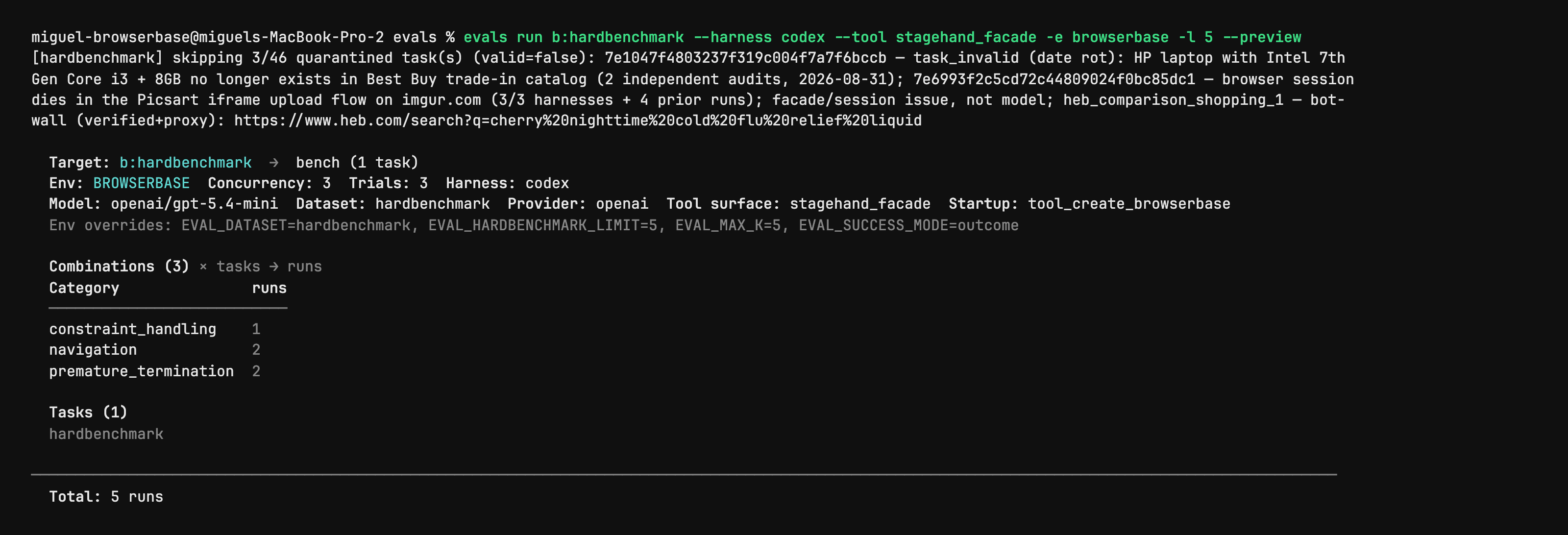
Stagehand Evals: inspect the plan before starting browsers
Author CLI capture shows evals run with --preview, selected harness/model, task counts and quarantined cases. It is a dry-run plan from the evaluation utility, not a browser action, a successful benchmark or an independent performance result. Full native capture is retained.
License
PNG converted to lossless WebP with entire native RGBA equal. No crop, resize or new test. Author shell prompt, model label and dataset notes remain part of the capture.
MIT License

Copyright (c) 2024 Browserbase Inc.

Permission is hereby granted, free of charge, to any person obtaining a copy
of this software and associated documentation files (the "Software"), to deal
in the Software without restriction, including without limitation the rights
to use, copy, modify, merge, publish, distribute, sublicense, and/or sell
copies of the Software, and to permit persons to whom the Software is
furnished to do so, subject to the following conditions:

The above copyright notice and this permission notice shall be included in all
copies or substantial portions of the Software.

THE SOFTWARE IS PROVIDED "AS IS", WITHOUT WARRANTY OF ANY KIND, EXPRESS OR
IMPLIED, INCLUDING BUT NOT LIMITED TO THE WARRANTIES OF MERCHANTABILITY,
FITNESS FOR A PARTICULAR PURPOSE AND NONINFRINGEMENT. IN NO EVENT SHALL THE
AUTHORS OR COPYRIGHT HOLDERS BE LIABLE FOR ANY CLAIM, DAMAGES OR OTHER
LIABILITY, WHETHER IN AN ACTION OF CONTRACT, TORT OR OTHERWISE, ARISING FROM,
OUT OF OR IN CONNECTION WITH THE SOFTWARE OR THE USE OR OTHER DEALINGS IN THE
SOFTWARE.
Stagehand source example: act on an Example Domain link
Full original TypeScript file asks the agent to click the More information link and checks its returned success field. Run from the matching Stagehand SDK repository: it imports ../src/index.js and dotenv, needs local Chrome and OPENAI_API_KEY; extract also needs zod/v4. Source model label is preserved without an availability or successful-run claim.
Example input
import "dotenv/config";
import { localBrowser, Stagehand } from "../src/index.js";

const { OPENAI_API_KEY } = process.env;
if (!OPENAI_API_KEY) throw new Error();

const browser = await localBrowser.launch({ headless: true });
const stagehand = await Stagehand.create({
  browser,
  model: {
    modelName: "openai/gpt-5.4-mini",
    apiKey: OPENAI_API_KEY,
  },
});

const [page] = await browser.context.pages();
await page.goto("https://example.com");

const result = await stagehand.act(
  "Click the link that provides more information about Example Domain",
);

console.log(JSON.stringify(result.data, null, 2));

if (!result.data.success) {
  throw new Error(`act() failed: ${result.data.message}`);
}

await stagehand.close();
await browser.close();
License
Complete original source file unchanged; editorial title, context and prerequisites added. No installation, account operation, model call, form submission or claimed result was executed.
MIT License

Copyright (c) 2024 Browserbase Inc.

Permission is hereby granted, free of charge, to any person obtaining a copy
of this software and associated documentation files (the "Software"), to deal
in the Software without restriction, including without limitation the rights
to use, copy, modify, merge, publish, distribute, sublicense, and/or sell
copies of the Software, and to permit persons to whom the Software is
furnished to do so, subject to the following conditions:

The above copyright notice and this permission notice shall be included in all
copies or substantial portions of the Software.

THE SOFTWARE IS PROVIDED "AS IS", WITHOUT WARRANTY OF ANY KIND, EXPRESS OR
IMPLIED, INCLUDING BUT NOT LIMITED TO THE WARRANTIES OF MERCHANTABILITY,
FITNESS FOR A PARTICULAR PURPOSE AND NONINFRINGEMENT. IN NO EVENT SHALL THE
AUTHORS OR COPYRIGHT HOLDERS BE LIABLE FOR ANY CLAIM, DAMAGES OR OTHER
LIABILITY, WHETHER IN AN ACTION OF CONTRACT, TORT OR OTHERWISE, ARISING FROM,
OUT OF OR IN CONNECTION WITH THE SOFTWARE OR THE USE OR OTHER DEALINGS IN THE
SOFTWARE.
Stagehand source example: inspect candidate page actions
Full original TypeScript file asks for the Example Domain link and checks that matching actions were returned. Run from the matching Stagehand SDK repository: it imports ../src/index.js and dotenv, needs local Chrome and OPENAI_API_KEY; extract also needs zod/v4. Source model label is preserved without an availability or successful-run claim.
Example input
import "dotenv/config";
import { localBrowser, Stagehand } from "../src/index.js";

const { OPENAI_API_KEY } = process.env;
if (!OPENAI_API_KEY) throw new Error();

const browser = await localBrowser.launch({ headless: true });
const stagehand = await Stagehand.create({
  browser,
  model: {
    modelName: "openai/gpt-5.4-mini",
    apiKey: OPENAI_API_KEY,
  },
});

const [page] = await browser.context.pages();
await page.goto("https://example.com");

const result = await stagehand.observe(
  "Find the link that provides more information about Example Domain",
);

console.log(JSON.stringify(result.data, null, 2));

if (result.data.length === 0) {
  throw new Error("observe() returned no matching actions");
}

await stagehand.close();
await browser.close();
License
Complete original source file unchanged; editorial title, context and prerequisites added. No installation, account operation, model call, form submission or claimed result was executed.
MIT License

Copyright (c) 2024 Browserbase Inc.

Permission is hereby granted, free of charge, to any person obtaining a copy
of this software and associated documentation files (the "Software"), to deal
in the Software without restriction, including without limitation the rights
to use, copy, modify, merge, publish, distribute, sublicense, and/or sell
copies of the Software, and to permit persons to whom the Software is
furnished to do so, subject to the following conditions:

The above copyright notice and this permission notice shall be included in all
copies or substantial portions of the Software.

THE SOFTWARE IS PROVIDED "AS IS", WITHOUT WARRANTY OF ANY KIND, EXPRESS OR
IMPLIED, INCLUDING BUT NOT LIMITED TO THE WARRANTIES OF MERCHANTABILITY,
FITNESS FOR A PARTICULAR PURPOSE AND NONINFRINGEMENT. IN NO EVENT SHALL THE
AUTHORS OR COPYRIGHT HOLDERS BE LIABLE FOR ANY CLAIM, DAMAGES OR OTHER
LIABILITY, WHETHER IN AN ACTION OF CONTRACT, TORT OR OTHERWISE, ARISING FROM,
OUT OF OR IN CONNECTION WITH THE SOFTWARE OR THE USE OR OTHER DEALINGS IN THE
SOFTWARE.
Stagehand source example: extract a typed page heading
Full original TypeScript file extracts the heading and description from the author’s evaluation site using a Zod schema. Run from the matching Stagehand SDK repository: it imports ../src/index.js and dotenv, needs local Chrome and OPENAI_API_KEY; extract also needs zod/v4. Source model label is preserved without an availability or successful-run claim.
Example input
import "dotenv/config";
import { z } from "zod/v4";
import { localBrowser, Stagehand } from "../src/index.js";

const { OPENAI_API_KEY } = process.env;
if (!OPENAI_API_KEY) throw new Error();

const browser = await localBrowser.launch({ headless: true });
const stagehand = await Stagehand.create({
  browser,
  model: {
    modelName: "openai/gpt-5.4-mini",
    apiKey: OPENAI_API_KEY,
  },
});

const [page] = await browser.context.pages();
await page.goto("https://stagehand-eval-sites.vercel.app/sites/example/");

const result = await stagehand.extract(
  "Extract the page heading and description",
  z.object({
    heading: z.string(),
    description: z.string(),
  }),
);

console.log(JSON.stringify(result.data, null, 2));

await stagehand.close();
await browser.close();
License
Complete original source file unchanged; editorial title, context and prerequisites added. No installation, account operation, model call, form submission or claimed result was executed.
MIT License

Copyright (c) 2024 Browserbase Inc.

Permission is hereby granted, free of charge, to any person obtaining a copy
of this software and associated documentation files (the "Software"), to deal
in the Software without restriction, including without limitation the rights
to use, copy, modify, merge, publish, distribute, sublicense, and/or sell
copies of the Software, and to permit persons to whom the Software is
furnished to do so, subject to the following conditions:

The above copyright notice and this permission notice shall be included in all
copies or substantial portions of the Software.

THE SOFTWARE IS PROVIDED "AS IS", WITHOUT WARRANTY OF ANY KIND, EXPRESS OR
IMPLIED, INCLUDING BUT NOT LIMITED TO THE WARRANTIES OF MERCHANTABILITY,
FITNESS FOR A PARTICULAR PURPOSE AND NONINFRINGEMENT. IN NO EVENT SHALL THE
AUTHORS OR COPYRIGHT HOLDERS BE LIABLE FOR ANY CLAIM, DAMAGES OR OTHER
LIABILITY, WHETHER IN AN ACTION OF CONTRACT, TORT OR OTHERWISE, ARISING FROM,
OUT OF OR IN CONNECTION WITH THE SOFTWARE OR THE USE OR OTHER DEALINGS IN THE
SOFTWARE.
Product overview
Stagehand helps developers automate browser tasks while keeping familiar page operations in code. You can navigate to a known URL with deterministic browser commands, then use AI where a page requires interpreting a label, choosing an element or extracting information. For example, an internal data collector might navigate to a product page in code and extract several named fields with a schema.
The core primitives serve different purposes: act performs a described action, extract returns data, and observe identifies candidate actions. These can be combined with Playwright-style page navigation, locators and screenshots. Your application supplies the task logic and decides what counts as a valid result; the SDK is not a ready-made business process.
What Stagehand offers
- 01Mix deterministic page operations with AI-assisted interactions.
- 02Extract fields into a defined schema instead of relying only on unstructured text.
- 03Use observe to inspect available actions before choosing an interaction.
A practical workflow
- 01Define one concrete browser task and the fields or page state that indicate success.
- 02Keep known navigation in code; use act, extract or observe only where interpretation is needed.
- 03Review the extracted fields and final page state, then add error handling before scheduling the workflow.
Summary based on source material; product claims have not been independently tested.
What makes it different
It is useful when a scripted browser workflow needs some interpretation without turning every step into an open-ended agent task. AI actions still depend on page state and model behavior, so keep predictable steps explicit and validate the uncertain ones.
Who should consider it
- Developers maintaining browser automation with variable page layouts.
- Teams extracting typed fields from pages as part of an existing application.
What to verify
- Prepare a supported SDK environment and the model/browser configuration required by your setup.
- Account separately for model use and any hosted browser service; SDK availability does not make the whole workflow free.
- Test changed layouts and authentication states; do not assume an AI action always selects the correct element.
Frequently asked questions
Is Stagehand a browser extension?
Its documentation presents it as a development SDK. It is integrated into your own code rather than installed as an end-user extension.
How do act, extract and observe differ?
act performs a described interaction, extract retrieves structured information, and observe identifies possible actions. Navigation and other predictable steps can remain ordinary browser code.
Product facts were checked against the official product website or its first-party documentation on Oct 26, 2026.