Veja em ação
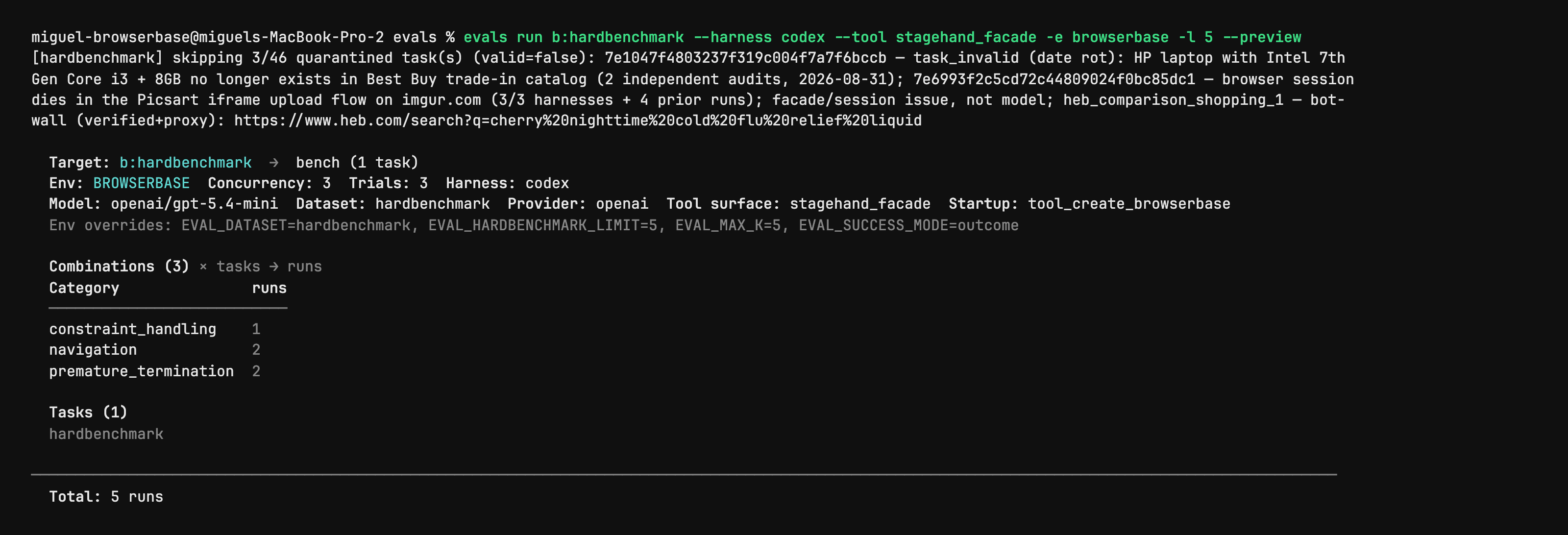
Stagehand Evals: inspect the plan before starting browsers
Author CLI capture shows evals run with --preview, selected harness/model, task counts and quarantined cases. It is a dry-run plan from the evaluation utility, not a browser action, a successful benchmark or an independent performance result. Full native capture is retained.
Licença
PNG converted to lossless WebP with entire native RGBA equal. No crop, resize or new test. Author shell prompt, model label and dataset notes remain part of the capture.
MIT License

Copyright (c) 2024 Browserbase Inc.

Permission is hereby granted, free of charge, to any person obtaining a copy
of this software and associated documentation files (the "Software"), to deal
in the Software without restriction, including without limitation the rights
to use, copy, modify, merge, publish, distribute, sublicense, and/or sell
copies of the Software, and to permit persons to whom the Software is
furnished to do so, subject to the following conditions:

The above copyright notice and this permission notice shall be included in all
copies or substantial portions of the Software.

THE SOFTWARE IS PROVIDED "AS IS", WITHOUT WARRANTY OF ANY KIND, EXPRESS OR
IMPLIED, INCLUDING BUT NOT LIMITED TO THE WARRANTIES OF MERCHANTABILITY,
FITNESS FOR A PARTICULAR PURPOSE AND NONINFRINGEMENT. IN NO EVENT SHALL THE
AUTHORS OR COPYRIGHT HOLDERS BE LIABLE FOR ANY CLAIM, DAMAGES OR OTHER
LIABILITY, WHETHER IN AN ACTION OF CONTRACT, TORT OR OTHERWISE, ARISING FROM,
OUT OF OR IN CONNECTION WITH THE SOFTWARE OR THE USE OR OTHER DEALINGS IN THE
SOFTWARE.
Stagehand source example: act on an Example Domain link
Full original TypeScript file asks the agent to click the More information link and checks its returned success field. Run from the matching Stagehand SDK repository: it imports ../src/index.js and dotenv, needs local Chrome and OPENAI_API_KEY; extract also needs zod/v4. Source model label is preserved without an availability or successful-run claim.
Entrada de exemplo
import "dotenv/config";
import { localBrowser, Stagehand } from "../src/index.js";

const { OPENAI_API_KEY } = process.env;
if (!OPENAI_API_KEY) throw new Error();

const browser = await localBrowser.launch({ headless: true });
const stagehand = await Stagehand.create({
  browser,
  model: {
    modelName: "openai/gpt-5.4-mini",
    apiKey: OPENAI_API_KEY,
  },
});

const [page] = await browser.context.pages();
await page.goto("https://example.com");

const result = await stagehand.act(
  "Click the link that provides more information about Example Domain",
);

console.log(JSON.stringify(result.data, null, 2));

if (!result.data.success) {
  throw new Error(`act() failed: ${result.data.message}`);
}

await stagehand.close();
await browser.close();
Licença
Complete original source file unchanged; editorial title, context and prerequisites added. No installation, account operation, model call, form submission or claimed result was executed.
MIT License

Copyright (c) 2024 Browserbase Inc.

Permission is hereby granted, free of charge, to any person obtaining a copy
of this software and associated documentation files (the "Software"), to deal
in the Software without restriction, including without limitation the rights
to use, copy, modify, merge, publish, distribute, sublicense, and/or sell
copies of the Software, and to permit persons to whom the Software is
furnished to do so, subject to the following conditions:

The above copyright notice and this permission notice shall be included in all
copies or substantial portions of the Software.

THE SOFTWARE IS PROVIDED "AS IS", WITHOUT WARRANTY OF ANY KIND, EXPRESS OR
IMPLIED, INCLUDING BUT NOT LIMITED TO THE WARRANTIES OF MERCHANTABILITY,
FITNESS FOR A PARTICULAR PURPOSE AND NONINFRINGEMENT. IN NO EVENT SHALL THE
AUTHORS OR COPYRIGHT HOLDERS BE LIABLE FOR ANY CLAIM, DAMAGES OR OTHER
LIABILITY, WHETHER IN AN ACTION OF CONTRACT, TORT OR OTHERWISE, ARISING FROM,
OUT OF OR IN CONNECTION WITH THE SOFTWARE OR THE USE OR OTHER DEALINGS IN THE
SOFTWARE.
Stagehand source example: inspect candidate page actions
Full original TypeScript file asks for the Example Domain link and checks that matching actions were returned. Run from the matching Stagehand SDK repository: it imports ../src/index.js and dotenv, needs local Chrome and OPENAI_API_KEY; extract also needs zod/v4. Source model label is preserved without an availability or successful-run claim.
Entrada de exemplo
import "dotenv/config";
import { localBrowser, Stagehand } from "../src/index.js";

const { OPENAI_API_KEY } = process.env;
if (!OPENAI_API_KEY) throw new Error();

const browser = await localBrowser.launch({ headless: true });
const stagehand = await Stagehand.create({
  browser,
  model: {
    modelName: "openai/gpt-5.4-mini",
    apiKey: OPENAI_API_KEY,
  },
});

const [page] = await browser.context.pages();
await page.goto("https://example.com");

const result = await stagehand.observe(
  "Find the link that provides more information about Example Domain",
);

console.log(JSON.stringify(result.data, null, 2));

if (result.data.length === 0) {
  throw new Error("observe() returned no matching actions");
}

await stagehand.close();
await browser.close();
Licença
Complete original source file unchanged; editorial title, context and prerequisites added. No installation, account operation, model call, form submission or claimed result was executed.
MIT License

Copyright (c) 2024 Browserbase Inc.

Permission is hereby granted, free of charge, to any person obtaining a copy
of this software and associated documentation files (the "Software"), to deal
in the Software without restriction, including without limitation the rights
to use, copy, modify, merge, publish, distribute, sublicense, and/or sell
copies of the Software, and to permit persons to whom the Software is
furnished to do so, subject to the following conditions:

The above copyright notice and this permission notice shall be included in all
copies or substantial portions of the Software.

THE SOFTWARE IS PROVIDED "AS IS", WITHOUT WARRANTY OF ANY KIND, EXPRESS OR
IMPLIED, INCLUDING BUT NOT LIMITED TO THE WARRANTIES OF MERCHANTABILITY,
FITNESS FOR A PARTICULAR PURPOSE AND NONINFRINGEMENT. IN NO EVENT SHALL THE
AUTHORS OR COPYRIGHT HOLDERS BE LIABLE FOR ANY CLAIM, DAMAGES OR OTHER
LIABILITY, WHETHER IN AN ACTION OF CONTRACT, TORT OR OTHERWISE, ARISING FROM,
OUT OF OR IN CONNECTION WITH THE SOFTWARE OR THE USE OR OTHER DEALINGS IN THE
SOFTWARE.
Stagehand source example: extract a typed page heading
Full original TypeScript file extracts the heading and description from the author’s evaluation site using a Zod schema. Run from the matching Stagehand SDK repository: it imports ../src/index.js and dotenv, needs local Chrome and OPENAI_API_KEY; extract also needs zod/v4. Source model label is preserved without an availability or successful-run claim.
Entrada de exemplo
import "dotenv/config";
import { z } from "zod/v4";
import { localBrowser, Stagehand } from "../src/index.js";

const { OPENAI_API_KEY } = process.env;
if (!OPENAI_API_KEY) throw new Error();

const browser = await localBrowser.launch({ headless: true });
const stagehand = await Stagehand.create({
  browser,
  model: {
    modelName: "openai/gpt-5.4-mini",
    apiKey: OPENAI_API_KEY,
  },
});

const [page] = await browser.context.pages();
await page.goto("https://stagehand-eval-sites.vercel.app/sites/example/");

const result = await stagehand.extract(
  "Extract the page heading and description",
  z.object({
    heading: z.string(),
    description: z.string(),
  }),
);

console.log(JSON.stringify(result.data, null, 2));

await stagehand.close();
await browser.close();
Licença
Complete original source file unchanged; editorial title, context and prerequisites added. No installation, account operation, model call, form submission or claimed result was executed.
MIT License

Copyright (c) 2024 Browserbase Inc.

Permission is hereby granted, free of charge, to any person obtaining a copy
of this software and associated documentation files (the "Software"), to deal
in the Software without restriction, including without limitation the rights
to use, copy, modify, merge, publish, distribute, sublicense, and/or sell
copies of the Software, and to permit persons to whom the Software is
furnished to do so, subject to the following conditions:

The above copyright notice and this permission notice shall be included in all
copies or substantial portions of the Software.

THE SOFTWARE IS PROVIDED "AS IS", WITHOUT WARRANTY OF ANY KIND, EXPRESS OR
IMPLIED, INCLUDING BUT NOT LIMITED TO THE WARRANTIES OF MERCHANTABILITY,
FITNESS FOR A PARTICULAR PURPOSE AND NONINFRINGEMENT. IN NO EVENT SHALL THE
AUTHORS OR COPYRIGHT HOLDERS BE LIABLE FOR ANY CLAIM, DAMAGES OR OTHER
LIABILITY, WHETHER IN AN ACTION OF CONTRACT, TORT OR OTHERWISE, ARISING FROM,
OUT OF OR IN CONNECTION WITH THE SOFTWARE OR THE USE OR OTHER DEALINGS IN THE
SOFTWARE.
Visão geral do produto
O Stagehand permite controlar tarefas de navegador em código. A navegação conhecida pode continuar determinística, enquanto a IA interpreta rótulos, escolhe elementos ou extrai campos. Um coletor pode, por exemplo, abrir uma página de produto por código e depois obter os dados conforme um esquema.
As funções têm papéis distintos: act executa uma ação descrita, extract retorna dados e observe identifica ações possíveis. Elas se combinam com navegação, localizadores e capturas no estilo Playwright. A lógica de negócio, os critérios de sucesso e a verificação continuam na aplicação.
O que o Stagehand oferece
- 01Combinar operações fixas com interpretação por IA.
- 02Extrair campos conforme um esquema definido.
- 03Examinar possíveis ações com observe antes de interagir.
Um fluxo prático
- 01Definir uma tarefa concreta e os campos ou estado final esperados.
- 02Programar a navegação conhecida e usar act, extract ou observe nos pontos necessários.
- 03Conferir os campos e a página final e tratar erros antes de agendar o processo.
Resumo baseado na fonte; as afirmações do produto não foram testadas de forma independente.
O que o diferencia
É útil para scripts em que apenas algumas etapas precisam de interpretação flexível. Mantenha explícitas as etapas previsíveis e verifique as ações de IA pelo estado da página e pelo resultado.
Para quem é indicado
- Desenvolvedores que mantêm automações com layouts variáveis.
- Equipes que integram dados web estruturados a aplicações existentes.
O que confirmar
- Preparar o ambiente do SDK e as configurações de modelo e navegador.
- Calcular separadamente os custos do modelo e do navegador hospedado; o SDK não torna toda a operação gratuita.
- Testar mudanças de layout e autenticação; a IA pode escolher o elemento errado.
Perguntas frequentes
O Stagehand é uma extensão de navegador?
A documentação o apresenta como SDK de desenvolvimento integrado ao próprio código, não como extensão para usuários finais.
Qual é a diferença entre act, extract e observe?
act executa interações, extract obtém informações estruturadas e observe identifica possíveis ações. A navegação previsível pode continuar em código convencional.
As informações foram conferidas em 26 de out. de 2026 com o site oficial ou documentação primária.