Zobacz w działaniu
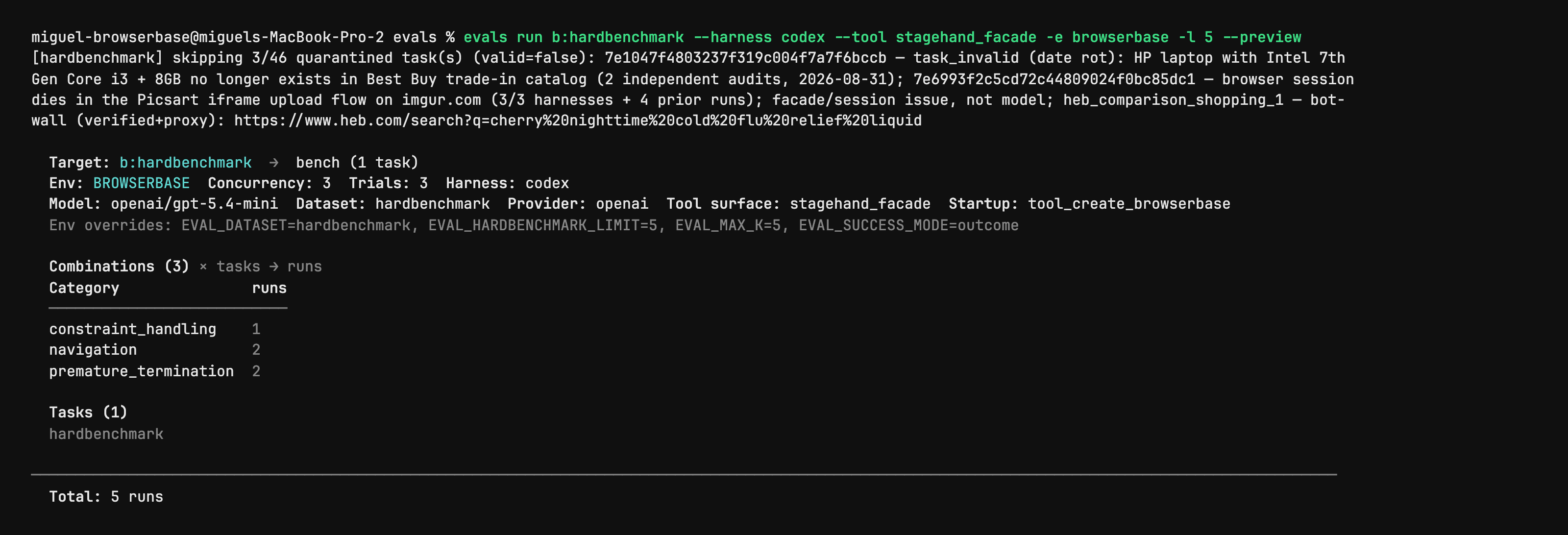
Stagehand Evals: inspect the plan before starting browsers
Author CLI capture shows evals run with --preview, selected harness/model, task counts and quarantined cases. It is a dry-run plan from the evaluation utility, not a browser action, a successful benchmark or an independent performance result. Full native capture is retained.
Licencja
PNG converted to lossless WebP with entire native RGBA equal. No crop, resize or new test. Author shell prompt, model label and dataset notes remain part of the capture.
MIT License

Copyright (c) 2024 Browserbase Inc.

Permission is hereby granted, free of charge, to any person obtaining a copy
of this software and associated documentation files (the "Software"), to deal
in the Software without restriction, including without limitation the rights
to use, copy, modify, merge, publish, distribute, sublicense, and/or sell
copies of the Software, and to permit persons to whom the Software is
furnished to do so, subject to the following conditions:

The above copyright notice and this permission notice shall be included in all
copies or substantial portions of the Software.

THE SOFTWARE IS PROVIDED "AS IS", WITHOUT WARRANTY OF ANY KIND, EXPRESS OR
IMPLIED, INCLUDING BUT NOT LIMITED TO THE WARRANTIES OF MERCHANTABILITY,
FITNESS FOR A PARTICULAR PURPOSE AND NONINFRINGEMENT. IN NO EVENT SHALL THE
AUTHORS OR COPYRIGHT HOLDERS BE LIABLE FOR ANY CLAIM, DAMAGES OR OTHER
LIABILITY, WHETHER IN AN ACTION OF CONTRACT, TORT OR OTHERWISE, ARISING FROM,
OUT OF OR IN CONNECTION WITH THE SOFTWARE OR THE USE OR OTHER DEALINGS IN THE
SOFTWARE.
Stagehand source example: act on an Example Domain link
Full original TypeScript file asks the agent to click the More information link and checks its returned success field. Run from the matching Stagehand SDK repository: it imports ../src/index.js and dotenv, needs local Chrome and OPENAI_API_KEY; extract also needs zod/v4. Source model label is preserved without an availability or successful-run claim.
Przykładowe dane
import "dotenv/config";
import { localBrowser, Stagehand } from "../src/index.js";

const { OPENAI_API_KEY } = process.env;
if (!OPENAI_API_KEY) throw new Error();

const browser = await localBrowser.launch({ headless: true });
const stagehand = await Stagehand.create({
  browser,
  model: {
    modelName: "openai/gpt-5.4-mini",
    apiKey: OPENAI_API_KEY,
  },
});

const [page] = await browser.context.pages();
await page.goto("https://example.com");

const result = await stagehand.act(
  "Click the link that provides more information about Example Domain",
);

console.log(JSON.stringify(result.data, null, 2));

if (!result.data.success) {
  throw new Error(`act() failed: ${result.data.message}`);
}

await stagehand.close();
await browser.close();
Licencja
Complete original source file unchanged; editorial title, context and prerequisites added. No installation, account operation, model call, form submission or claimed result was executed.
MIT License

Copyright (c) 2024 Browserbase Inc.

Permission is hereby granted, free of charge, to any person obtaining a copy
of this software and associated documentation files (the "Software"), to deal
in the Software without restriction, including without limitation the rights
to use, copy, modify, merge, publish, distribute, sublicense, and/or sell
copies of the Software, and to permit persons to whom the Software is
furnished to do so, subject to the following conditions:

The above copyright notice and this permission notice shall be included in all
copies or substantial portions of the Software.

THE SOFTWARE IS PROVIDED "AS IS", WITHOUT WARRANTY OF ANY KIND, EXPRESS OR
IMPLIED, INCLUDING BUT NOT LIMITED TO THE WARRANTIES OF MERCHANTABILITY,
FITNESS FOR A PARTICULAR PURPOSE AND NONINFRINGEMENT. IN NO EVENT SHALL THE
AUTHORS OR COPYRIGHT HOLDERS BE LIABLE FOR ANY CLAIM, DAMAGES OR OTHER
LIABILITY, WHETHER IN AN ACTION OF CONTRACT, TORT OR OTHERWISE, ARISING FROM,
OUT OF OR IN CONNECTION WITH THE SOFTWARE OR THE USE OR OTHER DEALINGS IN THE
SOFTWARE.
Stagehand source example: inspect candidate page actions
Full original TypeScript file asks for the Example Domain link and checks that matching actions were returned. Run from the matching Stagehand SDK repository: it imports ../src/index.js and dotenv, needs local Chrome and OPENAI_API_KEY; extract also needs zod/v4. Source model label is preserved without an availability or successful-run claim.
Przykładowe dane
import "dotenv/config";
import { localBrowser, Stagehand } from "../src/index.js";

const { OPENAI_API_KEY } = process.env;
if (!OPENAI_API_KEY) throw new Error();

const browser = await localBrowser.launch({ headless: true });
const stagehand = await Stagehand.create({
  browser,
  model: {
    modelName: "openai/gpt-5.4-mini",
    apiKey: OPENAI_API_KEY,
  },
});

const [page] = await browser.context.pages();
await page.goto("https://example.com");

const result = await stagehand.observe(
  "Find the link that provides more information about Example Domain",
);

console.log(JSON.stringify(result.data, null, 2));

if (result.data.length === 0) {
  throw new Error("observe() returned no matching actions");
}

await stagehand.close();
await browser.close();
Licencja
Complete original source file unchanged; editorial title, context and prerequisites added. No installation, account operation, model call, form submission or claimed result was executed.
MIT License

Copyright (c) 2024 Browserbase Inc.

Permission is hereby granted, free of charge, to any person obtaining a copy
of this software and associated documentation files (the "Software"), to deal
in the Software without restriction, including without limitation the rights
to use, copy, modify, merge, publish, distribute, sublicense, and/or sell
copies of the Software, and to permit persons to whom the Software is
furnished to do so, subject to the following conditions:

The above copyright notice and this permission notice shall be included in all
copies or substantial portions of the Software.

THE SOFTWARE IS PROVIDED "AS IS", WITHOUT WARRANTY OF ANY KIND, EXPRESS OR
IMPLIED, INCLUDING BUT NOT LIMITED TO THE WARRANTIES OF MERCHANTABILITY,
FITNESS FOR A PARTICULAR PURPOSE AND NONINFRINGEMENT. IN NO EVENT SHALL THE
AUTHORS OR COPYRIGHT HOLDERS BE LIABLE FOR ANY CLAIM, DAMAGES OR OTHER
LIABILITY, WHETHER IN AN ACTION OF CONTRACT, TORT OR OTHERWISE, ARISING FROM,
OUT OF OR IN CONNECTION WITH THE SOFTWARE OR THE USE OR OTHER DEALINGS IN THE
SOFTWARE.
Stagehand source example: extract a typed page heading
Full original TypeScript file extracts the heading and description from the author’s evaluation site using a Zod schema. Run from the matching Stagehand SDK repository: it imports ../src/index.js and dotenv, needs local Chrome and OPENAI_API_KEY; extract also needs zod/v4. Source model label is preserved without an availability or successful-run claim.
Przykładowe dane
import "dotenv/config";
import { z } from "zod/v4";
import { localBrowser, Stagehand } from "../src/index.js";

const { OPENAI_API_KEY } = process.env;
if (!OPENAI_API_KEY) throw new Error();

const browser = await localBrowser.launch({ headless: true });
const stagehand = await Stagehand.create({
  browser,
  model: {
    modelName: "openai/gpt-5.4-mini",
    apiKey: OPENAI_API_KEY,
  },
});

const [page] = await browser.context.pages();
await page.goto("https://stagehand-eval-sites.vercel.app/sites/example/");

const result = await stagehand.extract(
  "Extract the page heading and description",
  z.object({
    heading: z.string(),
    description: z.string(),
  }),
);

console.log(JSON.stringify(result.data, null, 2));

await stagehand.close();
await browser.close();
Licencja
Complete original source file unchanged; editorial title, context and prerequisites added. No installation, account operation, model call, form submission or claimed result was executed.
MIT License

Copyright (c) 2024 Browserbase Inc.

Permission is hereby granted, free of charge, to any person obtaining a copy
of this software and associated documentation files (the "Software"), to deal
in the Software without restriction, including without limitation the rights
to use, copy, modify, merge, publish, distribute, sublicense, and/or sell
copies of the Software, and to permit persons to whom the Software is
furnished to do so, subject to the following conditions:

The above copyright notice and this permission notice shall be included in all
copies or substantial portions of the Software.

THE SOFTWARE IS PROVIDED "AS IS", WITHOUT WARRANTY OF ANY KIND, EXPRESS OR
IMPLIED, INCLUDING BUT NOT LIMITED TO THE WARRANTIES OF MERCHANTABILITY,
FITNESS FOR A PARTICULAR PURPOSE AND NONINFRINGEMENT. IN NO EVENT SHALL THE
AUTHORS OR COPYRIGHT HOLDERS BE LIABLE FOR ANY CLAIM, DAMAGES OR OTHER
LIABILITY, WHETHER IN AN ACTION OF CONTRACT, TORT OR OTHERWISE, ARISING FROM,
OUT OF OR IN CONNECTION WITH THE SOFTWARE OR THE USE OR OTHER DEALINGS IN THE
SOFTWARE.
Opis produktu
Stagehand pozwala programistom sterować zadaniami przeglądarki w kodzie. Znana nawigacja może pozostać deterministyczna, a AI interpretuje etykiety, wybiera elementy lub odczytuje pola. Przykładowo kolektor otwiera stronę produktu zwykłym kodem, a następnie pobiera dane według schematu.
Funkcje mają różne role: act wykonuje opisane działanie, extract zwraca dane, a observe rozpoznaje możliwe działania. Można je łączyć z nawigacją, lokalizatorami i zrzutami ekranu w stylu Playwright. Logika biznesowa, kryteria sukcesu i kontrola wyników nadal należą do aplikacji.
Co oferuje Stagehand
- 01Łączenie stałych operacji z interpretacją AI.
- 02Ekstrakcja pól według ustalonego schematu.
- 03Sprawdzanie możliwych działań przez observe przed interakcją.
Praktyczny przebieg pracy
- 01Zdefiniować zadanie oraz pola lub stan końcowy potwierdzające sukces.
- 02Zapisać znaną nawigację w kodzie i użyć act, extract lub observe tam, gdzie potrzeba interpretacji.
- 03Sprawdzić pola i końcową stronę oraz obsłużyć błędy przed uruchamianiem cyklicznym.
Podsumowanie na podstawie źródła; deklaracje produktu nie zostały niezależnie przetestowane.
Co je wyróżnia
Przydaje się w skryptach, w których tylko część kroków wymaga elastycznej interpretacji. Przewidywalne kroki pozostają jawne, a działania AI wymagają sprawdzania stanu strony i wyniku.
Dla kogo
- Programiści utrzymujący automatyzację przy zmiennym układzie stron.
- Zespoły włączające uporządkowane dane webowe do istniejących aplikacji.
Co sprawdzić
- Przygotować środowisko SDK oraz konfigurację modelu i przeglądarki.
- Oddzielnie oszacować model i przeglądarkę hostowaną; dostępność SDK nie oznacza darmowego procesu.
- Sprawdzić zmiany układu i logowania; AI może wskazać niewłaściwy element.
Najczęstsze pytania
Czy Stagehand jest rozszerzeniem przeglądarki?
Dokumentacja opisuje SDK programistyczne integrowane z własnym kodem, a nie rozszerzenie dla użytkownika końcowego.
Czym różnią się act, extract i observe?
act wykonuje interakcje, extract odczytuje dane strukturalne, a observe wskazuje możliwe działania. Zwykła nawigacja może pozostać tradycyjnym kodem.
Informacje o produkcie porównano 26 paź 2026 z oficjalną stroną lub dokumentacją.