Original document
GPT Image 2.5 · en
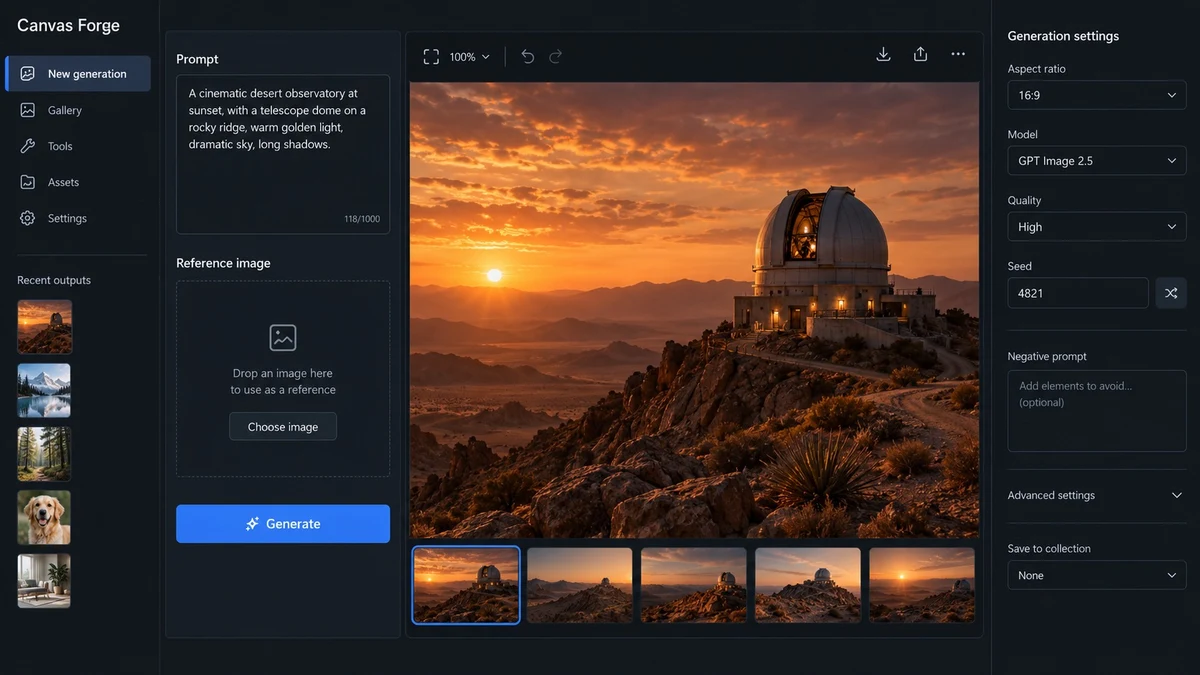
Create one high-fidelity desktop web app screenshot for a fictional AI image-generation workbench called Canvas Forge. This is a single polished 16:9 product UI screen, not a collage or presentation.
Dark editorial interface with a left navigation rail, a central 3-column image-generation workspace, and a right inspector panel.
Exact readable text: Canvas Forge, New generation, Prompt, Reference image, Generate, Aspect ratio, 16:9, Model, GPT Image 2.5, Quality, High, Seed, 4821, Recent outputs.
Show one large generated image preview of a warm cinematic desert observatory at sunset in the center.
Use concise realistic labels, consistent spacing, clear hierarchy, accessible contrast, subtle borders, no gradients, no fake logos, no gibberish, no extra windows.
The screenshot should feel like a mature production creative tool with believable controls and useful empty states. Render every specified label exactly and keep all UI text short and legible.
How to use
- Copy the complete original prompt, including any parameters.
- Replace the subject, text and composition with your own requirements.
- Use a compatible external tool; check its current access conditions and review the result.
Before you start
- Check whether a reference image is required. A compatible model label does not mean this example was generated with that model.
- Keep names, figures and visible text accurate; results can vary between model versions.